Cool Edit Pro and Skype stopped working on the desktop - perhaps it was after installing DRM Removal from Giveaway of the day. Using SoundForge instead of CEP, and fring on the QTEK mobile. At first, fring seemed to have issues with sound. Sometimes it needs checking with the "fring test call" - the mic doesn't work. A bit tinny, but reasonably OK except for a nearly 1 second lag. Mainly quick and convenient, till the laptop comes back.
Edit: Confirmed that the DRM Removal was the reason for the CEP errors. Removed DRM Removal, CEP started working again. But Skype still has errors on startup.
Thursday, July 30, 2009

Thursday, July 23, 2009
trying Cisco's Linksys "iPhone" CIT200
Tested out this skype-phone - needs skype running on the computer on which the base-station is connected by USB. Voice quality just as good as any cordless (DECT) phone, has an option for speakerphone and hands-free also - 2.5 mm handsfree socket. The minus point is that it needs the PC to be on with skype running. But it's half the price of standalone wifi phones.
Sunday, July 12, 2009
bridge mode on Netgear wireless router WGR614
One of my former colleagues had an issue with his Airtel broadband, wireless and his laptop - every time the power failed, he had to connect his laptop to the DSL modem directly, "repair" the connection, then connect the wireless router and so on. Airtel tech support asked him to reinstall network interface drivers on his laptop. That seemed to work - the wired network now worked without the need for "repair". Then he wanted to add the wireless router into the mix, and it appeared that disabling DHCP was the way to go. So he assigned ip addresses in the same sub-net to the DSL router's LAN interface, the Netgear's LAN interface and to the laptop's wireless interface. He was able to ping the wireless router, but not the DSL modem. Then he changed the port on which the DSL router was connected to the wireless router - initially it was connected to the "uplink" port, now he connected it to one of the "normal" 4 LAN ports on the Netgear. Now everything works. It seems this is the way to do "bridge-mode" (as against NATing) on the Netgear WGR614 - googling brought up this page which links to the Netgear KB article.
recording on windows mobile
Recording calls with the QTEK 9100 was quite simple - the recording utility works quite well if the mobile is not in hands-free mode. Speakerphone on or off, it records both sides of the conversation quite well. If recorded using the notes function, it ends up in pwi format. To convert that to wav, this page has the run-down:
- Open the pwi file in Word
- Right-click on the audio object speaker icon
- Open the pwi file in Word
- Choose Sound Recorder Document Object -> Edit -> Edit menu -> Copy
- Open another instance of Sound Recorder, choose Paste Insert and Save As.
miscellaneous vnc problems
I had miscellaneous vnc problems with the server running Suse. Unable to use smb4k to mount windows shares and rdesktop not opening using the VNC connection. Error mesg was
Thought it might have something to do with the window manager - twm and not KDE. According to this page, I could change it by editing ~/.vnc/xstartup to
Next, vncserver was getting into a loop or something when I try to run it from a putty session, but not when I run it from a terminal in Linux! This turned out to be some sort of vnc allergy to ssh tunnels - when I used putty without any tunnels, vncserver created desktops without complaints.
Then P solved the issue with smb4k:
In settings -> configure Smb4k -> super user
checked the boxes which say "Use super user privileges to mount and unmount shares", and also for 'force unmounting', gave the su pw when asked. Now it mounts.
rdesktop server-ip
Autoselected keyboard map en-us
X Error of failed request: BadMatch (invalid parameter attributes)
 Major opcode of failed request: 1 (X_CreateWindow)
Thought it might have something to do with the window manager - twm and not KDE. According to this page, I could change it by editing ~/.vnc/xstartup to
#!/bin/shBut that did not help. Then thought it might be the colour depth. Changed the colour depth to 16 as
/usr/bin/startkde
vncserver -geometry 800x600 -depth 16 :68That did the trick.
Next, vncserver was getting into a loop or something when I try to run it from a putty session, but not when I run it from a terminal in Linux! This turned out to be some sort of vnc allergy to ssh tunnels - when I used putty without any tunnels, vncserver created desktops without complaints.
Then P solved the issue with smb4k:
In settings -> configure Smb4k -> super user
checked the boxes which say "Use super user privileges to mount and unmount shares", and also for 'force unmounting', gave the su pw when asked. Now it mounts.
Friday, July 10, 2009
using sed
The Cygwin install on the server running colinux doesn't have vi, so sed is useful on occasion. This useful page has the basics. String replace has the syntax
The article mentions that sed can change any printable character with another printable character, but use tr instead for unprintable characters. It also discusses append and insert.
's/{old value}/{new value}/'like$ echo The tiger cubs will meet | sed 's/tiger/wolf/'which of course you can pipe to a new file.
The wolf cubs will meet
The article mentions that sed can change any printable character with another printable character, but use tr instead for unprintable characters. It also discusses append and insert.
Tally caveats
For TALLY users - if your installation license misbehaves, this info might help.
The following is an extract from a long post by one of my colleagues. The full version has lots of humour, I have just extracted the "lessons".
At one of our units, the Tally installation had a few little problems since the day we installed.... It might be useful to someone who faces a similar issue or someone can tell us what we might have done better.
First, the lessons: (for those who want to move on) :
1. Keep your system date and time current before activating Tally.
2. Register at the Tally site.
3. After you activate, there is such a thing called 'Update', which you should do within 45 days. Can do offline, but nobody will tell you.
4. Don't expect good English from Tally Customer Service.
The following is an extract from a long post by one of my colleagues. The full version has lots of humour, I have just extracted the "lessons".
At one of our units, the Tally installation had a few little problems since the day we installed.... It might be useful to someone who faces a similar issue or someone can tell us what we might have done better.
First, the lessons: (for those who want to move on) :
1. Keep your system date and time current before activating Tally.
2. Register at the Tally site.
3. After you activate, there is such a thing called 'Update', which you should do within 45 days. Can do offline, but nobody will tell you.
4. Don't expect good English from Tally Customer Service.
Tuesday, June 02, 2009
phone as bluetooth modem
Finally a lucid article in smartphonemag.com which also points to an article in smartphonethoughts.com for PC configuration gave the crucial info - the number to be entered in the dial-up networking is *99# - once this is done, everything works. Apparently this is a code which tells the mobile phone to connect to GPRS connection which has already been set up. There are other similar codes found on googling - *99***1# for example, and another is *99*1#. Maybe this means the first GPRS setting in memory or something like that. Anyway, this provides a way to dial up with the USB connection also without using the USBModem_Dialer.exe - use the *99# as the number and the USB modem as the device. But here, two caveats:
- The Modem Link software has to be running on the mobile before the USB is connected.
- The APN has to be entered, since Modem Link doesn't seem to remember it.
Sunday, May 31, 2009
using the phone as a modem
Followed the excellent article at pdagold to connect to use the phone as a modem. Basically it requires that I start the Modem Link software on the phone, "Activate" on the phone, and use the provided dialler with the appropriate APN. Bluetooth modem is proving to be more difficult, will try it later.
Speed tests - 48 kbps using McAfee's speed test, and also by manually counting the number of bytes.
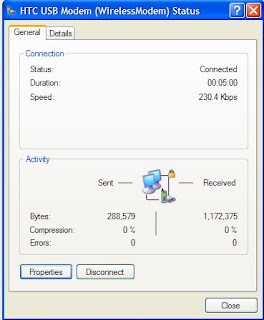
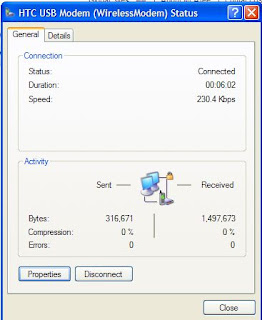
Speed tests - 48 kbps using McAfee's speed test, and also by manually counting the number of bytes.

As you can see, the testing involved around 2 MB of data transfer, lasting around a minute more for a total of around 7 minutes, and this cost approx Rs. 12.
Thursday, May 28, 2009
DNS requests not resolving
We faced a strange problem on fs3 of DNS requests not resolving - nslookup would complain that even the default dns server could not be contacted and would time out after 2 seconds.
nslookupGoogling gave many hits on configuring the dns service properly, and advice to run
DNS request timed out.
timeout was 2 seconds.
*** Can't find server name for address x.y.z.p: Timed out
Default Server: UnKnown
ipconfig /registerdnsAll these didn't work - finally the issue turned out to be a firewall problem after all: TCP/IP filtering was turned on, and ALL UDP packets were being blocked. TCP/IP Properties -> Advanced -> Options tab, TCP-IP filtering Properties, Changed radio-buttons to Permit All for UDP Ports and Protocols. That solved the problem.
SPF restored
No wonder the SPF was being shown as bad by the tools in my previous post - whoever shifted our domain to the new dns servers had also forgotten the spf records in addition to many cnames. Restored it today.
Wednesday, May 27, 2009
Signing emails with DKIM
Yahoo once again started rejecting mails from our mail server. I wanted to title this post "Yahoo mail admins need to grow up" but then thought better of it. After filling in their bulk sender form for the third time, decided to enter their Complaint Feedback Loop programme. Had to implement DKIM first, so headed over to howtoforge after googling. Test mechanisms were in the centos setup page and the DNS setup required a request to our ISP. Then signed up for the complaint feedback loop, and the next day got 3 'complaints' - these 3 guys marked our mail as spam to cause yahoo to block 3000 of our subscribers.
In case the howtoforge articles vanish, here's the gist:
Once the dns propagates, you can check by sending email to yahoo or gmail - gmail shows as "signed by radiosai.org" when you click show details. domainkeys.sourceforge.net lists some test tools - some of them are a bit flaky. I got dkim=pass from crynwr.com but sa-test@sendmail.net reported my SPF as bad - I thought it was working.
In case the howtoforge articles vanish, here's the gist:
sudo apt-get install dkim-filterHere, un-comment the following, with the appropriate domain name. The selector can be anything, only remember to set the same selector name in dns. Relevant dkim-filter.conf settings:
sudo mkdir /var/dkim-filter
cd /var/dkim-filter
sudo openssl genrsa -out private.key 1024
sudo openssl rsa -in private.key -out public.key -pubout -outform PEM
sudo vim /etc/dkim-filter.conf
# Log to syslogActually setting the X-header to yes is useful for initial debugging - then, checking the headers shows you right away if the milter is working. (Milter = Mail API Filter, from sendmail-speak). Then
Syslog yes
# Required to use local socket with MTAs that access the socket as a non-
# privileged user (e.g. Postfix)
#UMask 002
# Sign for example.com with key in /etc/mail/dkim.key using
# selector '2007' (e.g. 2007._domainkey.example.com)
Domain DOMAIN.TLD
KeyFile /var/dkim-filter/private.key
Selector mail
# Common settings. See dkim-filter.conf(5) for more information.
AutoRestart no
Background yes
Canonicalization simple
DNSTimeout 5
Mode sv
SignatureAlgorithm rsa-sha256
SubDomains no
UseSSPDeny no
X-Header no
sudo /etc/init.d/dkim-filter startto add the following lines to the end,
sudo vi /etc/postfix/main.cf
milter_default_action = acceptAnd then finally restart with
milter_protocol = 2
smtpd_milters = inet:localhost:8891
non_smtpd_milters = inet:localhost:8891
sudo /etc/init.d/postfix restartThe DNS record to be set is of the form
mail._domainkey.DOMAIN.TLD. IN TXT "k=rsa; t=y; p=MIGfKh1FC.....bfQIDAQAB"where mail is the selector, DOMAIN.TLD should be your domain name and the p=is the key from /var/dkim-filter/public.key
Once the dns propagates, you can check by sending email to yahoo or gmail - gmail shows as "signed by radiosai.org" when you click show details. domainkeys.sourceforge.net lists some test tools - some of them are a bit flaky. I got dkim=pass from crynwr.com but sa-test@sendmail.net reported my SPF as bad - I thought it was working.
Wednesday, May 13, 2009
add Google contacts to windows mobile without using Outlook
Googling got this link which pointed to this great solution.
1. Install PIM Backup
2. Change the extension of the Outlook formatted .csv file to .csc
3. Zip the file and change the extension of the .zip file to .pib, copy the pib file to the mobile.
4. Run the PIM backup app on the windows mobile, and choose the Restore option, browsing to the .pib file above. It gives the option to allow duplicates or update existing contacts and so on.
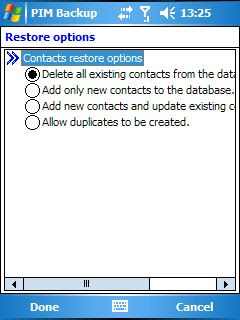
Here actually the third option is what I selected - add contacts and update old etc. BTW the screenshot was taken with MyMobileR using which you can control your mobile from your PC.
1. Install PIM Backup
2. Change the extension of the Outlook formatted .csv file to .csc
3. Zip the file and change the extension of the .zip file to .pib, copy the pib file to the mobile.
4. Run the PIM backup app on the windows mobile, and choose the Restore option, browsing to the .pib file above. It gives the option to allow duplicates or update existing contacts and so on.

Here actually the third option is what I selected - add contacts and update old etc. BTW the screenshot was taken with MyMobileR using which you can control your mobile from your PC.
Saturday, May 09, 2009
more with the QTEK mobile
Posting this with the QTEK mobile with wifi at home. Wifi at work working as of now only in "Open" mode and not WEP or WPA. But probably will have some workaround. Home wifi needed freebase to make the SSID broadcast - it couldn't connect with SSID hidden. Saw some google results about WM6 having that feature, but this one is WM5 and can't. Skype for WM was disappointing - 10 MB download, and the sound was stuttering on wifi. Fring looks much more promising, and feature packed too. Skyfire looks really good, and streams youtube videos without buffering over our 256 k connection.
Wednesday, May 06, 2009
QTEK 9100 mobile
Set up the smartphone to use wifi at home, but not yet working at PSN with the Airport - probably the hidden SSID is causing the problem for Windows Mobile 5. Infrared works fine with the Toshiba PDA, but transfers to the laptop @ S3 were not going through. Bluetooth also the same. Set up with mobireader total commander etc. Will set up skype as and when the wifi is operational.
GPRS setup on Airtel was simple enough, but had to call customer care.
Start -> Settings -> Connections tab -> Connections -> Advanced tab -> Select Networks
Here, Programs that connect to the internet should connect using 'My ISP name'
Start -> Settings -> Connections tab -> Connections -> Tasks tab
under 'My ISP name', manage existing connections -> Modem should be Cellular line (GPRS) and the apn name or access point name should be airtelgprs.com, username and password to be left blank.
Charges are currently 30 paise for 50 kB.
GPRS setup on Airtel was simple enough, but had to call customer care.
Start -> Settings -> Connections tab -> Connections -> Advanced tab -> Select Networks
Here, Programs that connect to the internet should connect using 'My ISP name'
Start -> Settings -> Connections tab -> Connections -> Tasks tab
under 'My ISP name', manage existing connections -> Modem should be Cellular line (GPRS) and the apn name or access point name should be airtelgprs.com, username and password to be left blank.
Charges are currently 30 paise for 50 kB.
Thursday, April 16, 2009
vbscript error handling
Added error handling to asp file which adds content disposition attachment headers to files on stream.radiosai.org - used ideas from this msdn blog post and this devguru article to write something like:
Err.Clear
On Error Resume next
'This statement makes the program resume the next statement
'instead of throwing an error
'***************
set f=fs.GetFile(strFilePath)
strFileSize=f.Size

numerror=Err.number
if numerror <> 0 Then
  Response.Write ErrorMesg
  Response.Flush
else
....snip snip ....
'and at the end of the script
On Error GoTo 0
'This means On Error, report it - the syntax is crazy.
Wednesday, April 08, 2009
schedule update flushing
The schedule update was consistently timing out every time the csv update was done. Checked with Plesk DBWebadmin (phpmyadmin) and found records from 2008 onwards. Blundering about the interface, found a "Search" - tried 2008, it gave
Search results for "2008" (at least one of the words):Blundering, because I chose delete, and it did
336232 match(es) inside table radiosai_stream_daily Browse Delete
SQL-query:At least now I know what to give as the proper SQL statement - something like
DELETE FROM `radiosai`.`radiosai_stream_daily` WHERE `streamId` LIKE '%2008%'
OR `fileId` LIKE '%2008%' OR `groupId` LIKE '%2008%'
OR `gmtDatetime` LIKE '%2008%' OR `newflag` LIKE '%2008%'
DELETE FROM `radiosai`.`radiosai_stream_daily` WHERE `gmtDatetime` LIKE '%2009-01%'
Sunday, March 29, 2009
command prompt here
Adding a command prompt to the context menu got by right-clicking a folder in Windows Explorer: followed this link and added a Command Prompt item in Tools -> Folder Options -> Files Tab -> File Folder -> Advanced -> New with cmd.exe as the executable. The link actually mentions the item Folder, I did it for File Folder. Maybe due to this, CKRename became the default action for folders on double-clicking, just like this query on Experts-Exchange. Downloaded and ran the vbs file as mentioned there, restored to "Open" default action. The code in the vbs file is:
'folder_open.vbs - Fixes problem where Search opens on a double click
'© Doug Knox - 03/13/2002
'Downloaded from www.dougknox.com

Set WshShell = WScript.CreateObject("WScript.Shell")

p1 = "HKEY_CLASSES_ROOT\Directory\shell\"
p2 = "none"

WshShell.RegWrite p1, p2

p1 = "HKEY_CLASSES_ROOT\Drive\shell\"
WshShell.RegWrite p1, p2

X = WshShell.Run("REGSVR32 /I /S SHELL32.DLL",4,True)
Set WshShell = Nothing

MyBox = MsgBox("Folders will now Open when double clicked", 4096, "Finished!")
Friday, March 27, 2009
phplist return-path
Found that phplist was having some bounces of unknown user. These were bounces which were going to the local sender email id - found that Sai Spiritual phplist emails had return-path showing this as the return-path (which was not being resolved by google apps, of course). Googled and found
http://docs.phplist.com/PhpListConfigBounces
Un-commented in the/config/config.php
$message_envelope = "noreply@sssbpt.org";
and made the return-path noreply@sssbpt.org
Also noted that on the new Ubuntu install, vi filename uses the old-style vi - for the more user-friendly version where you can use the arrow keys, have to use vim filename !
http://docs.phplist.com/PhpListConfigBounces
Un-commented in the
$message_envelope = "noreply@sssbpt.org";
and made the return-path noreply@sssbpt.org
Also noted that on the new Ubuntu install, vi filename uses the old-style vi - for the more user-friendly version where you can use the arrow keys, have to use vim filename !
Subscribe to:
Posts (Atom)