Friday, July 10, 2009

using sed

The Cygwin install on the server running colinux doesn't have vi, so sed is useful on occasion. This useful page has the basics. String replace has the syntax
's/{old value}/{new value}/'
like
$ echo The tiger cubs will meet | sed 's/tiger/wolf/'
The wolf cubs will meet
which of course you can pipe to a new file.

The article mentions that sed can change any printable character with another printable character, but use tr instead for unprintable characters. It also discusses append and insert.

Tally caveats

For TALLY users - if your installation license misbehaves, this info might help.

The following is an extract from a long post by one of my colleagues. The full version has lots of humour, I have just extracted the "lessons".

At one of our units, the Tally installation had a few little problems since the day we installed.... It might be useful to someone who faces a similar issue or someone can tell us what we might have done better.

First, the lessons: (for those who want to move on) :
1. Keep your system date and time current before activating Tally.
2. Register at the Tally site.
3. After you activate, there is such a thing called 'Update', which you should do within 45 days. Can do offline, but nobody will tell you.
4. Don't expect good English from Tally Customer Service.

Tuesday, June 02, 2009

phone as bluetooth modem

Finally a lucid article in smartphonemag.com which also points to an article in smartphonethoughts.com for PC configuration gave the crucial info - the number to be entered in the dial-up networking is *99# - once this is done, everything works. Apparently this is a code which tells the mobile phone to connect to GPRS connection which has already been set up. There are other similar codes found on googling - *99***1# for example, and another is *99*1#. Maybe this means the first GPRS setting in memory or something like that. Anyway, this provides a way to dial up with the USB connection also without using the USBModem_Dialer.exe - use the *99# as the number and the USB modem as the device. But here, two caveats:
  1. The Modem Link software has to be running on the mobile before the USB is connected.
  2. The APN has to be entered, since Modem Link doesn't seem to remember it.
APN entering has to be a bit of voodoo, as explained at the pdagold article - it has to be entered into the modem properties. In my case, the path is different from the pdagold article - in Control Panel -> System -> Hardware tab -> Device Manager -> Modem properties -> Advanced tab -> Extra initialization commands. Here, entered AT+CGDCONT=1,"IP","airtelgprs.com" where airtelgprs.com is my APN. Then, the normal windows dialler works.

Sunday, May 31, 2009

using the phone as a modem

Followed the excellent article at pdagold to connect to use the phone as a modem. Basically it requires that I start the Modem Link software on the phone, "Activate" on the phone, and use the provided dialler with the appropriate APN. Bluetooth modem is proving to be more difficult, will try it later.

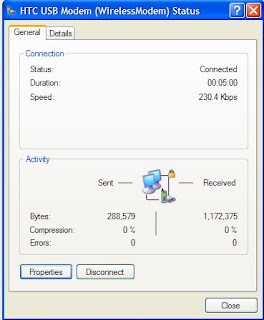
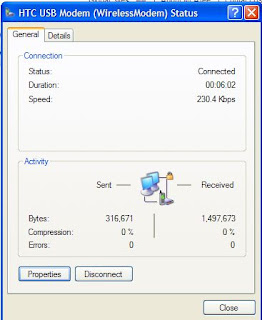
Speed tests - 48 kbps using McAfee's speed test, and also by manually counting the number of bytes.


As you can see, the testing involved around 2 MB of data transfer, lasting around a minute more for a total of around 7 minutes, and this cost approx Rs. 12.

Thursday, May 28, 2009

DNS requests not resolving

We faced a strange problem on fs3 of DNS requests not resolving - nslookup would complain that even the default dns server could not be contacted and would time out after 2 seconds.
nslookup
DNS request timed out.
timeout was 2 seconds.
*** Can't find server name for address x.y.z.p: Timed out
Default Server: UnKnown
Googling gave many hits on configuring the dns service properly, and advice to run
ipconfig /registerdns
All these didn't work - finally the issue turned out to be a firewall problem after all: TCP/IP filtering was turned on, and ALL UDP packets were being blocked. TCP/IP Properties -> Advanced -> Options tab, TCP-IP filtering Properties, Changed radio-buttons to Permit All for UDP Ports and Protocols. That solved the problem.

SPF restored

No wonder the SPF was being shown as bad by the tools in my previous post - whoever shifted our domain to the new dns servers had also forgotten the spf records in addition to many cnames. Restored it today.

Wednesday, May 27, 2009

Signing emails with DKIM

Yahoo once again started rejecting mails from our mail server. I wanted to title this post "Yahoo mail admins need to grow up" but then thought better of it. After filling in their bulk sender form for the third time, decided to enter their Complaint Feedback Loop programme. Had to implement DKIM first, so headed over to howtoforge after googling. Test mechanisms were in the centos setup page and the DNS setup required a request to our ISP. Then signed up for the complaint feedback loop, and the next day got 3 'complaints' - these 3 guys marked our mail as spam to cause yahoo to block 3000 of our subscribers.

In case the howtoforge articles vanish, here's the gist:
sudo apt-get install dkim-filter
sudo mkdir /var/dkim-filter
cd /var/dkim-filter
sudo openssl genrsa -out private.key 1024
sudo openssl rsa -in private.key -out public.key -pubout -outform PEM
sudo vim /etc/dkim-filter.conf
Here, un-comment the following, with the appropriate domain name. The selector can be anything, only remember to set the same selector name in dns. Relevant dkim-filter.conf settings:
# Log to syslog
Syslog yes
# Required to use local socket with MTAs that access the socket as a non-
# privileged user (e.g. Postfix)
#UMask 002


# Sign for example.com with key in /etc/mail/dkim.key using
# selector '2007' (e.g. 2007._domainkey.example.com)
Domain DOMAIN.TLD
KeyFile /var/dkim-filter/private.key
Selector mail

# Common settings. See dkim-filter.conf(5) for more information.
AutoRestart no
Background yes
Canonicalization simple
DNSTimeout 5
Mode sv
SignatureAlgorithm rsa-sha256
SubDomains no
UseSSPDeny no
X-Header no
Actually setting the X-header to yes is useful for initial debugging - then, checking the headers shows you right away if the milter is working. (Milter = Mail API Filter, from sendmail-speak). Then
sudo /etc/init.d/dkim-filter start
sudo vi /etc/postfix/main.cf
to add the following lines to the end,
milter_default_action = accept
milter_protocol = 2
smtpd_milters = inet:localhost:8891
non_smtpd_milters = inet:localhost:8891
And then finally restart with
sudo /etc/init.d/postfix restart
The DNS record to be set is of the form
mail._domainkey.DOMAIN.TLD. IN TXT "k=rsa; t=y; p=MIGfKh1FC.....bfQIDAQAB"
where mail is the selector, DOMAIN.TLD should be your domain name and the p=is the key from /var/dkim-filter/public.key

Once the dns propagates, you can check by sending email to yahoo or gmail - gmail shows as "signed by radiosai.org" when you click show details. domainkeys.sourceforge.net lists some test tools - some of them are a bit flaky. I got dkim=pass from crynwr.com but sa-test@sendmail.net reported my SPF as bad - I thought it was working.

Wednesday, May 13, 2009

add Google contacts to windows mobile without using Outlook

Googling got this link which pointed to this great solution.

1. Install PIM Backup
2. Change the extension of the Outlook formatted .csv file to .csc
3. Zip the file and change the extension of the .zip file to .pib, copy the pib file to the mobile.
4. Run the PIM backup app on the windows mobile, and choose the Restore option, browsing to the .pib file above. It gives the option to allow duplicates or update existing contacts and so on.


Here actually the third option is what I selected - add contacts and update old etc. BTW the screenshot was taken with MyMobileR using which you can control your mobile from your PC.

Saturday, May 09, 2009

more with the QTEK mobile

Posting this with the QTEK mobile with wifi at home. Wifi at work working as of now only in "Open" mode and not WEP or WPA. But probably will have some workaround. Home wifi needed freebase to make the SSID broadcast - it couldn't connect with SSID hidden. Saw some google results about WM6 having that feature, but this one is WM5 and can't. Skype for WM was disappointing - 10 MB download, and the sound was stuttering on wifi. Fring looks much more promising, and feature packed too. Skyfire looks really good, and streams youtube videos without buffering over our 256 k connection.

Wednesday, May 06, 2009

QTEK 9100 mobile

Set up the smartphone to use wifi at home, but not yet working at PSN with the Airport - probably the hidden SSID is causing the problem for Windows Mobile 5. Infrared works fine with the Toshiba PDA, but transfers to the laptop @ S3 were not going through. Bluetooth also the same. Set up with mobireader total commander etc. Will set up skype as and when the wifi is operational.

GPRS setup on Airtel was simple enough, but had to call customer care.

Start -> Settings -> Connections tab -> Connections -> Advanced tab -> Select Networks
Here, Programs that connect to the internet should connect using 'My ISP name'

Start -> Settings -> Connections tab -> Connections -> Tasks tab
under 'My ISP name', manage existing connections -> Modem should be Cellular line (GPRS) and the apn name or access point name should be airtelgprs.com, username and password to be left blank.

Charges are currently 30 paise for 50 kB.

Thursday, April 16, 2009

vbscript error handling

Added error handling to asp file which adds content disposition attachment headers to files on stream.radiosai.org - used ideas from this msdn blog post and this devguru article to write something like:
Err.Clear
On Error Resume next
'This statement makes the program resume the next statement
'instead of throwing an error
'***************
set f=fs.GetFile(strFilePath)
strFileSize=f.Size

numerror=Err.number
if numerror <> 0 Then
Response.Write ErrorMesg
Response.Flush
else
....snip snip ....
'and at the end of the script
On Error GoTo 0
'This means On Error, report it - the syntax is crazy.

Wednesday, April 08, 2009

schedule update flushing

The schedule update was consistently timing out every time the csv update was done. Checked with Plesk DBWebadmin (phpmyadmin) and found records from 2008 onwards. Blundering about the interface, found a "Search" - tried 2008, it gave
Search results for "2008" (at least one of the words):

336232 match(es) inside table radiosai_stream_daily Browse Delete
Blundering, because I chose delete, and it did
SQL-query: 
DELETE FROM `radiosai`.`radiosai_stream_daily` WHERE `streamId` LIKE '%2008%'
OR `fileId` LIKE '%2008%' OR `groupId` LIKE '%2008%'
OR `gmtDatetime` LIKE '%2008%' OR `newflag` LIKE '%2008%'
At least now I know what to give as the proper SQL statement - something like
DELETE FROM `radiosai`.`radiosai_stream_daily` WHERE `gmtDatetime` LIKE '%2009-01%'

Sunday, March 29, 2009

command prompt here

Adding a command prompt to the context menu got by right-clicking a folder in Windows Explorer: followed this link and added a Command Prompt item in Tools -> Folder Options -> Files Tab -> File Folder -> Advanced -> New with cmd.exe as the executable. The link actually mentions the item Folder, I did it for File Folder. Maybe due to this, CKRename became the default action for folders on double-clicking, just like this query on Experts-Exchange. Downloaded and ran the vbs file as mentioned there, restored to "Open" default action. The code in the vbs file is:
'folder_open.vbs - Fixes problem where Search opens on a double click
'© Doug Knox - 03/13/2002
'Downloaded from www.dougknox.com

Set WshShell = WScript.CreateObject("WScript.Shell")

p1 = "HKEY_CLASSES_ROOT\Directory\shell\"
p2 = "none"

WshShell.RegWrite p1, p2

p1 = "HKEY_CLASSES_ROOT\Drive\shell\"
WshShell.RegWrite p1, p2

X = WshShell.Run("REGSVR32 /I /S SHELL32.DLL",4,True)
Set WshShell = Nothing

MyBox = MsgBox("Folders will now Open when double clicked", 4096, "Finished!")

Friday, March 27, 2009

phplist return-path

Found that phplist was having some bounces of unknown user. These were bounces which were going to the local sender email id - found that Sai Spiritual phplist emails had return-path showing this as the return-path (which was not being resolved by google apps, of course). Googled and found
http://docs.phplist.com/PhpListConfigBounces
Un-commented in the /config/config.php
$message_envelope = "noreply@sssbpt.org";
and made the return-path noreply@sssbpt.org

Also noted that on the new Ubuntu install, vi filename uses the old-style vi - for the more user-friendly version where you can use the arrow keys, have to use vim filename !

mail merge with MS Office 2003

Mail merge turns out to be easy to do, even easier than this document says:
http://www.wellesley.edu/Computing/Office03/MailMerge03/letexistdata.html

Basically, you just have to go to Tools -> Letters and Mailings -> Mail Merge
and follow the wizard clicking Next, Next. Just choose data source and insert suitable field at suitable place in the Word document.

The screenshots detail the procedure.


Sunday, March 22, 2009

Indic scripts on Microsoft Word and Google Docs

Creating documents with Indic scripts using online tools like Blogger or Quillpad and opening in MS Word 2003 doesn't work: the Indic letters are shown as rectangles. Quillpad's FAQ notes that
"You will have to install 'Supplemental language support' in Windows XP.
Start -> Control Panel -> Regional & Language Options -> Languages -> Install files for complex script and right-to-left languages (including Thai)
(You would need your Operating System installation disc for this)
Incidentally(accidentally!!) Microsoft WordPad (write.exe) (and notepad to some extent) doesn't have any problem rendering indian language content, so if you don't have complex formatting in your documents you can use the minimalistic wordpad."
Even after the Complex script install, the problem persists in Word, but the WordPad workaround is useful for printing. The print command in Google docs nowadays creates a pdf, and this pdf has Telugu script mangled. Workaround till now was to take a screenshot (!) but now I can save as .doc, open in WordPad, correct font size issues and then print.

Just now found another workaround - use the File -> Print menu item in the browser menu instead of the Google docs menu - this one works fine!

Miranda IM sounds

Found that sounds were enabled in Miranda IM but I wasn't hearing any alerts. Reason was that there was no wav file assigned to each event by default. Set some events and went on with life.

Monday, March 16, 2009

hide apache version info

As suggested here, edited /etc/apache2/apache2.conf and changed ServerTokens from Full to Prod and then did /etc/init.d/apache2 restart

Monday, March 09, 2009

15.6 kHz hum when TV is connected

When the TV monitor is kept above the PA system mixer, a 15.6 kHz hum is induced in the system.


I use a notch filter to get rid of it in recordings.

Sunday, February 22, 2009

loading Ubuntu Linux on Clamshell iBook - part 5

Probably I should conclude this series here.

The power issue is a niggling one, but couldn't solve it, so am living with a max battery life of 1.5 hours or so. Standby lifetime is around a week, so it's pretty nice to leave it on standby and start it up for a quick browse or something. Found that the Fn-backspace (or should I say Fn-delete?) combo works as the delete key (since the mac keyboard doesn't have a "backspace" and instead has a "delete" which works like a backspace).

Future work may be an upgrade to swfdec-mozilla 0.8 (currently installed is 0.6)which is supposed to let flash movies play OK. Currently using greasemonkey workaround to download from youtube and play with vlc on desktop.

checking which version is installed on ubuntu

To find which version of a package is installed on ubuntu: Googling led to this post on howtogeek and this one in ubuntuforums so I can do either dpkg -s packagename or aptitude show packagename Aptitude is much slower. Another option, apt-show-versions turns out to be not installed currently. aptitude search pattern searches for all packages which match pattern.

Wednesday, February 18, 2009

Miranda IM

Finally settled on Miranda IM for Yahoo and MSN. Trillian used to need re-login for MSN after a couple of hibernate/resumes. Pidgin had crashes with MSN.


Had to install two more plugins for Miranda, keepstatus and startupstatus, for my requirement of remaining logged in automatically whenever I use the machine. Miranda also used to give an error message on resume, saying that Yahoo login was refused. Figured that this was because the ethernet interface was not yet up when it retried. Tweaked the settings Options -> Status -> StartupStatus -> Set after 60000 ms and in Options -> Status -> KeepStatus -> Check Connection (ticked) and Delay between retries at 60 sec.


Also blocked spam using Options -> Events-> Ignore settings. A bit non-intuitive, "The following events are being ignored" - Unknown contacts, everything is enabled (i.e. everything is ignored).


Saturday, February 14, 2009

mp3 and wav as WinAmp Media File

While sorting files based on type in Windows explorer, both mp3 and wav files were being listed as WinAmp Media file. To prevent this, googled and adopted a similar strategy as given in the WinAmp forums:
  1. Remove the mp3 and wav files associations from WinAmp preferences (Ctrl-P in WinAmp to reach preferences, File Types on left pane).
  2. In Windows Explorer, Tools -> Folder Options -> File Types tab, Click New, Enter mp3 extension. Here, if it is already associated with some other app, it will complain. Then you need to remove the association from the other app...
  3. Click Advanced button at the bottom, delete all the Actions, create two new actions - Action Play with Application used to perform field set as
    "C:\Program Files\Winamp\winamp.exe" "%1"
    and Action Enqueue in WinAmp with the field set as
    "C:\Program Files\Winamp\Winamp.exe" /ADD "%1"
  4. Note of course that you need to put in the correct path to winamp.exe on your system, and that if the %1 is not within quotes, you will come to grief with any long filenames!

Thursday, February 12, 2009

multilingual show notices in Google docs

Created multilingual show notices in Google docs by copy-pasting from blogger which has Indic transliteration support. Telugu had a problem - on generating print preview or while printing, the generated pdf had wrongly placed diacritic marks. Downloading a doc doesn't help, since the Telugu fonts are not loaded. Maybe I'll try later after installing the Indic fonts and keyboard support.

Wednesday, February 11, 2009

krishna on dell t100 setup continues

  1. automysqlbackup.sh script from krishna used to backup and restore mysql databases. It gives two ways to restore:
    # mysql --user=username --pass=password --host=dbserver database < /path/file.sql 
    # or
    # mysql --user=username --pass=password --host=dbserver -e "source /path/file.sql" database
    The latter method fails with ERROR 1064 (42000) at line 1: Luckily the former method works, tho' while importing SI db, it gave an error ERROR 1298 (HY000) at line 2410: Unknown or incorrect time zone: 'NULL' the db seems to be working. After the database import, phplist said database needs to be upgraded. As given in the docs, went to Main Page -> System Functions -> upgrade and it took less than a second.
  2. Next, the php files were being served as MIME type application/x-trash. Not sure what exactly was wrong, but now it is working after
    (a) DirectoryIndex index.php index.html added to /etc/apache2/apache2.conf
    (b) index.html.old moved to another directory.
    (c) Subscription page configured properly.
  3. Commandline php had to be installed, with apt-get install php5-cli as given at ubuntuforums.org
  4. getmail downloaded from http://pyropus.ca/software/getmail/ and extracted from tar.gz.
  5. apachemails added to webserver's group with
    useradd -G {group-name} username
    as given here. Listed users and groups seeing /etc/group,
    ps -eo euser,ruser,suser,fuser,f,comm,label
    showed that apache was being run as www-data so did
    chown apachemails:www-data apachebounces
  6. Later found (after many attempts, testing pop with and without notls option) that this version of phplist (2.10.9) would not read arbitrary files as mbox files (like the earlier 2.10.5 on the older krishna could!) .
    Cannot open mailbox file Can't open mailbox /var/www/bounces/apachebounces: no such mailbox
    So had to change mbox location to /var/mail/username for a valid username.
  7. Before that, sendemaillib edited as given in PB's earlier post. Since I copied the scripts from the old krishna, did not have any user problems with running the scripts.
  8. Running processbounces gave
    Error: IMAP is not included in your PHP installation, cannot continue 
    Installed imap module with apt-get install php5-imap
  9. Now to lock up the system using the techniques given here, but passwd -l causes the message
    Your account has expired; please contact your system administrator
    probably due to this bug. So, did the editing of /etc/ftpusers and /etc/ssh/sshd_config instead.

Sunday, February 08, 2009

more on vm and finally not virtualizing after all

I'm filling in this post with stuff on the virtual machine just for completeness - we've decided to go ahead without virtualization for krishna since the only thing to be running on it would have been a single vm with phplist on it.
  1. Added gpm to use mouse if necessary on the local terminal.
  2. removed many daemons like bluetooth from /etc/rc3.d
  3. Was giving error on boot of vm, "Use of uninitialized value $uni in pattern match (m//) at /usr/bin/ckbcomp 3109." etc. Apparently this was due to a missing dependency and adding perl solves the problem. sudo apt-get install perl solved the issue.
  4. Cannot redir from lower ports as unprivileged user. So, 5080 redirected to port 80 and so on.
  5. Way to port-forward only a limited number of ports for passive ftp is discussed in experts-exchange. The syntax for vsftpd is given here, for example, specifying pasv_max_port and pasv_min_port
  6. Changed /etc/hostname and /etc/hosts so that each vm has it's own name.
  7. While starting the vms using kvm, use -daemonize -nographic and not & to put into background. Otherwise becomes a zombie or something.
  8. ftp server running on the vm was accessible from outside with firefox, not with filezilla or IE. Reason was probably that FF was rolling over to active mode.
  9. Packet sniffed with wireshark, it gave all out-going packets tcp checksum errors due to checksum offload, so disabled checking in wireshark. Edit -> Preferences -> TCP
  10. PASV ip address and port are specified as given here: http://en.wikipedia.org/wiki/File_Transfer_Protocol
    "PORT 192,168,0,1,192,2". first 4 numbers are ip address, The port fields should be interpreted as p1×256 + p2 = port192x256+2
  11. Since qemu's natting was mangling the pasv packets, changing the ip to 10.0.2.2 - probably we have to go with ftp on raw server. This is in spite of setting the pasv_address in vsftpd.conf. After the packets leave the vm, the change is made by the NAT.
  12. Since ftp is on bare metal, phplist being on a single vm is more convenient, so why have a vm at all - hence, going with a bare metal install. Install itself took only 10 minutes!

Friday, February 06, 2009

removing X from server

Too late, found that sudo aptitude remove ubuntu-desktop would have removed all the stuff in one line. Anyway, went through the meta-package references given here and did the aptitude remove for many of them. Some daemons like bluetooth still left, manually hunting them down... sudo apt-get remove xserver-xorg to remove X.

building virtualized servers on a dell T100

This is yet another looong post. Starting from scratch, had to do everything from changing bios settings to adding and removing virtual machines. Maybe I'll skip over the many days of trial and error and will just summarize the actual steps to be taken here.

  1. The lights 1 2 3 4 on the front panel are only for diagnostics according to the Dell manual and do not indicate hard disks or anything like that.
  2. Warning message "Alert! cover was previously removed" and not booting till F1 or F2 is pressed. Solution as given here - Bios setup -> System Security -> Chassis Intrusion -> Enabled Silent.
  3. Much later, while installing KVM, found virtualization needs to be enabled in Bios as given here. So, as mentioned in the dell manual, went into Bios setup -> CPU Information -> Virtualization -> Enable. Also enabled the CPU info reporting to OS, which also was disabled by default.
  4. PB wanted to do JeOS as given here, the installation on the base machine was Ubuntu server 8.10 Intrepid amd64 build.
  5. Installed gui with sudo apt-get install ubuntu-desktop since I wanted to try out virt-manager. The installation of ubuntu-desktop stalled at 99% after downloading files for more than an hour, probably due to some network glitch. Did Ctrl-C, again ran the same command, this time it downloaded a few kB more and then finished the install with no more problems. The install itself took around 6 minutes. 4 GB RAM, amd64 kernel. Did apt-get remove gdm so that it would not boot into X.
  6. While installing virtual machines from CD with virt-manager as given here, wizard would not proceed until CD was unmounted in host OS. Then, the CD could be selected.
  7. Had to install qemu, without which install of virtual machines was failing. Listed in Ubuntu docs here, here and here.
    sudo apt-get install kvm libvirt-bin ubuntu-vm-builder qemu bridge-utils
  8. Trying to install from the same Ubuntu server CD using virt-manager was hanging at the point where it installs and configures grub. Tried the install in expert mode and installed Lilo instead, this works. For expert mode, hit F4 when booting from CD after choosing English (language of install).
  9. Virtual machines created with network options with virt-manager were not able to access the network. Only later did I know that all these machines needed was to be set to DHCP. QEMU has a strange and wonderful user mode virtual network which has a firewall / gateway / dhcp server at 10.0.2.2, DNS at 10.0.2.3. Since each instance of Qemu is a separate process, if set to DHCP, each Qemu virtual machine will get the address 10.0.2.15 ! And they are automatically NATed.
  10. Now tried the commandline vmbuilder, since the virt-manager based installs were taking so much time and user interaction.Did the install according to the docs, some find the install to take just a minute! But in my case, found it took two hours. Reason was that it was downloading from ubuntu.com instead of using CD.
  11. The --iso option for vmbuilder does not work, so the install was going to ubuntu.com for each package.
  12. Also found that lines separated by \ for a multiline command works if typed in, but takes only the first line if copy-pasted!! So, my first vmbuilder image was a basic default one. Luckily, the default made a run.sh filein the same directory, which gave the syntax to run the vm as
    kvm -m 128 -drive file=disk0.qcow2 -net nic -net user $@
    The trailing $@ is equivalent to $1 $2 $3..., which means that you can add any more commandline arguments to the script (run.sh) and they will be passed on to the kvm program. Man kvm says it takes the same arguments as kvm-qemu - and man kvm-qemu redirects to the qemu man page.
  13. Again another trial - the commandline virt-install (since the vmbuilder was using so much network and time). . It complained of "Unsupported virtualization type" - apparently had to put --hvm in the arguments. Bridge mode causes it to crash. Reason seems to be that the bridging, tap interface etc should be manually set up beforehand. So, removed the bridge option --network bridge:eth1. Then, it has qemu-system-x86 running at 100% cpu for a long time - indefinitely? - with no disk activity, as seen with top. So abandoned this attempt. The command used was
    virt-install --name testX3 --ram 512 --file testX3 file-size 6 --nographics --hvm --cdrom ubuntu-8.10-server-amd64.iso
  14. The images created with vmbuilder could be copied and run using the kvm command. So, concentrating on those. Found the wonderful world of Qemu virtual networking! Redir seems to be the way to go, given at wikibooks. btm.geek says be sure to use bridging, but let's see how it goes with the user mode qemu. Now calling the virtual machines with
    kvm -m 128 -hda disk0.qcow2 -hdb disk1.qcow2 -redir tcp:5555::22
    for example exposes the ssh port 22 of the guest on the host machine's interfaces (localhost and eth0).
    ssh -p 5555 user@localhost connects to the guest vm's sshd. We've to see if this method continues to work under load.

Tuesday, February 03, 2009

printing over network with command prompt

Printing from the Acer laptop over the network using the method given at computing.net forum by typing
net use lpt2: \\machine2\shared_printer_name /persistent:yes
type filename.bin > lpt2

Thursday, January 29, 2009

colinux dns fix

Emails from colinux were not coming to the radiosai.org address tho' the ones to the gmail address were being delivered. After checking spam and trash, checked out sending a mail from commandline and then checking /var/mail.info on colinux. Found that radiosai MX was not resolving, also mails to colinux root were bouncing saying that the file was too big. So, vi /etc/resolv.conf and added the opendns ips
nameserver 208.67.222.222
nameserver 208.67.220.220
Also did a rm * -f in /var/mail and restored the mailboxes with touch, chmod 600 and chown root:mail etc.

Wednesday, January 28, 2009

Annoying pop-up warns of click-jacking


Some glitch either in Blogger or in this template or in Firefox - this pop-up comes up every time I try to search for something, and have to clear the 'keep it blocked' check box every time...

Correction: This is from the NoScript plugin, so a simple fix is to uninstall it!

Monday, January 26, 2009

pidgin

Using pidgin now to remain online on Yahoo and MSN. Initially it crashed a lot, seemingly every time the machine hibernated or lost connectivity or both. Then disabled everything and enabled one by one. It may be either the email notifications or psychic mode or some such plugin. Disabled all plugins as advised in http://developer.pidgin.im/wiki/TipsForBugReports, started with only Yahoo account enabled, one by one added GTalk and MSN, works OK. Went back to Google's client for GTalk, since I like the email notification with the very visible red icon.

Edit: Found that it was the MSN connectivity module, or maybe anything more than one network at a time, which is causing the crash on resume: when MSN is logged in along with yahoo, it crashes. When only yahoo is logged on, no crash on hibernate and resume.

Sunday, January 25, 2009

two pass encoding fail

My last post was too euphoric too soon. WMEncoder is not allowing 2-pass encoding for some reason. When 2-pass is selected, it exits as soon as it finishes the first pass, and a 2 kB or something wmv file results. 1-pass is working, so using that as a workaround for the moment. Wonder if using avi files with ac3 audio is the culprit.

Saturday, January 24, 2009

multitasking joy

Ah! the joys of multitasking! Typing this while WMEncoder and Virtualdubmod do encoding and Nero rips tracks from a CD (RW, recorded from MiniDisc using the Marantz recorder CDR631, with an optical connection to automate track creation). Probably better hardware, better drivers, more RAM are all responsible. Saispace2 would have definitely crashed with all this together.

Wednesday, January 21, 2009

loading Ubuntu Linux on Clamshell iBook - part 4

Previous posts in this series: Part 1, Part 2, Part 3.

USB mem-key automounting was pretty easy to add - just added ohci-hcd to the end of /etc/modules, and on next reboot, USB volumes were being automounted.

For the power management misreporting, did as suggested at applefritter, resetting PMU, PRAM and NVRAM followed by a full discharge. Copy-pasting from that post,
1) Reset the PMU again. With the computer off, use a straightened paper clip to push down the reset button "under the grille" near the power button for 5-10 seconds (the proper technique for this model). Your PMU has been reset.

2) Reset the PRAM. Start up the machine, then hold down the following 4-key combination immediately after the startup chime: [Apple]-[Option]-[letter P]-[letter R]. I usually find it helpful to hold [Apple]-[Option]-[letter R] with my left hand, press the power button with my right hand, then immediately press the [letter P]. Hold down all four keys until the Mac has chimed 3-4 times. When you let up, the Mac should start up normally. You'll have to shut it down again for the third step.

3) Reset the NVRAM. Start up the machine, then hold down the following 4-key combination immediately after the startup chime: [Apple]-[Option]-[letter O]-[letter F]. Hold down all four keys until the machine boots up to a grey screen with text: this is Open Firmware mode. NOTE: Be very careful what you do here! It's easy to mess things up in Open Firmware very quickly if you don't know what you're doing! Type the following commands exactly as they're written here, and follow each command by pressing the [Return] key:

reset-nvram
reset-all

Your NVRAM has been reset, and your Mac will now restart itself normally.

Now you can go about the task of completely draining, then recharging, your battery. Go to your Apple Menu>System Preferences>Energy Saver. Select "Battery" instead of "Power Adapter," and set the all the sliders to not sleep, ever. Period.

Now stick a CD in the drive and open iTunes. Turn on Repeat mode and play the CD indefinitely (you might want to pick a CD you actually like ...).

Unplug the power adapter and let the iBook run until it goes into low-power deep sleep. This could be the 5 minutes or so that you've been reporting, or it could be the full 2 hours that the battery should have been holding.

Once you're in deep-sleep mode, plug in the power adapter and allow the battery to charge for however long it takes -- overnight would be ideal. Then you can test the battery under normal use conditions and let us know what (if anything) has changed.

Sometimes, the PMU becomes confused and either (1) reports a charge higher than is actually on the battery, causing the charging circuit to turn off prematurely, (2) reports a charge lower than is actually on the battery, causing the computer to shut down or deep-sleep prematurely, or (3) some combination of these symptoms.

By resetting the PMU, the PRAM, and the NVRAM, the Mac should now have a clean slate and be forced to "relearn" when the battery is fully drained and fully charged. A full drain-and-charge cycle should help it find these parameters.

But unfortunately, after doing all that, still the battery shows only 44% charged, 1.15 hours remaining. Will have to dig some more.

Monday, January 19, 2009

router set up

DLink router DIR-615 set up at Planet. Currently disabled wireless and using it as a plugin replacement for saispace. This router has login Admin with blank pw, at 192.168.0.1 by default.

Sunday, January 18, 2009

loading Ubuntu Linux on Clamshell iBook - part 3

Part one of this series and part two have more details.

Adding left and right button emulation - this post (google led me to this guy who links to a bunch of iBook Linuxers) mentioned that F11 and F12 were already mapped to middle and right-click. Just tried mine, mine are, too! Since mouseemu is installed, it must be doing the job. Or maybe it is the line in my /etc/X11/xorg.conf which says Option "XkbRules" "xorg"
... Aha! This guy says it is in /etc/sysctl.conf, and it is!
dev/mac_hid/mouse_button_emulation = 1
dev/mac_hid/mouse_button2_keycode = 87
dev/mac_hid/mouse_button3_keycode = 88


Choosing System->Preferences->Keyboard, one gets the Gnome Keyboard Prefs. In the layouts tab, choosing the Layout options button, under Numeric Keypad Delete behaviour, I have chosen the . button to be delete button. Next on the todo list is to clear up the power behaviour. Currently, the charging doesn't seem to be taking place when running linux, or maybe the pmu is not reporting it correctly. The Gnome panel was showing 44% for much of the time I was using it earlier. Now it shows 37%. When I disconnect and reconnect power, /proc/pmu/battery_0 shows a different count. But then it seems to get stuck?!

Right now, cat /proc/pmu/battery_0 shows:
flags      : 00000011
charge : 810
max_charge : 2141
current : 0
voltage : 16030
time rem. : 0
More than an hour back, it showed
flags      : 00000011
charge : 789
max_charge : 2141
current : 0
voltage : 16020
time rem. : 0
Plucking out and putting back the power plug makes the charge start moving at the rate of 5 for ten seconds (815 to 820 in around 10 sec, for example). But now it has stopped at 827 and doesn't move any more. Will have to check out this issue as well as the lack of USB hotplug support (sees the USB key only if rebooted).

toshiba satellite A75 laptop power jack re-soldering

Yet another Toshiba laptop with power jack problem, just a touch of solder on the jack by D did the job - just 90 minutes.

Saturday, January 17, 2009

loading Ubuntu Linux on Clamshell iBook - part 2

The part 1 of this saga is here.

After a 256 MB SDRAM ordered from ebay.in arrived, installed xubuntu-desktop. But when it rebooted, it came up with gdm and gnome desktop by default. Looked pretty good. Went back to the login screen, chose Xfce, found the look to be similar, but some things like the volume control in the panel were missing. So, went back to the gnome desktop. Not too sluggish, pretty good, in fact. Installed various stuff like flash plugins for firefox mozilla-plugin-gnash and swfdec-mozilla, OpenOffice, etc, performance is good. Have to download flv files and play them with vlc or mplayer, since the swfdec has a CPU drinking problem playing flv flash players, does not refresh the screen. Hibernate is not supported in hardware, I think. Suspend works well. Have to disable the "Failed to suspend" message in GConf as mentioned in the help center. Battery life is perpetually shown as 40% in the Gnome panel applet. Must take a dekko at what can be done about that. But someone wants to buy the machine, so I may not get time to do that...

Tuesday, January 13, 2009

outgoing mails from Thunderbird to gmail - AVAST!

Outgoing mails were getting an error 5.7.0 Must issue a STARTTLS... though the TLS settings were set correctly. Googling found this page which gave the solution of disabling AVAST scanning of outgoing emails. On my system, Avast 4.8 Pro, in the Enhanced Interface (as against the Simple Interface) it was in Tasks -> Resident Protection (right-click) -> Properties (it gives a warning at this point) -> Internet Mail (with the Advanced configuration checkbox at the bottom checked) -> SMTP -> Scan outbound mail. Removed it, and SMTP started working again.

Monday, January 12, 2009

extigy check

I'd not mentioned that the Creative Extigy had gone bad before I got the Tascam US1641 in the Mandir. Checked it today with an adjustable power supply set to 12 V - it needs 12 V 1 amp - to see if the problem is only with the power supply. At first try, it seemed No go, well and truly dead. Then instead of the auto-detected drivers from XP, tried installing the creative drivers. Then the analog section seems to be working fine. Line in -84 dB noise floor or better, mic also good. The digital section seems to have packed up due to the high voltage from the bad power supply - burning smell when it is connected. SPDIF copper and optical, no sound heard in headphones tho the mixer has these inputs unmuted and turned up. Anyway, it'll do for mic PB recordings, that's a big plus.

adding cleartype

In Display properties, on the Appearance tab, Effects button: Select "Use the following method to smooth edges of screen fonts" check box, and then choose ClearType in the list.

Thunderbird migration

Migrating Thunderbbird to the Aspire 4530 was not so straightforward, since I'd made a bit of a mess while configuring it on saispace2. The mail files and the configuration were at two different places, and the settings had to be redone since the paths were different - E:\My Documents ... etc now instead of L:\Mozilla Thuderbird etc earlier.

  1. Copied contents of L:\Program Files\Mozilla Thunderbird\Profiles and Local Folders to the new location in E:\
  2. Copied contents of C:\Documents and Settings\username\Application Data\Thunderbird to same location
  3. After starting Thunderbird, went to each account and changed the path to sig file and local folders.

Saturday, January 10, 2009

New Acer laptop Aspire 4530

Migrating to the laptop to save power. Making a list of what I want installed on it, putting it all in a folder for easy installation. Used PING to create a backup image. Have not yet done any benchmarks except for audio. Though the Realtek HD audio has SPDIF out, the Line In is average: -73 dB noise floor and a drift of 0.054 sec in 30 minutes of recording. Not frame accurate, but at least better than the M-Audio MobilePro! Noise floor goes up considerably on using Mic Boost. Maybe I'll use the MobilePro for PB recordings?

Friday, January 09, 2009

loading Ubuntu Linux on Clamshell iBook - part 1

This will a long post.

The Clamshell iBook was hamstrung by non-availability of current browsers for MacOS 9. Loading MacOS X was not an option, with only 64 MB of RAM and no DVD drive. On an impulse, looked up Ubuntu, and found it had a PowerPC install supporting older machines with http://cdimage.ubuntu.com/ports/releases/hardy/release/ubuntu-8.04.1-alternate-powerpc.iso

First started the install using just the install-powerpc image, but this didn't work: it went on for 45 minutes before asking me for user info, then went on for 2 more hours or so before saying that the install failed. Probably due to the limited RAM, tho' the installer was in "Low memory mode".

Then tried the cli-expert-powerpc image. Chose the same partitioning scheme as before,
Guided - use full disk
It created a 180 MB swap
(#4 180 MB swap)

One problem with this install was that it did not ask for a username - it created username oem and added it to sudoers list. The message was that I could run oem-config-prepare and then oem-config to change the oem user to whatever name I wanted. But the latter did not work, probably because of the minimal install. So, manually added user using adduser and added to sudo list using the method given here
sudo usermod -a -G admin username
removing the oem user with the technique given here, userdel.

Sound started working by adding snd-powermac to the end of modules with
sudo nano /etc/modules
as given in the PowerPC FAQ.

glxinfo
reports no accelerated video as of now, though tried some stunts with setting the driver to ati and so on.

The Mac keyboard has some mapping problems. Where is the Del key for Ctrl-Alt-Del ?! Also, only a single button on the track-pad, so middle-clicking is out. Possible solution is at http://linuxaleph.blogspot.com/2008/11/mapping-middle-click-to-keyboard-key.html

Actually none of the bugs given at the Low-Memory Install page afffected my install, particularly the bug #202959 did not happen for me on the PowerPC. It does show an error while booting,
PCI: Cannot allocate resource region 0 of device 0001:10:19.0
but the boot process continues.

Adding repositories by editing sources.list sudo nano /etc/apt/sources.list was not so easy. The PowerPC builds were shifted to the ports servers, so finally found at http://ports.ubuntu.com/dists/hardy/
My sources.list file :
deb http://ports.ubuntu.com/ hardy-security main restricted
deb-src http://ports.ubuntu.com/ hardy-security main restricted
deb http://ports.ubuntu.com/ hardy-security universe
deb-src http://ports.ubuntu.com/ hardy-security universe
deb http://ports.ubuntu.com/ hardy-security multiverse
deb-src http://ports.ubuntu.com/ hardy-security multiverse
deb http://ports.ubuntu.com/ hardy main restricted
deb-src http://ports.ubuntu.com/ hardy main restricted
deb http://ports.ubuntu.com/ hardy universe
deb-src http://ports.ubuntu.com/ hardy universe
deb http://ports.ubuntu.com/ hardy multiverse
deb-src http://ports.ubuntu.com/ hardy multiverse


Installed IceWM using instructions from the Low-Memory Install page with
sudo aptitude install icewm iceconf icepref iceme icewm-themes

Tried installing xdm for auto-login, since gdm and kdm are resource-hungry. But then xdm doesn't have that feature! So, using the technique given here and here, putting startx at the end of .bashrc as
if [ $(tty) == "/dev/tty1" ]; then
startx
/sbin/halt
fi
Firefox and dillo work OK. Dillo is fast but doesn't render CSS. Firefox needs more RAM, swaps a lot. Ordered more RAM from ebay.in - PC-133 SDRAM "suitable for most P-III laptops". Actually need PC-66, I hope it works. With more RAM, might try installing xubuntu-desktop and other goodies.

Tuesday, December 23, 2008

saga of corrupt pst file

K's S had a corrupt pst file, not opening in Outlook. Googled and passed on the following gyan:

Techrepublic points to MS knowledgebase and says pst max filesize is 2 GB
http://articles.techrepublic.com.com/5100-10878_11-1052339.html (BTW, the link is correct - it is techrepublic.com.com....)

http://support.microsoft.com/default.aspx?scid=kb;en-us;Q197315
also says the same thing,
http://support.microsoft.com/default.aspx?scid=kb;en-us;Q296088
mentions that it affects
  • Microsoft Outlook 2000 Standard Edition
  • Microsoft Outlook 2002 Standard Edition
  • Microsoft Outlook 98 Standard Edition
  • Microsoft Outlook 97 Standard Edition
Googling for 5 GB pst file, found
"I'd suggest using Mozilla Thunderbird on Windows to do the conversion. It creates MBOX files, and it's free. I've used it to migrate 5 GB of PST files to mail.app for my wife and myself."
from comments at http://www.davidalison.com/2008/05/outlook-pst-files-and-mac-conversion.html

According to http://www.tek-tips.com/viewthread.cfm?qid=1401989&page=12 last line,
"server side .pst tools don't support .pst files larger than 2gb. "
So there may have been some corruption if the file has gone through such tools.

Some more possibilities are listed in the comments of:
http://weblogs.asp.net/bleroy/archive/2007/06/27/outlook-pst-file-repair-tool.aspx
which say
Since this is paid sw, you could try thunderbird first, and later export back to outlook if necessary.

Resolution: Trying the Thunderbird stunt also did not work, many folders had junk characters and so on. It turned out that the file had become corrupted while being copied to the laptop. S went back to office, copied it again, this time it worked fine.

Tuesday, December 09, 2008

repairing dialup networking in XP

M had a problem connecting to Reliance using the USB dongle. Googled the error message 'Error 6 The handle is invalid.' and found the solution was a bit of voodoo from http://forums.practicallynetworked.com/showthread.php?t=6781:
1. Remove Modem driver from the Device Manager.

- Right click My Computer and select Properties.

- Click on Hardware, Device Manager. Click on + sign by modem, right click and
uninstall modem.

2. Delete the dial up connections and remove 3rd party RAS related
program if any.

3. Run the attached file to install RArepair.exe, then run RArepair.exe to
reinstall RAS components. Reboot.

4. Reinstall Modem driver and the 3rd party dial up program if it is
required by your ISP.

5. Recreate the dial up connection and check if the problem is resolved.


The exe file is also available on the forum page.

Friday, November 28, 2008

easy scheduled shutdown for windows

I wanted the equivalent of shutdown -h 3600 for windows, googled and found that it is shutdown -s -t 3600. And \System32\shutdown.exe shows a dialog box counting down the time to shutdown too. shutdown /? for more options...

M-Audio MobilePre USB

Unfortunately seems to be el-cheapo in results too. Has -72 dB of noise - comparable to a normal PC sound card, not like Pro or Semi-Pro cards which have at least -84 like the Darla (a discontinued product now at www.echoaudio.com ). But the real killer was lack of frame-accurate sampling. Drift of 0.3 sec in 30 minutes recording.

While doing the tests, played back drama CD with 13 tracks with the Marantz CD recorder (CDR 631)and recorded on saispace2 and sathya with the MobilePre and Darla cards respectively. The Darla recording synced with the CD audio captured using Cool Edit Pro's audio extraction, accurate to 0.02 sec over 70 minutes. The MobilePro had the 0.3 sec in 30 minutes.

Thursday, November 06, 2008

HP Pavilion travails

M brought a HP Pavilion dv6000 - dv6402ca to be precise - to check if networking is OK. He runs WinXP on it, and not the pre-installed Vista, because he has some sw which won't work with Vista. Found that the network driver was not installed - nForce chipset. Since the wireless was working, thought it would be a ten minute job to download the driver, install it and check it. Little did I know....

First, the Broadcom Wifi refused to work with our Airport wireless network. After entering the SSID and WEP key, a simple "Repair" was enough to make the Compaq connect to it. Tried removing the earlier configured wireless network, retaining only our home network. No go. Finally tried a restart. Voila! Connected. So, try try try again, if you don't succeed, restart!

The nVidia driver was a hefty 50 MB download. Got the link from
http://en.kioskea.net/forum/affich-20336-hp-pavilion-dv6000-xp-drivers

Unfortunately, Windows downloaded a couple of updates, and I thought I could club both restarts together. So, ran the nVidia driver setup and chose not to restart immediately, ran the update installation, chose not to restart immediately, then restarted. But then the screen remained black after the initial XP splash screen. Back-light is seen, but no display.

Tried Safe mode: login screen comes up, but keyboard and trackpad are disabled! Keyboard only works in the initial boot menu. Even attaching a USB keyboard didn't help. Turned in for the night on that note.

Maybe in normal boot, the new driver might be making the external VGA the main screen, thought I, so tried it out today with an external monitor. That one too showed exactly the same display as the built-in LCD.

Is it a hardware problem? Tried booting with Knoppix. What I had was an older version from Linuxforu, 3.2. It booted fine the first time, but reported that it found BIOS Bug #81[000...000] - Later rebooting worked only in failsafe mode. Anyway, it seemed there was no hardware problem. But couldn't do any repair of the Windows install from there, since it was on NTFS and this version of Knoppix couldn't mount the drive though it made suitable fstab entries.

Next option was to try Windows XP recovery console using my XP disk. Administrator password? It turns out the default is blank! OK, but what do I do next? Tried chkdsk /r - it found some errors and corrected them, but on restart, the problem remained.

According to this thread, instead of recovery console, I should try the Windows repair method:
.... would probably recommend that you just do a setup-mode repair by booting from your Windows CD.

Skip the initial repair console option and choose to install Windows. When it says there is already a Windows, would you like to repair it?, that's the repair you want. It will run a full setup and keep your existing Windows configuration. This will mostly back you out to the service pack that is on your CD and so you'll need to reapply updates and service packs (except of course the
offending one.)

If the setup won't repair your existing Windows because your current service pack level is too far past your CD, you'll need to first build a "slipstreamed" CD with Win2K SP4 or XP SP2 integrated into it. The information to do this is widely available on the web, or post back if you need to and I'll give you details. You of course need another machine or a separate, clean Windows install with a CD-RW to make this....

OK, worked as advertised, except... it asked for my XP CD key and then asked for activation! Yikes. Tried options from RB both of whose CDs did not boot, finally got a volume licensed CD from P. At last. After another round of "repair", it finally came up.

Then I had to install the network driver. After that installation, still the Network Connections was empty! When in doubt, restart; so restarted. But the Wireless Adapter was shown as driver not loaded, and the ethernet adapter driver also was not loaded. Tried deleting the devices in device manager as per the trouble-shooting wizard's advice. Then rebooting with the Wireless adapter enabled, successfully detected both wireless and wired connections. ]

Phew!

Edit: And now the keyboard and trackpad work in Safe mode too.

Monday, November 03, 2008

setting up an Airport network with a PC

The old Airport Base station (graphite) needs a Mac for the configuration. Connected the base station and the iBook to a hub to which the ADSL router was also hooked up. Running the Airport Admin Utility, configured the Base station with appropriate ip address and so on, and enabled WEP. To make the PC connect, the WEP key has to be entered in hex: to get it in hex, one needs to go to the menu in the Airport Admin Utility and choose Network Equivalent Password. Once the hex key is entered in the PC, it connects just fine. This forum post which says XP requires 128 bit encryption is wrong. In my case, an added extra is an SSID which is not broadcast.

For setting up the connection, Network Connections -> Wireless Connection -> Properties -> Wireless Networks tab, add the SSID and the key. Once this is done, "Repair" option for the wireless connection makes it connect. In case a wired connection was active, the newly connected wireless connection may not be used as the gateway, a restart may be required.

Friday, October 31, 2008

posting with Wamcom Mozilla on the iBook

Now an Airport Base station is set up in the room and the Compaq connects wirelessly using WEP. This iBook doesn't have an Airport card, so it connects via ethernet to a hub.

Opera 6.03 has an issue with links not working: clicking on a link does not follow the hyperlink. Strange. Maybe a system problem? Will try the older Opera 5. Wamcom Mozilla - OK when it works, but crashes often. Like it crashed 5 minutes back going to the Apple website's Airport Extreme page! Error 2, and the computer needs to be restarted.

The blogger edit toolbar is seen, but in this browser, it's buggy - selecting some text and hitting any of the button makes all the text in the post disappear!

Edit: Got the Opera 6 from mac.oldapps.com Will try the Opera 5 version, later, maybe.

Edit: Opera 5 works. But javascript, rendering etc leave much to be desired. Mozilla seems the best of the lot.

Wednesday, October 29, 2008

posting from the iBook

All these days I thought the iBook's ethernet port was broken. K told me that it used to work just fine. Tried it out with different CAT5 cables, but still the router ethernet light did not glow. Then, googling for troubleshooting ethernet on Mac OS 9, found this page which guides users through the Internet Setup Assistant. Just went through the Assistant - a Wizard in Windows-speak - and "lo and behold" the connection works just fine. Revisited my old post to make the router dial out, and I'm in business. Maybe I'll hook up a hub or something to allow both laptops (iBook and Compaq) to be simultaneously online.

Edit: Since the IE5 on the iBook was not displaying the edit toolbar on Blogger, had to log in again on the PC to add the links. Will be installing better browsers soon.

Audition 3 mixer monitoring problem

Trying to record with Audition 3, came up against a monitoring issue. Even though the monitoring is set to "Always Input" as given in their knowledge base the result is as if "Smart Input" is selected: Can monitor only if the track is armed for recording. This is a major show-stopper for my technique of mixing down to a single stereo track. Also, the cues are not written to the wav files in Multitrack mode - only in Edit mode are the cues written to the wav files. So, my major USP for using Audition instead of Cubase goes down the drain. If the Yamaha AW4416 comes back, then maybe I can record in Edit mode with Audition. I'll post this issue with Adobe Support, let's see what happens.

Saturday, October 25, 2008

Adobe Audition 3

Installed Adobe Audition 3 on the Mandir laptop. Audition records multitrack directly into the folder in which the session file is saved, similar to Cubase. But it silently dropped frames and finally stopped recording completely without any warnings when trying to record 6 tracks directly to the USB drive. Cubase gives a CPU meter and if it drops any frames, gives a dialog box and stops completely. Probably can record 1-2 tracks directly to the USB drive just like Cubase. Will activate and register Audition in a couple of days.

Tuesday, October 21, 2008

Saturday, October 18, 2008

problem booting saispace2

There was some issue booting saispace2 last evening. Stopped at the Windows boot screen. Booting into Linux without any problem. Booted into Safe Mode - OK. Then tried Debug mode - froze while Yahoo messenger was logging in, and Adobe Flash plugin was trying to download an update. Tried the Enable Boot Logging mode - OK. Freed some more space on C drive after the recent updates - only 200 MB was free, made it to 1 GB free. Then booted normally, no problems.

Friday, October 17, 2008

exploring video streaming hosting options

Wowza media server gives a cost effective solution for streaming broadcast flash. Windows media server is free, of course. Hosting plans - checked out dedicated hosting at ThePlanet, for $199 for 5000 GB per month, $25 setup fee.

Bypass Gmail Spam filter

Gmail has added a nice option - making a filter to bypass the spam filter - an option "Never send it to Spam". Saw a reference in this thread.

Thursday, October 16, 2008

chrome application shortcut

Created an application shortcut in the Quick Launch bar using Google Chrome for this blog. Ideal, since it will remember my login, and will open up in a jiffy. So, many recent posts....

Search and Replace

Found this great tool for find/replace whole blocks of text, googling for S who wanted to do this with some thousands of html pages. See screenshot below:

multiple recorders in Nero

Ticked the check-box to use multiple recorders, so can write mp3 backup CDs (of which I need two copies, one for Planet and one for Studio) twice as fast. When doing this, the number of copies can be kept as 1. Otherwise, it will prompt for another set of 2 blanks after finishing the first set.

Wednesday, October 15, 2008

videos on the iBook

Transcoding some Ted talks with Super as a background job at Planet and later watching them on the iBook at home. VCD compatible MPEG1 is always a safe bet, plays off the 8 GB mem-key. The PocketPC MPEG4 preset also works if used with DivXDoctor. DD takes around a minute to "doctor" the file and create a placeholder mov file of around 5-10 MB for the 20 minute video. Filesize of the orig video is around 10-20% of the MPEG1 file. Custom settings, using uncompressed PCM wav audio with DivX5 for video also works without DivXDoctor, filesize comparable to the MPEG1 when using 350 kbps for video.

Tuesday, October 14, 2008

find out which files are opened by a process

In Linux, lsof is available to find out lots of stuff about the filesystem, which files are open, by whom or which process, etc. On Windows, the solution seems to be the Sysinternals Process Explorer. The built-in tool on XP, called OpenFiles.exe, needs a flag to be enabled for it to show local non-shared files, or else it says
INFO: The system global flag 'maintain objects list' needs to be enabled to see
local opened files. See Openfiles /? for more information.
Unfortunately Openfiles /? does not give the solution so easily. Found it by googling at ExpertsExchange - The actual answer is more easily given by Openfiles /Local /? which is

OPENFILES /Local [ ON | OFF ]

Description:
Enables an administrator to enable or disable the system global flag
'maintain objects list' which tracks local file handles. Changes made
by this switch will take effect only after restarting the system.
Note: Enabling this flag adds performance overhead.

Examples:
OPENFILES /Local
OPENFILES /Local ON
OPENFILES /Local OFF
The condition requiring a restart, and the performance overhead, means that we should go with ProcessExplorer....

In Process Explorer, there is a Findmenu item. Using that, just give the substring you want to search for. No wildcards. Just substring. If you want to see any file ending with .mp3, should not give *.mp3, just .mp3. And so on.

new feature in Listen Now

Added B's code for check-boxes for people to choose to skip some files in "Listen Now". Had to do some editing to remove the non-functional "Listen after ___ hour(s): ___ minutes - finally just made the fields hidden.

Sunday, October 12, 2008

Data entry techniques on the PocketPC

The Toshiba e400 PocketPC gives 4 data entry methods.
  • Transcriber - recognizes natural handwriting if written neatly.
  • Block Recognizer - similar to Palm's Graffiti.
  • Letter recognizer - supposed to recognize individual letters entered into a part of the screen
  • Onscreen keyboard
Using the transcriber, this is what results:
This is a test of handwriting recognition where I will keep writing till it stops recognizing stuff. With this thing I can write pretty fast, but not very accurately. If I have to write with this. T,cs the time takento write neatly and then correct it waltz the effort? Or is typing with the virtual keyboard a better choice? Only timee tests will tell. But fol the moment, Tim trying it out.worth thePlncbablly it will recognizeProbablyI have to write very legibly otherwise it will recognize junk.

Using the onscreen keyboard:
This may be much slower, but less error-prone. And the suggestions also save time.

The quick brown fox jumped over the lazy dog. 40 sec. With keyboard.

The quick brown fox jumped over the lazy dog. 45 sec with transcriber after correcting with kb.

The quick brown fox jumped over the lazy dog. 42 sec. With block recognizer, many errors as I'm out of practice.

The qulck bkown fox jumpag oock tha lnzy boa 37seconds wltth eefceh necoynlzer. (letter recognizer)

The quick brown fox jumped over the lazy dog.
28 seconds with transcriber! Result of writing neatly.

Of course, now when I'm entering this into the blog, I remember that the phrase is actually "The quick brown fox jumps over the lazy dog." Jumps, not jumped.

speeds of various flash memory devices

Today I forgot to bring the 8 GB mem-key when I left the room in the morning, so fleetingly thought about recording on the 512 MB SD-card in the PocketPC. Then remembered that the Mandir laptop doesn't have a card-reader built-in. Anyway, tested out the speeds, found the times taken to read and write a 100 MB file to the various devices:
Transcend 8 GB JF220 - 20 sec write, 5 sec read. 40 Mbps w / 160 Mbps r.
Sandisk 1 GB - 20 sec write, 8 sec read. 40 Mbps w /100 Mbps r.
Kingston 512 MB SD-card - 35 sec write, 14 sec read. 23 Mbps w / 57 Mbps read.

Not a very scientific test, since just transferring the 100 MB file from one hard disk to another took 7 sec - the hard disk speeds probably interfere with the results above. But gives a rough idea.

At a time, the Transcend cannot record more than 2 mono audio tracks at 16 bit 44.1 kHz from Cubase - trying to add any more results in buffer underrun and Cubase stops recording. That's just 1.4 Mbps. Relatively, then, the SD-card with a card reader can probably not handle more than one mono audio track at a time while recording.

The unbranded All-in-One card reader I have also has some issues. Twice it caused the drive to vanish while reading the 100 MB file from the SD-card - power over USB cable issue, most probably. Connected it to another USB slot, checked with scandisk and found no errors, copied OK.

more software for the PocketPC

Added the Plucker reader Vade Mecum to the Pocket PC, as well as an image viewer from PDAMill. Both working well. Must try out Plucker files as an alternative to Mobipocket and iSilo. The reader is slower to load, but if the desktop "distiller" is good, it will make up for those deficiencies...

Friday, October 10, 2008

tweaking analog referer reports

Analog reports for sssbpt.org were becoming too large due to the referer report listing all the webmail sites which were being used to read the Sai Spiritual Showers emails. Added the following lines to the config file to make the report more manageable:
REFFLOOR 1000s
#list only those with more than 1000 ref in last 7 days
REFREPEXCLUDE http://mail.google.com/*
REFREPEXCLUDE http://*mail*
REFREPEXCLUDE http://sss.sssbpt.org/sssbpt/?p=confirm&uid*

Sunday, October 05, 2008

e-commerce

I've had a flurry of ordering stuff on the 'Net - using bank direct debit via CCAvenue at zoomin.com, using paypal at Barnes and Noble and now with HDFC's NetSafe, probably I can do much more. It took just 10 minutes to open an HDFC account with PAN card and VoterID xerox copies. New branch here, so probably they are hungry for business. 5.30 pm to 7.30 pm working hours are good for us, too.

Recording Yagnam chants

Recording in PC with Tascam US-144 and PDStudio laptop. 2 line-ins for the mornings, one mic for the evenings. Works with Audition 1.0 and Cubase 1.1 LE. Cubase has the advantage of directly writing to the mem-key.

Wednesday, October 01, 2008

burnt fingers with IMAP

R wanted a solution to back up his gmail. Suggested IMAP, since so much is said about IMAP being superior to POP3. But in this case,
  1. His total email size is going to be more than 4 GB, and according to Murphy's law, he will probably be still on FAT32, so will crash when that happens.
  2. Archiving to DVD and deleting old mbox files will probably cause catastrophe with IMAP - won't that delete files on the server?
So, recommended POP3 to him. But he needs to make a lot of filters to make folders and populate them to recreate the labels he has on gmail.

Sunday, September 28, 2008

fixed stuck ups button

The UPS in Mandir had it's on-off switch jammed by spilt paint. Took it to studio after unsuccessfully trying to un-jam it using a screwdriver and a knife-blade. There, D opened it up, filed away the paint, now it's better than before tho' a bit rough looking.

Friday, September 26, 2008

DKU-5 cable installation problem

N's clone DKU-5 cable was not working with his Nokia 6070 phone. For the error mesg on the phone, 'Enhancement not supported'

http://www.susteen.com/support/kb_answers.asp?QuestionId=34

Reasons could be:

1. Phone not supported by cable.
2. No proper driver installed.
3. Cable/phone may be damaged

DKU-5 seems to be compatible with 6070. Checking it out, found that the driver had an issue - Device manager showed that the USB-UART driver had problems.

While reinstalling the driver from driver CD, error message is "name already in use as service name". Uninstalled PC Suite and tried, still no go.
Uninstalled PC Suite, booted safe mode, removed all instances, rebooted safe mode, checked no instances of USB-UART, still the problem persisted.

Some people report that the driver which came with their CD was not working, they downloaded a driver from the manufacturer's website and that worked. But in this case, googling "USB World Technology Inc" gave a driver from driverguide.com which seems to be identical to the one in the CD.

Then, following the tip at linksys forum checked C:\WINDOWS\setupapi.log. It referred to the service "Serenum". Searched with regedit, found the keys, but could not delete them: it says "Unable to delete all specified values". So, stuck till some solution for this is found.

Sunday, September 21, 2008

nice web 2.0 site

zoomin.com had a promo of 30 free prints for new sign-ins. Signed in with an invite sent by K, was pleased with their implementation and ideas. Pros - cheap prints. Unlimited storage, privacy options. Responsive site, fast photo uploads. Cons - Slooow Slideshows. They say they're hiring, and are looking for *nix experience. Maybe they want to switch away from ASP.NET?

capturing from video conferencing system

There's a LifeSize installation next door, and they wanted to be able to record the HiDef video for archives. Saw the manual (pdf, 723 kB) and it says the way to record is using a Standard Def video out. Checked it out, was giving a blurry PAL signal at something like 15 fps. Nothing like the 1280x720 30 fps output on the VGA out. Their tech support email said pretty much the same thing.

Tried connecting to the box using NetMeeting, since it supports H.323 and SIP. NetMeeting only got us 320x240 video with 10fps or so.

Have to try Mizuphone SIP client next, running a local SIP server.

Monday, August 25, 2008

This week when Automatic Update prompted me to install IE7, I finally gave in and said yes. During the install, it had an option to install Malicious Software Removal Tool, which I had been de-selecting all these months. Again, gave in to MS's persistence, and agreed to the install. After that, MusicMatch Jukebox (v6) refuses to work. Serves me right for doing something stupid. Installed WinLame instead to do encoding with gui. Added to it's preset xml file for my usual:
<preset name="96 k mono">
<comment>
96 kbps cbr mono.
Command line used: "-b 96 -m m" (maybe)
</comment>
<value name="lameNumberChannels">1</value>
<value name="lameBitrate">96</value>
<value name="lameCBR">1</value>
<value name="hideLameSettings">1</value>
</preset>

Edit (Jan 12 2009): Move this to the top of the presets list in the xml file to make it the default...

Saturday, August 23, 2008

loose contact with line driver card?

Following up my previous post, going through the diagrams, it appears that the only thing between our injected signal and some of the equipment is the line driver cards. Going through the line driver cards, tracing the signal since the circuit diagram could not be found, apparently no path for the System Reset signal there - just a dumb buffer using UHP 407s with pin 8 just connected to Vcc. So, system malfunction most probably due to a loose card, rather than anything else.

Sunday, August 17, 2008

System troubles at Space

On Thursday August 14, just before the show, the "Home in process" light came on, and everything stopped working. I was under the impression that we'd bypassed the entire ATM2 system in 2006 by directly injecting the signal after the output demultiplexer. Strange, need to dig deeper. On Friday, opened up to see if any obvious wiring damage was visible. Nothing. Just to see, put it on, and it came on! Even the cabinet intrusion interlock is bypassed. But now the "Home in process" light is off. So, maybe some other signal is blocking the system - must trace the signals through.

And today, just when WB youth arrived for their show, the Star-Ball lamp blew. First replacement also seemed to be bad. Only after they left (showing them "Love is My Form" video instead) and we tried another lamp lying on the table, it worked! So we're down to our last replacement lamp....

Saturday, August 09, 2008

IRDA transfers

Tried IR transfers to the Toshiba e400 - data goes at 56 kbps from phone to PDA - 250 kByte file takes 45 seconds.

Tuesday, August 05, 2008

Using Transcend JF220 with Linux

Another of A2's gifts was a Transcend Jetflash JF220 8 GB USB Flash drive - TS8GJF220
In order to use it with Linux and the iBook, had to run through some hoops because of its integrated finger-print reader. First, tried the partitioning techniques suggested in places like here, but fdisk on linux just showed the drive as having 10 MB. Learned that this was the "public" partition, and that I would have to repartition the drive's "public" and "private" areas using the Repartition tool given on CD, which works only on Windows. And for that to work, I have to go through a Wizard and submit my fingerprint! Struggled for a while with the fingerprint, since the sensor seemed to be sensitive to orientation (or maybe my finger-prints are not well-defined). Got through after 10-20 tries. After the repartition, when I made the "private" area the minimum possible 50 MB and the rest as "public", the iBook and Linux recognize the 7.5 GB space in the drive without any problem.

Now I have to try the Windows method of disabling auto-insert notification to prevent the fingerprint software from running in Windows. Unfortunately, the Win98 method doesn't work with XP. The fingerprint stuff is in a partition which is recognised as a CD-ROM - formatted cdfs. Can't even remove it.

Edit: Did the autoplay disabling with the Group Policy method mentioned here and as a comment here.

New toy - Toshiba e400 PocketPC

A2 gave me a Toshiba e400 PocketPC. Loaded eBook readers, video players into it. Tech specs are:
Intel PXA261 @ 300 MHz.
64 MB RAM, 16 MB ROM.
SD-card slot (512 MB card loaded).
16 bit colour TFT 240 x 320 pixels, 3.5 inches.
Microsoft PocketPC Ver. 4.20.1081 (2003, I think).

Here are the usage notes.

  1. Removing the SD-card - According to the manual, you must shut off the PocketPC before removing the SD card. Also, in my experience, to prevent File Explorer from hanging, navigate to some other folder or the root folder (My Device) before putting off the device and removing the card, then put on the device to check that the card has been "unmounted". Later, if the card is put back (again, with the device switched off) File Explorer will then remount the card and show the new contents correctly. Maybe using "Stop All" in Settings -> System -> Memory -> Running Programs is also useful.
  2. Installing programs without the USB cable - Those programs for pocketpc which are available as CAB files installed quite well, just by copying to SD card and clicking on them from File Explorer.
  3. PDF readers - PocketXpdf does not have text reflow. Had problems with Foxit reader - it installs an installer(!) from the CAB file, which is not recognised as a PocketPC executable. Will have to try Adobe Reader using the convoluted technique of running the install with ActiveSync, copying out the CAB files created and so on.
  4. Video players - Tried TCPMP and PocketMVP from PocketPCFreewares.com. TCPMP seemed to have the best performance and seemed the most tweakable. The Windows Media Player which is already installed plays wmv files quite well.
  5. Ebook Readers - Successfully installed iSilo and Mobipocket readers. The Pocket Word and Pocket Excel which are also installed are also useful. I specially like iSilo's scrolling along with a finger touch-drag on the screen. iSilo supports pdb and txt, Mobipocket supports html and prc, Pocket Word reads doc, but did not work with an RTF exported from Google Docs. Mobi had trouble with a large html file (BattleStar Galactica novel, 540 kB single html file) saying insufficient memory, but read a H2H issue, 557 kB, fine. This was converted from pdf to html with libprs500. Both files read with the Pocket IE installed, but the novel had formatting problems due to margins which were too large.