Saturday, April 09, 2011
small gotcha with blogger's compose mode
I had noted this before, but not documented it - copy-paste into the compose window does not work with (at least my installation of) IE8. Copy-paste only works into the Edit HTML section, but that strips out all links. So, for copy-pasting long posts with links like this one, I used Firefox. Why do I not use Firefox all the time for blogger? Because I have multiple google accounts for different blogs, and as of it seems easier to open one in a different browser than go through google's hoops for multiple login (if at all it is possible).

Logic gotchas and finally Reaper to the rescue!
The Studio got a Macbook Pro for Mandir recordings along with Logic Express for multi-tracking. According to the Wikipedia, the only differences for me between Logic Pro and Logic Express are the lack of 5.1 mastering and extra content - so Logic Pro is not required for my use. Anyway, when I tried to use it with the Tascam US-1641 and the Korg NanoKontrol and chronicled my adventures.
Initially when I created multiple inputs and tried to record-enable (arm) only one of them, all of them were being armed! This turned out to be a problem with the control mapping (I think) where the control was set to "arm selected track" instead of "arm track 1", and by creating multiple tracks simultaneously Logic had also selected all the tracks. Later, using the Deselect all menu item, this was resolved.
One of the most important things was a control room mix - doing an AFL (After-Fade Listen). Googling gave this google books link which confirmed my hunch that the only way to do an independent AFL would be to make sends to duplicate tracks (Buses in Logic) which are routed to a different output and mute those buses which I don't want to listen to. All right, I did that.
Then, the mapping of the NanoKontrol buttons and faders. Logic too has a "Learn Mode", but it is somewhat less user-friendly than the Reaper one, at least in my opinion. Click Learn Mode (it is difficult to see if it is enabled or not - this is a general problem with the MacOS buttons) and move a fader or button, then click on the onscreen control you wish it to be mapped to. Logic does the mapping without any success dialog box, and silently waits for the next fader or button. This caused some initial confusion till I got the hang of it. Also, Logic goes the route of allowing multiple actions per button press (or fader move) on the control surface, instead of Reaper's more elegant 'Actions'. So, for my requirement of muting 13 (out of 14) Aux Buses for AFL of one channel, I needed to map that button 13 times to 13 channel mutes. Makes a big mess on the MIDI mapping page. But at least it works.
Then another small gotcha - Logic by default trims any send to -inf dB! Tried buses, couldn't hear any output, till I figured out that the sends needed to be manually set to 0 dB or whatever using the dinky rotary control next to the send!
More Reaper features which I missed were: no customization of filenames of recorded files, un-intuitive LED graphs where -20 dB shows up as only a sliver of light! and far less complete realtime updating of recorded track. Also, probably it does not have the ability to add markers directly to the recorded wav file as in Reaper, though I did not test for this.
Then came the slow realization of the vital missing feature - without which Logic would be almost useless for me - cannot enable or disable EQ, effects etc on the fly onscreen while a recording is going on! (except maybe with mapped MIDI commands). So I went on a lookup and saw this DAW comparison wikipedia page, which mentions that Reaper has a MacOS version. Immediately downloaded, so now I can put my license in it due to Reaper's generous license terms,
Your license allows you to use REAPER on one computer at a time. Multiple REAPER installs for use by the same person are fine (home/studio/laptop, Win32/x64/OSX).and get going.
Friday, April 08, 2011
sharing files between Windows7 and XP
N got a Lenovo with Windows 7 pre-loaded. S wanted to be able to share files between his Windows XP machine and this one. I googled and found this technet forum link which basically says these steps:
- Make sure both are in the same Workgroup
- Verify in Advanced Sharing settings on Win7 that Network Discovery, File and Printer Sharing, and Public Folder Sharing are all set to “on” and Password Protected Sharing is set to “off”.
- Right-click and share a folder.
- Right-click and change security settings on the folder, to allow Everyone access. Type Everyone in the Security box and click the Add button, giving appropriate read write permissions.
- Make firewall changes if required, not applicable for us.
Using that, I made an entire drive (I:) on the win7 pc shared, and visible from the xp machine. But that share does not allow writing, for some reason. But other folder shares we made allow write from the XP machine. So, probably we can share folders but not entire drives in Win7.
I think it also requires identical usernames and passwords. Since my account on both machines is exactly the same, I am not asked for a pw when I use my account. But with the admin account, it asks me for username & password. When I give the Win7 administrator username and password (Both Case sensitive!) then it allowed read and write. Probably it might have worked with any other credentials on the Win7 machine too, since Everyone had permissions on that folder.
upload issues with the new internet connection
Sometimes, the upload script was timing out. My hunch was that this was during times when there was intense network activity from others on the network - mostly http uploads. So this was my checklist to mitigate:
- Check if the router lights are blinking madly. If not, then you have no problem, you can upload.
- One more check may be to check in cyberoam if traffic has been dropped in the IDS - in the dashboard. If yes, you could restart management services. (If traffic is being dropped, DNS may fail and you may not be able to connect to outside servers.)
- If lights blinking madly, you can put the 512 kbps speed limit for http in cyberoam. For this, the procedure is as follows.
(a) In cyberoam, go to Firewall -> Manage Firewall -> LAN to WAN
(b) There you have to edit rules 1 and 2 - both of them are duplicates. You need to go to bandwidth policy and choose 512 kbps and save changes.
This will limit outgoing traffic to 512 kbps, so incoming ssh will not be timed out.
adventures with PING
A guest post from S:
The task I wanted to accomplish : Increase the space in C:\ partition (primary) by shrinking other partitions. I had D & E as Logical partitions. Cleared E to make it empty. It was a 60 GB ATA HDD. C was 12 GB, D & E sharing the rest in an extended partition.
I had :
a. PING 3.0 CD for backup. (I had used it earlier to restore primary partitions to identical machines/partitions with success. )
b. Lucid Puppy Live CD for useful tools like Gparted, Batch Renamer etc.
c. Ultimate Boot CD, just in case required.
Backed up C & D using ping to ping-images named PingC and PingD, just in case required. This would come in handy as things went wrong. During backup, C was seen by Ping as hda1 and D was seen as hda5. The backup image folders were written to USB External HDD.
Booted with Puppy for Gparted. It so happened, E being empty, wasn't reason enough for C to expand. Deleted D, thinking I would be able to restore later. C had all the space it needed to expand, yet it didn't. (??)
Deleted C, too and re-did the partitioning, thinking backups were handy anyway. Turned out, I would run into restoration problems.
Tried to restore C, from the image, to the now expanded C partition. Hmm, it failed. Apparently, as noted here, resizing of the partitions may be a problem ?
Firstly, PING would ask "where your images are stored" (the source of restoration), but at no point, it would ask "where do you want to restore to" (destination for restore). I had noticed this in my earlier experiences with PING, but in those case, didn't bother and it still worked because the backup and restoration environs were identical in size, order of partitions and hardware. This time I had re-done the partitioning. This problem has been noted by other PING users in forums, and I guess, by default, PING attempts to restore to the identical partition which you backed up from. This was noted at one of the forum posts, but not in PING's documentation.
Secondly, towards the last step ( just when you expect it to kick off the restoration), PING would ask something like "We found additional space in the partition you are trying to restore. Do you want us to extend the partition for you after restoration ? " . This problem too has been noted by other users. Here, either way you are caught, because I had tried both in different attempts (every time clearing up and redoing the partitioning). Either way it failed saying "Partitioning failed. May be, you have to do it yourself". If you didn't have a backup, the strange behaviour here can sometimes lead to catastrophic results, like here. btw, PING's errors and notifications are strange, they are in first person/second person in conversational lang (Some exasperation on this, here) . Like, after identifying drives, it would say "So, everybody is here". :) :)
Thirdly, during one of my many attempts with various combinations of answers to PING's questions, it "accidentally" restored the C partition successfully. This problem is also noted by a PING user in the forum. If you press the Cancel Button at one point in time, it would go ahead and kick off the restoration and finish it. (Natan acknowledges in the forum post that all is not well with the Cancel button behaviour).
However, after the above restoration, Gparted showed weird partition info. It showed the entire drive as unallocated. Pmount (in Puppy) failed to mount the partition giving an error. But Windows booted, hahaha. But it showed only C parition at 12 GB. I had had some Program Files in D, because C had run out of space. Since D hadn't been restored, I had a strange situation like IE works but Firefox doesn't, KM Player works but VLC doesn't and so on, because those other software were installed in D.
Windows XP's Disk Manager had even weird things to show. It showed drives as huge as 800GB with unallocated free space (where did she get that) and also a 23 GB unallocated space and another 230 GB unallocated space. When I tried Windows to create partitions in unalloacted free space, it failed. This problem of weird partitions sizes after a PING restoration attempt is also noted by other users in the forum. ( Can't dig the link now, don't remember).
In other attempts, I also tried PartImage from the UBCD to do the restorations. (PING is built around PartImage, I guess). That too failed.
In the meanwhile, my room-mate [Edit: me :)] suggested, 'Can't you mount D's ping image and copy files from there and worry only about C's restoration'.
Part of this suggestion would come in handy. Looked up on ways to mount a PING image. Unfortunately, this is not possible with PING, but while confirming this, Natan had suggested in an earlier forum post, that you could restore it to some other partition/machine and copy files from there.
Finally, after many rounds of trial, with every time re-partitioning from scratch, and I was about to give up, I bumped into the forum post, where Natan had suggested a solution for a similar situation of problems with restoring extended partitions. I took a clue from there and did the following.
Restoring only D :
1. In the PingD image folder, renamed hda5.001 to hda1.001, hda5.002 to hda1.002 and so on for all the zip files. Effectively, fooling PING as if it was an image of C.
2. Deleted the "hda" file created by PING.
3. Created a blank text file, called hda.
4. Deleted the "hda5-first sectors.txt" file created by PING.
5. Re-did the partition table, to create one big 55GB primary partition.
6. Tried now to restore PingD to hda1 as identified by PING. Strange, isn't it, since it is the D partition files that are getting restored to the primary partition.
7. When asked "whether you want PING to extend the additional space", say Yes.
8. PING completes restoration.
9. Boot with Puppy, mounted the partition and saw the D files in it.
10. Remembered my room-mate's suggestion and copied the D-partition files from HDD to USB External hard disk.
Restoring only C :
1. Deleted partitions, Re-did the partitioning, to create one big 55 GB primary partition.
2. In the PingC image folder, Deleted the "hda" file created by PING.
3. Created a blank text file, called hda.
4. Deleted the "hda5-first sectors.txt" file created by PING. (Strange, but it worked only after I did this deletion and creation of blank stuff).
5. Restored C successfuly, similar to steps 6 to 9 above.
Back to Puppy, Gparted showed a good C partition, was mountable.
Used Gparted to shrink C. Created the Extended partition, Logical partition and so on for D & E.
Copied the D-partition files from the USB external disk, including Program Files.
Windows XP now booted neatly. I now had enough space to provide for hibernation, additional space for the page file and 15% space for defragmentation.
At the end of two nights, all is well that ends well.
In retrospect, it's quite possible, some of these steps are silly and illogical and there are better simpler ways to do these things or to find the answers earlier on. Whatever, allow some crazy stuff for a novice like me in the open-source world. Also, there must be more sophisticated ways to do this from scratch from the Shell command prompt, as noted by Natan here.
Don't ask me whether I could have reinstalled Windows XP on Day 1. Haha, I could have. Had it ready, but I wanted to book something to adventurous exploration :) and open source problem-solving. Also, I had always relied on PING, it can't fail me now, so I have to find ways to make it work. :) :) It's a very useful piece of software and I love it. :)
Wednesday, April 06, 2011
speed tests
The new network is supposed to be 10 Mbps 1:1. The main requirement for this sort of speed would be uploads. Checking out Vimeo upload speed, got 0.27 MB/sec which is around 3 Mbps. 108 MB in around 8 minutes. Probably speed limited by vimeo server, I suppose.
In case vimeo upload is slower in the Studio, that will probably be due to filtering being done by cyberoam. We can disable cyberoam filtering for a particular user or machine to make it faster for vimeo uploads, or connect a machine directly to the public-ip subnet on the DLink.
After doing the speed tests, there was a false alarm when I found ftp transfer to my machine was going at only 25 Mbps when connected through a 100 Mbps link after the router. Later concluded that this was because of wifi being used at the last hop. Removed the wifi and connected by wired LAN and the transfer became 75 Mbps, no problems.
In case vimeo upload is slower in the Studio, that will probably be due to filtering being done by cyberoam. We can disable cyberoam filtering for a particular user or machine to make it faster for vimeo uploads, or connect a machine directly to the public-ip subnet on the DLink.
After doing the speed tests, there was a false alarm when I found ftp transfer to my machine was going at only 25 Mbps when connected through a 100 Mbps link after the router. Later concluded that this was because of wifi being used at the last hop. Removed the wifi and connected by wired LAN and the transfer became 75 Mbps, no problems.
Monday, April 04, 2011
configuring the DFL-210 router without NAT
The studio got a bunch of IP addresses on a different subnet and a single IP address to connect to the ISP. Using the old DLink DFL-210 router to do the routing, steps to get it working were:
 (This means that all packets meant for ip addresses in lannet should go to the lan interface, all packets meant for the outside world - all-nets - should go to the wan interface and so on.) Even though "all services" are enabled, the router is intelligent enough not to allow access to its control panel from WAN port - accessing it gives an error 403.
- remove the firewall rules mentioning NAT.
- add a single firewall rule with all services allow as below.
- Add appropriate IP addresses at the LAN and WAN end in the 'address book'.
- Routing is already enabled as below by default, so nothing else needs to be done.

 (This means that all packets meant for ip addresses in lannet should go to the lan interface, all packets meant for the outside world - all-nets - should go to the wan interface and so on.) Even though "all services" are enabled, the router is intelligent enough not to allow access to its control panel from WAN port - accessing it gives an error 403.
Sunday, April 03, 2011
ssh in from macbook pro to saiwaves and others
First I tried the default method given in my earlier post. The thing to remember is, how to navigate to hidden folders in Finder - use the Go Menu -> Go to Folder (Command+Shift+G)
Tried by copying the contents of the id_rsa.pub from a Windows machine into the ssh terminal there, to the authorized_keys file. Did not succeed. Permission denied (publickey)
Thought it might be some permissions problem, tried changing
chmod 755 .ssh - still no go. So changed it back to 700.
Some posts suggest using DSA instead of RSA on OS X. "Don't use RSA"! So, tried with DSA as given here, using ssh-keygen -d instead of ssh-keygen -t rsa and also not copy-pasting the key from Windows or Mac but instead doing a cat id_dsa.pub >> .ssh/authorized_keys2 - this time it worked immediately.
Friday, April 01, 2011
migrating google sites to google apps
Googling showed that the procedure for migrating google sites from one account to another is given at this blog post. It has to be done by the "owner" of the site.
- Share the site as owner with the new GApps account.
- Log in with the new account, and after clicking on the notification email to go to the site, go to More Actions -> Manage Site -> General -> Copy this site.
lots of interesting online apps
A had sent me a link to a large collection of online apps from techsupportalert,
www.techsupportalert.com/content/best-free-online-applications-and-services.htm
I've not yet tested all of them, but I created a pan online with www.dermandar.com here.
Also tried out a one-page OCR with www.onlineocr.net - that also worked nicely.
www.techsupportalert.com/content/best-free-online-applications-and-services.htm
I've not yet tested all of them, but I created a pan online with www.dermandar.com here.
Also tried out a one-page OCR with www.onlineocr.net - that also worked nicely.
Saturday, March 26, 2011
error while importing files into database
When I ran our usual main_ftp script to import audio files to local database, it gave a strange error:
/home/sgh/scripts/question: error while loading shared libraries: libgnomeui.so.32: cannot open shared object file: No such file or directory
and the same message repeated on and on kept scrolling. Later, realized that three of the files were wav files instead of mp3, that had triggered the errors! Removed the wav files, replaced with mp3 files, all fine.
/home/sgh/scripts/question: error while loading shared libraries: libgnomeui.so.32: cannot open shared object file: No such file or directory
and the same message repeated on and on kept scrolling. Later, realized that three of the files were wav files instead of mp3, that had triggered the errors! Removed the wav files, replaced with mp3 files, all fine.
Thursday, March 24, 2011
problems during first fulldome show
So we had our first fulldome show - two shows actually. The problems we faced were:
- projector doesn't switch off with remote - have to lean around to switch off using the button on the unit. Another workaround is to change the input to another non-active input and then power off.
- avs files give error on first try, intermittently - this seems to be because the machine and or hard disk cannot keep up. Solution is probably to render the AVISynth files as avi files.
- alignment may be improved - probably increasing the height of the mirror might help to reduce the height of the horizon at the front of the dome, by increasing the angle of tilt of projection.
Another innovation would be to remove the need for the 110V system altogether - currently used only for lighting - by using the video projector itself for lighting. Still frames like the one below, made into movies with AVISynth.

Tuesday, March 22, 2011
avisynth and virtualdub for fulldome show
After warping with tgawarper, and rendering with virtualdub to make a movie, decided to do non-destructive edits with avisynth for making the credit appear at the beginning (so that the audience wouldn't walk out during the end credits!) and for the intro and outro videos. For the intro and outro videos, it turned out that taking 4:3 video as the source, I could just make the video occupy a 640x480 rectangle near the bottom of the 1920x1080 screen, and it would come out reasonably well though much enlarged when reflected with the mirrordome. This conclusion was reached after much trial and error using the General Quadrilateral Transform filter from here. The settings were as follows:
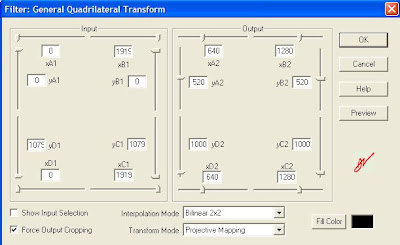
The last line being actually on a single line with all the ++ etc. The outro also had some gymnastics because of an extra line of audio I wanted added. This was before the Virtualdub quadrilateral transformation:
video=Trim(DirectShowSource("VTS_01_2.VOB"),750,4690)
blank=BlankClip(video,length=750, color=$000000)
blankaudio=DirectShowSource("30sec_48k.wav")
video_pre=AudioDub(blank, blankaudio)
video_pre ++ video
Finally, all the three - intro, outro and the show itself - were put in a KMPlayer playlist, a .KPL file.

1000 - 520 = 480 and so on.
Except for simple FadeOut and Trim commands, the intro video was relatively straightforward. The show video itself had some extras, including a subtitle call for adding the Indian voices to the credits. The file was as below:
video=DirectShowSource("TSPOG_2k_w.avi")
audio=WavSource("TSPOG_IN_stereo.wav")
mix=AudioDub(video,audio)
Trim(mix,0, 3085)
++ subtitle(Trim(mix,39024,40504), "Indian voices: K, A, V", -1, 1000, align=2, 651, 699)
++ FadeOut(Trim(mix,3116, 37816),60)
The last line being actually on a single line with all the ++ etc. The outro also had some gymnastics because of an extra line of audio I wanted added. This was before the Virtualdub quadrilateral transformation:
video=Trim(DirectShowSource("VTS_01_2.VOB"),750,4690)
blank=BlankClip(video,length=750, color=$000000)
blankaudio=DirectShowSource("30sec_48k.wav")
video_pre=AudioDub(blank, blankaudio)
video_pre ++ video
Finally, all the three - intro, outro and the show itself - were put in a KMPlayer playlist, a .KPL file.
Friday, March 18, 2011
MediaWarp3D evaluation
Tried out MediaWarp3D - had been in touch with one of the guys involved in developing it. Priced at $995. On my machine - Athlon X2 Dual core at 1.9 GHz, 2.75 GB RAM, nVidia GeForce 9100 M G - only one of the two windows could be running for a full fps Real-Time Warping. If both windows were open, drops to 15 fps or so. Has options for 3D, but since I neither have the hardware nor the content, couldn't test the 3D part. A screenshot is here.
rate of sending emails
This morning, there was a gateway mixup - the SMTP firewall rule was pointing to a disabled gateway, so the emails did not go through. After I changed it, checking the number of mails pending with sudo qshape incoming active deferred found that the mails were going at the rate of approximately 20,000 per hour. Of course, services like yahoo which had rate limiting would queer the pitch, but otherwise this was the rate for a 1 Mbps line, I believe.
Wednesday, March 16, 2011
bat file to start IMs
Going offline in three chat apps and coming back online later was a bit of a pain. So, exiting them instead, and made a bat file to start all three of them at once. But for running Windows apps in a BAT file, and to continue execution (similar to putting a task in the background on *nix) the syntax is:
START C:\Progra~1\PATH\TO\FILE\IN\DOS\STYLE\file.exe
START C:\Progra~1\PATH\TO\FILE\IN\DOS\STYLE\file.exe
migrating mail from GMail to Google Apps and so on
While discussing the sssihl migration, where they have an edu GApps account and hence can use GApps IMAP migration tool, S mentioned that some other institutions like MedTrust had similar requirements. But they're using the Standard (Free) Edition.
For just a single account to another account, the migration would be possible, though slow, by just adding both accounts as IMAP accounts on a desktop client like thunderbird, making sure that emails are retrieved completely and not only headers, and dragging and dropping from one account to the other, as given in this discussion.
In the link above, the popular answer is the way it's being done with the IMAP migration tool on the Edu version. But the lifehacker link just below that gives this other method.
For just a single account to another account, the migration would be possible, though slow, by just adding both accounts as IMAP accounts on a desktop client like thunderbird, making sure that emails are retrieved completely and not only headers, and dragging and dropping from one account to the other, as given in this discussion.
In the link above, the popular answer is the way it's being done with the IMAP migration tool on the Edu version. But the lifehacker link just below that gives this other method.
Tuesday, March 15, 2011
transferring files to a Nokia phone
N wanted me to transfer some mp3s to a Nokia music phone. First try with the data card directly inserted into the card reader did not work - probably because the card reader can't read high density SD cards or something like that. Then tried by connecting the phone via usb and using Nokia Phone browser. That opened up Windows Media Player, and asked it to transfer files. But when we attempted to transfer, it would say "An error occurred". Finally got the job done by transferring to my SD card, then transferring from my phone to the Nokia via bluetooth. One future possibility is attempting through Nokia PC suite.
Thursday, March 10, 2011
phplist attachment size limit
There were issues with the shared internet connection being swamped by the Sai Inspires emails, especially when they were sent late. P wanted me to set an attachment size limit in phplist, so that the email attachment would be 20 kB instead of 100 kB as was done recently. Went through the docs, did not find any such parameter in phplist except setting file upload limit for php itself, as given at this post.
Since the upload_max_filesize attribute is of php itself, not of phplist, I was afraid of breaking things if I set it in php.ini, so did not do so. Instead, the current solution is to not embed images at all inline, and to just link them instead as in Sai Spiritual Showers. A link to the online version makes it easier for the 'linked image challenged' email clients.
Since the upload_max_filesize attribute is of php itself, not of phplist, I was afraid of breaking things if I set it in php.ini, so did not do so. Instead, the current solution is to not embed images at all inline, and to just link them instead as in Sai Spiritual Showers. A link to the online version makes it easier for the 'linked image challenged' email clients.
changing virtual postfix hosts and testing SMTP with telnet
As given in my earlier post, the only change required was to change the line
virtual_alias_domains = whateverdomain.com
in /etc/postfix/main.cf and accordingly make changes in /etc/postfix/virtual running
sudo postfix reload
sudo postmap virtual
afterwards. Actually I ran the postfix reload after the postmap also, just to be sure. For testing, using telnet as given in this technet article, telnet on port 25 to our machine failed from dreamhost. Tried restarting the network, firewall box, etc, but probably dreamhost has blocked port 25 for spam-blocking. Restarting network was
sudo /etc/init.d/networking restart
by the way. Finally tried it from our colinux machine, there it was working fine.
telnet our.mail.server.radiosai.org 25
Trying 111.111.111.111...
Connected to our.mail.server.radiosai.org.
Escape character is '^]'.
220 our.mail.server.radiosai.org ESMTP Postfix
MAIL FROM:whatever@yahoo.co.in
250 2.1.0 Ok
RCPT TO:whoever@whatever.in
250 2.1.5 Ok
DATA
354 End data with.
Subject:2nd test
One more test email.
.
250 2.0.0 Ok: queued as 491ID14E8EC
^]
telnet> quit
virtual_alias_domains = whateverdomain.com
in /etc/postfix/main.cf and accordingly make changes in /etc/postfix/virtual running
sudo postfix reload
sudo postmap virtual
afterwards. Actually I ran the postfix reload after the postmap also, just to be sure. For testing, using telnet as given in this technet article, telnet on port 25 to our machine failed from dreamhost. Tried restarting the network, firewall box, etc, but probably dreamhost has blocked port 25 for spam-blocking. Restarting network was
sudo /etc/init.d/networking restart
by the way. Finally tried it from our colinux machine, there it was working fine.
telnet our.mail.server.radiosai.org 25
Trying 111.111.111.111...
Connected to our.mail.server.radiosai.org.
Escape character is '^]'.
220 our.mail.server.radiosai.org ESMTP Postfix
MAIL FROM:whatever@yahoo.co.in
250 2.1.0 Ok
RCPT TO:whoever@whatever.in
250 2.1.5 Ok
DATA
354 End data with
Subject:2nd test
One more test email.
.
250 2.0.0 Ok: queued as 491ID14E8EC
^]
telnet> quit
Wednesday, March 09, 2011
backing up phone contacts
I've not tried them myself, but A at the Studio said these were good:
1. Google Sync for your phone
2. www.mobical.net
(this one seems to have moved to
https://www.everdroid.com/
)
1. Google Sync for your phone
2. www.mobical.net
(this one seems to have moved to
https://www.everdroid.com/
)
deleting a gateway in Cyberoam
Our ISP changed, and suddenly I had to delete a gateway on the Cyberoam which was no longer active. With the gateway still existing, the device was unstable and not allowing incoming connections. First took a backup as P advised, System -> Manage Data -> Backup Data. Then, going directly to System -> Gateway -> Manage Gateways and trying to delete it gave the error message
So I went to Firewall -> Manage Firewall and removed all the firewall rules relating to virtual hosts which mentioned that gateway. Still no dice. Then removed those virtual hosts too. Still no. Then removed the relevant host names from Firewall -> Host -> Manage. Still no. Then, during a support chat with Tech support, thought about other firewall rules, outgoing rules for eg. Lan to Wan and so on. Went through those, in a couple of them the old gateway was the Primary. Modified the rules suitably, then the gateway could be deleted.
Gateway used for pool(s) or Acting as Effective Gatway or assigned to firewall(sic)
rule cannot be deleted
So I went to Firewall -> Manage Firewall and removed all the firewall rules relating to virtual hosts which mentioned that gateway. Still no dice. Then removed those virtual hosts too. Still no. Then removed the relevant host names from Firewall -> Host -> Manage. Still no. Then, during a support chat with Tech support, thought about other firewall rules, outgoing rules for eg. Lan to Wan and so on. Went through those, in a couple of them the old gateway was the Primary. Modified the rules suitably, then the gateway could be deleted.
Friday, March 04, 2011
ip address change and cyberoam changes needed
After getting a new IP address and a new ISP, did the following changes to cyberoam.
1. Delete firewall rules using the relevant virtual host(s) which reference the old ISP ip addresses etc. For this, you have to go through all the firewall rules - even things like DMZ-DMZ etc.
2. Delete the relevant virtual host.
3. Create the corrected virtual host - basically only the External ip address changes.
4. Make the firewall rules again! Here, things like DMZ-DMZ rules are made automatically, when the WAN-DMZ rules are made.
5. Modify host group (if any) to add the new ips. We had the group of machines which were allowed to ssh. For this, first create a relevant host name, and add it to the group while creating it.
All these changes took around half an hour.
Later I had to change the ip addresses pointing to the web server and so on.
Edit: After 24 hours, learnt from experience :( that I should have updated the spf txt dns records before-hand! All gmail emails went to spam. Anyway, I have done so now...
1. Delete firewall rules using the relevant virtual host(s) which reference the old ISP ip addresses etc. For this, you have to go through all the firewall rules - even things like DMZ-DMZ etc.
2. Delete the relevant virtual host.
3. Create the corrected virtual host - basically only the External ip address changes.
4. Make the firewall rules again! Here, things like DMZ-DMZ rules are made automatically, when the WAN-DMZ rules are made.
5. Modify host group (if any) to add the new ips. We had the group of machines which were allowed to ssh. For this, first create a relevant host name, and add it to the group while creating it.
All these changes took around half an hour.
Later I had to change the ip addresses pointing to the web server and so on.
Edit: After 24 hours, learnt from experience :( that I should have updated the spf txt dns records before-hand! All gmail emails went to spam. Anyway, I have done so now...
Tuesday, February 22, 2011
sql injection
Tried out HackBar for firefox to check for SQL injection on our sites. Basically followed this article's walkthrough. Lots of useful links at this stackoverflow post, in the comments. Especially the Oracle tutorial.
Sunday, February 20, 2011
Reviving a Transcend 256 MB pen drive
S wanted me to try and revive a 256 MB Transcend USB flash memory pen-drive. Plugging into an Ubuntu machine and checking fdisk -l showed it was formatted as FAT16. Probably there was also some corruption since he reported pulling it out while Puppy was formatting and/or partitioning it! Anyway, a quick mkfs -t vfat /dev/sdc1 did the trick, working fine now.
Friday, February 11, 2011
adding a mail relay
Re-created a virtual mail server relaying mail to alias addresses on our current server just like in my previous posts
http://hnsws.blogspot.com/2006/03/finishing-postfix-configuration.html
http://hnsws.blogspot.com/2006/03/using-krishna-to-forward-mails-to.html
Just had to do postmap /etc/postfix/virtual after the cf file etc update. This new machine did not start refusing emails for krishna.radiosai.org after adding the virtual domain. Added appropriate firewall rules to the gateway, of course. Just a note: in /etc/postfix/main.cf,
mynetworks = 127.0.0.0/8
does not need to be changed. Changing this is only required if you want the postfix to relay mail (without auth, for third-party domains - an open relay!) from some other ip address also.
http://hnsws.blogspot.com/2006/03/finishing-postfix-configuration.html
http://hnsws.blogspot.com/2006/03/using-krishna-to-forward-mails-to.html
Just had to do postmap /etc/postfix/virtual after the cf file etc update. This new machine did not start refusing emails for krishna.radiosai.org after adding the virtual domain. Added appropriate firewall rules to the gateway, of course. Just a note: in /etc/postfix/main.cf,
mynetworks = 127.0.0.0/8
does not need to be changed. Changing this is only required if you want the postfix to relay mail (without auth, for third-party domains - an open relay!) from some other ip address also.
Saturday, February 05, 2011
winamp not playing wav files - resolved
For many months, my WinAmp installation was not playing wav files, but was playing mp3 files. Today I finally worked out that the in_wave.dll was missing. And the reason was given in this post - I had installed Winamp Lite at one point of time, and that does not have wav support. Installed WinAmp full now - Lite is no longer available - and now it plays wav files without problems.
Friday, February 04, 2011
problems with Nokia Internet Radio on E63
B had a problem with his Nokia E63 phone not allowing him to open the Internet radio app, and giving
playinit error =-5
on trying to play with s60 internet radio app which was installed later. Googling found that this was most probably due to a failed update. Suggested solution seems to be to hard-reset the phone.
playinit error =-5
on trying to play with s60 internet radio app which was installed later. Googling found that this was most probably due to a failed update. Suggested solution seems to be to hard-reset the phone.
Thursday, February 03, 2011
playlist in The KMplayer
Making a playlist in The KMplayer might be the solution to my issue of playing PAL clip followed by NTSC (or 30 fps HD) clip. To make KMplayer play the next file in the playlist automatically, I had to go into
Options -> Preferences -> General -> Repeat / Playlist -> Choose Play Next Album
under "When Finished (Album has been fully played)..."

Wednesday, February 02, 2011
niggling bugs with Kubuntu
Had installed Kubuntu Ubuntu 10.04.2 LTS as the dual boot on my work machine after the earlier install stopped booting. (Most probably that was due to the mbr file being deleted from c:, or becoming corrupted.) This installation also runs from a loopback device, a file on the Windows filesystem, like my earlier install.
Anyway, came across some niggling bugs. One persistent one was the error message E:Unable to correct problems, you have held broken packages.

This would pop up every time I clicked OK for Amarok to install "extra multimedia functionality" as this dialog box says.

Doing a mouse-over reveals the correct package name. Installing everything else worked fine except for Flash. The package was flashplugin-installer
Googling found this thread, and as suggested, doing
sudo apt-get update
sudo apt-get install flashplugin-installer
seems to have done the trick.
Anyway, came across some niggling bugs. One persistent one was the error message E:Unable to correct problems, you have held broken packages.

This would pop up every time I clicked OK for Amarok to install "extra multimedia functionality" as this dialog box says.

Doing a mouse-over reveals the correct package name. Installing everything else worked fine except for Flash. The package was flashplugin-installer
Googling found this thread, and as suggested, doing

sudo apt-get update
sudo apt-get install flashplugin-installer
seems to have done the trick.
Monday, January 31, 2011
Testing our page loads and optimizing
K pointed out some excellent page-load speed resources for testing and optimizing:
http://googlepagespeed.com/
http://code.google.com/speed/page-speed/
http://modpagespeed.com/
And for testing, http://www.webpagetest.org/
As suggested by webpagetest.org , I have enabled compression on media.radiosai.org as given in this article: basically
cd c:\InetPub\AdminScripts
cscript adsutil.vbs set w3svc/filters/compression/parameters/HcDoStaticCompression true
cscript adsutil.vbs set W3Svc/Filters/Compression/GZip/HcFileExtensions "txt" "htm" "html" "js"
cscript adsutil.vbs set W3Svc/Filters/Compression/Deflate/HcFileExtensions "txt" "htm" "html" "js"
cscript adsutil.vbs set W3Svc/Filters/Compression/GZip/HcDynamicCompressionLevel 7
cscript adsutil.vbs set W3Svc/Filters/Compression/Deflate/HcDynamicCompressionLevel 7
cscript adsutil.vbs set W3Svc/Filters/Compression/GZip/HcOnDemandCompLevel 7
cscript adsutil.vbs set W3Svc/Filters/Compression/Deflate/HcOnDemandCompLevel 7
I have not enabled the compression for aspx and other dynamic files, I have not disabled for HTTP 1.0 or proxies as given in the last two lines: will do that if problems arise.
Also set in content expiration as 1 day from the IIS Manager. http://www.radiosai.org/ had some difficulty in setting compression, since it is a shared environment under Plesk. Did contact nettigritty team about it anyway.
http://googlepagespeed.com/
http://code.google.com/speed/page-speed/
http://modpagespeed.com/
And for testing, http://www.webpagetest.org/
As suggested by webpagetest.org , I have enabled compression on media.radiosai.org as given in this article: basically
cd c:\InetPub\AdminScripts
cscript adsutil.vbs set w3svc/filters/compression/parameters/HcDoStaticCompression true
cscript adsutil.vbs set W3Svc/Filters/Compression/GZip/HcFileExtensions "txt" "htm" "html" "js"
cscript adsutil.vbs set W3Svc/Filters/Compression/Deflate/HcFileExtensions "txt" "htm" "html" "js"
cscript adsutil.vbs set W3Svc/Filters/Compression/GZip/HcDynamicCompressionLevel 7
cscript adsutil.vbs set W3Svc/Filters/Compression/Deflate/HcDynamicCompressionLevel 7
cscript adsutil.vbs set W3Svc/Filters/Compression/GZip/HcOnDemandCompLevel 7
cscript adsutil.vbs set W3Svc/Filters/Compression/Deflate/HcOnDemandCompLevel 7
I have not enabled the compression for aspx and other dynamic files, I have not disabled for HTTP 1.0 or proxies as given in the last two lines: will do that if problems arise.
Also set in content expiration as 1 day from the IIS Manager. http://www.radiosai.org/ had some difficulty in setting compression, since it is a shared environment under Plesk. Did contact nettigritty team about it anyway.
Thursday, January 27, 2011
ssh-add required for Ubuntu 8.04 after ssh-keygen
On the Macbuntu running Ubuntu 8.04, when I attempted to use ssh with RSA key-based authentication like in my old post, ssh returned an error
Agent admitted failure to sign using the key.
Permission denied (publickey).
Googling found this as the first match.
Verified that running
SSH_AUTH_SOCK=0 ssh myuser@myhost
works fine with key-based auth.
Then ran ssh-add as suggested in that thread. From then on, ssh works fine.
Agent admitted failure to sign using the key.
Permission denied (publickey).
Googling found this as the first match.
Verified that running
SSH_AUTH_SOCK=0 ssh myuser@myhost
works fine with key-based auth.
Then ran ssh-add as suggested in that thread. From then on, ssh works fine.
Wednesday, January 26, 2011
keeping Windows and Linux dual-boot times correct
In this old post I had mentioned how to do it with Mandrake 10. In Kubuntu 10, the file to be edited, as per this forum post, is /etc/default/rcS
and by default it is already set to UTC=no
and by default it is already set to UTC=no
Saturday, January 15, 2011
downmixing to stereo
According to these posts on Hydrogenaudio forums, for downmixing 5.1 to stereo I should go with either
Lo = 1.0 * L + 0.7071 * C + 1.0 * Ls;
Ro = 1.0 * R + 0.7071 * C + 1.0 * Rs;
or
Lo = 1.0 * L + 0.5 * C + 1.0 * Ls;
Ro = 1.0 * R + 0.5 * C + 1.0 * Rs;
But I suppose in my case the C will have to be more since I want the commentary to be a bit louder.
Lo = 1.0 * L + 0.7071 * C + 1.0 * Ls;
Ro = 1.0 * R + 0.7071 * C + 1.0 * Rs;
or
Lo = 1.0 * L + 0.5 * C + 1.0 * Ls;
Ro = 1.0 * R + 0.5 * C + 1.0 * Rs;
But I suppose in my case the C will have to be more since I want the commentary to be a bit louder.
Tuesday, January 11, 2011
direct links to listen to specific radio programs
Explored ways to give direct links to radio programs like the hidden form + javascript like the technique mentioned at this stackoverflow form post. Basically of the type

but all in one line. Tried making a tinyurl link out of the javascript. It works with preview.tinyurl.com, but not with the direct tinyurl link. Other url shorteners like bit.ly did not work with javascript at all. So finally decided on html forms with javascript to auto-submit.

but all in one line. Tried making a tinyurl link out of the javascript. It works with preview.tinyurl.com, but not with the direct tinyurl link. Other url shorteners like bit.ly did not work with javascript at all. So finally decided on html forms with javascript to auto-submit.
Tuesday, January 04, 2011
updates on twitter
Started populating the twitter feed by 31 Dec using FutureTweets.com so that a twitter update box could be added to the schedule page by 2 Jan. Maybe it will be added to the home page later. Takes around 10 minutes a day or less to update. The thing to get the hang of is: which timezone to report in the tweet. For AsiaStream programs, IST is the easy choice. Other programs need some thinking.
Earlier, I'd envisaged making some sort of automated twitter posting with code similar to this blog post using php - but the coding is pending with P, and for me spending 5 minutes daily tweeting is easier.
Earlier, I'd envisaged making some sort of automated twitter posting with code similar to this blog post using php - but the coding is pending with P, and for me spending 5 minutes daily tweeting is easier.
Wednesday, December 29, 2010
printing to a receipt printer from OpenBravo POS
P had installed a new POS system on a Win7 Lenovo netbook and was having trouble printing to the USB receipt printer. It was printing, but leaving a lot of blank space at the top before printing and cutting the receipt. Finally fixed it by going to the printer properties, and in the paper settings, choosing 'Conserve paper' 'Top and Bottom'. The font is also different from the one seen in his other POS, which runs Linux. Probably because the Linux machine is printing to a driver similar to Generic Text. Trying Generic Text driver on the Win7 box gave the "correct" font, but the layout was awry. Probably an issue with paper settings for that driver, too. Anyway, since the smaller font is OK, he'll probably go with the Epson driver.
Edit: P adds:
Finally was able to get this work with correct font size.
Suggestion from this forum post.
Solution:
Epsons POS website had the latest virtual COM port software which works for Windows 7: TM Virtual Port Driver Ver.5.00aE . Assigned the printer to COM1 through the software and changed the openbravo pos settings to Printer: epson -> Serial -> COM1
Edit: P adds:
Finally was able to get this work with correct font size.
Suggestion from this forum post.
Solution:
Epsons POS website had the latest virtual COM port software which works for Windows 7: TM Virtual Port Driver Ver.5.00aE . Assigned the printer to COM1 through the software and changed the openbravo pos settings to Printer: epson -> Serial -> COM1
Tuesday, December 28, 2010
set mime types in Plesk
Noticed that after the server migration, the pls and asx files were no longer being served from www.radiosai.org - so went into the Plesk control panel,
radiosai.org -> Virtual Directories -> Mime types tab and added
asx - video/x-ms-asf
pls - audio/x-scpls
radiosai.org -> Virtual Directories -> Mime types tab and added
asx - video/x-ms-asf
pls - audio/x-scpls
upgrading ActiveSync and more
A brought a Toshiba Portege for me/A. When I attempted to sync it, it wanted me to upgrade to ActiveSync 4.5 from 4.2. After doing that, syncing from the old phone no longer does Contacts Sync - it says install Outlook for that functionality. So, for now, using ActiveSync merely as a connection mechanism to manually transfer files. Initially internet connectivity using ActiveSync did not work. Then changed the Connection settings on the desktop, "This computer is connected to:", changing the dropdown to The Internet

Also, as this post points out, changed the Remote NDIS host setting on the mobile so that the "Unable to obtain IP address" error stops popping up.

Also, as this post points out, changed the Remote NDIS host setting on the mobile so that the "Unable to obtain IP address" error stops popping up.
Wednesday, December 08, 2010
gmail pop3 captcha
Found an issue with pop3 not working on our automated bounce processing - fetchmail could not fetch mail from gmail and gapps accounts. At first I thought it was the problem with the issue reported here, and that I had to go to http://www.google.com/accounts/DisplayUnlockCaptcha
Did all that, but actual problem was a change in password from sssbpt.org. Fixed that, and everything started working again.
Did all that, but actual problem was a change in password from sssbpt.org. Fixed that, and everything started working again.
Tuesday, December 07, 2010
cyberoam failover tweak
By default, cyberoam failover rules checks pings to the default gateway and fails-over if the pings fail. But in our case, the default gateway itself is ususally fine, it is the link to Bangalore which fails. So, it needs to ping the Bangalore end of the link and if that fails, failover. Changed the rule accordingly in cyberoam, works well now.
Monday, December 06, 2010
upload through cyberoam - problem solved
In a previous post, I'd mentioned that the Studio people have problems uploading stuff - ftp / yousendit / vimeo et al. Found a workaround - disable virus / spam scanning in the firewall rules. You can, of course, do this for only the particular host you are uploading from.

That is, clear all the check-boxes in the last line in the image above.

That is, clear all the check-boxes in the last line in the image above.
Sunday, December 05, 2010
problems with kindle not connecting to wifi - solved with static ip address
K had some issues with his Kindle not connecting to his wireless router at home. He tried many things including changing the security settings to WPA and even to unencrypted. Still did not connect. Finally he put in a static ip address instead of getting the ip address from the router, and this worked like a charm. So, don't rely on the DHCP server running on routers for connecting mobile devices. I did not even try to connect my Windows mobile to Airport at home with DHCP, since even my Windows laptop had problems with the Airport's DHCP. Static IPs work with no problems.
K was initially turned off since a DNS server IP address is required. You can always give the google public dns ip address of 8.8.4.4 or 8.8.8.8 if your router itself does not do a good job of providing a stable dns server. OpenDNS is also available, 208.67.222.222 and 208.67.220.220
K was initially turned off since a DNS server IP address is required. You can always give the google public dns ip address of 8.8.4.4 or 8.8.8.8 if your router itself does not do a good job of providing a stable dns server. OpenDNS is also available, 208.67.222.222 and 208.67.220.220
Thursday, December 02, 2010
uploads problems with Cyberoam
The Studio people have problems uploading stuff - ftp / yousendit / vimeo - using the Cyberoam 50ia as the gateway. For all of last month, P was directly connecting a laptop to the gateway directly for uploads. So is there a solution with Cyberoam support, or do we have to make a workaround with another router etc?
Wednesday, December 01, 2010
thumbnail images for saicast
Ran a thumbnail factory this morning for saicast, generating 15 thumbnail images. On DG's guidance, this was my procedure.
Saved http://saicast.org/images/gangacanal.jpg on my system as saicast4x3.jpg
Opened it in Gimp and found the dimensions of the image alone excluding the frame to be 171 x 127
Then, opened the vimeo videos one by one, played them till a suitable frame, paused and hit printscreen, pasted into Gimp, cropped to a suitable 4x3 frame, resized to 171x127, pasted into the selection on saicast4x3.jpg and then exported as whatever.jpg.
Saved http://saicast.org/images/gangacanal.jpg on my system as saicast4x3.jpg

Opened it in Gimp and found the dimensions of the image alone excluding the frame to be 171 x 127
Then, opened the vimeo videos one by one, played them till a suitable frame, paused and hit printscreen, pasted into Gimp, cropped to a suitable 4x3 frame, resized to 171x127, pasted into the selection on saicast4x3.jpg and then exported as whatever.jpg.
Wednesday, November 24, 2010
live streaming with stock laptop
Used the daily-use machine for live streaming on 23 November, with just its built-in soundcard. Reaper was running as something for me to monitor the waveform and also as an archive copy of the stream. Srv ran the mix through his Yamaha mixer from Chennai and used the Alesis compressor from the Studio to give me a compressed mix. My nominal input level for 0 dB for -10 dBV signal was as shown.

I rode the rec-level fader since Srv was monitoring before the compressor. Maybe next time a better choice of compressor settings can avoid my having to ride the faders. Anyway, output level was respectable, near -12 dB RMS, after the first few minutes when I was not riding the faders close enough and the compressor was not set on the output.

I rode the rec-level fader since Srv was monitoring before the compressor. Maybe next time a better choice of compressor settings can avoid my having to ride the faders. Anyway, output level was respectable, near -12 dB RMS, after the first few minutes when I was not riding the faders close enough and the compressor was not set on the output.
Saturday, November 20, 2010
direct download to kindle
Playing around with the Kindle got for A - Latest Generation Wifi. Can download directly to the kindle by browsing gutenberg.org. But can't load to the kindle from email attachments. I think it's because the kindle's experimental browser does not support redirects and most webmail services have a redirect for attachments. Pointing the kindle to the direct link after deciphering the redirect's URL encoding, it loads the content with no issues. This works with the content emailed by yourkindlename@free.kindle.com too.
Sunday, November 14, 2010
smtp timeout errors
After introducing the Cyberoam 50ia as the gateway at the studio, there were some teething troubles. When one of the two redundant links went down, the device would refuse incoming connections on the other link also. The management services would then have to be restarted from the console. Also, occasionally krishna had some smtp timeout issues even after the links were up. These were solved by restarting krishna.
Friday, November 12, 2010
qshape for checking postfix queue
One of the tools for checking the sending of our emails - qshape.
Some results from 5 days back when the problem was first detected:
sudo qshape -s incoming active deferred
shows
Some results from 5 days back when the problem was first detected:
sudo qshape -s incoming active deferred
shows
T 5 10 20 40 80 160 320 640 1280 1280+Out of these mails, most of them were yahoo.
TOTAL 33626 0 0 0 0 0 0 0 4 9645 23977
radiosai.org 32886 0 0 0 0 0 0 0 4 9645 23237
sssbpt.org 740 0 0 0 0 0 0 0 0 0 740
sudo qshape incoming active deferred
T 5 10 20 40 80 160 320 640 1280 1280+
TOTAL 33623 0 0 0 0 0 0 0 4 9645 23974
yahoo.com 24602 0 0 0 0 0 0 0 3 6365 18234
yahoo.co.in 7809 0 0 0 0 0 0 0 1 2903 4905
airtelbroadband.in 154 0 0 0 0 0 0 0 0 30 124
yahoo.in 127 0 0 0 0 0 0 0 0 72 55
spml.co.in 82 0 0 0 0 0 0 0 0 20 62
lycos.com 67 0 0 0 0 0 0 0 0 13 54
....  snip  .....
Wednesday, November 10, 2010
bug - some files not imported into database
When there is a file with the same download file name (spaces replaced by underscores) being imported, the import script silently fails. The workaround would be to change the download filename of the old file in the database and then do the import.
importing files to downloads without playing them
1. Create playlists for the required files. Don't forget Signature tune. Choose a date in 1985 or something like that.
2. Enter suitable date in /home/sgh/scripts/playlist_import_hardcoded_date.sh
3. Then we can run playlist_import_hardcoded_date.sh to get the csv to the radiosai.org database
4. Then go to http://localhost/mkcsv/csv.php?date=01&month=01&year=1985 (or whatever date) to upload csv
6. Then go to radiosai.org and import the csv of the correct date.
2. Enter suitable date in /home/sgh/scripts/playlist_import_hardcoded_date.sh
3. Then we can run playlist_import_hardcoded_date.sh to get the csv to the radiosai.org database
4. Then go to http://localhost/mkcsv/csv.php?date=01&month=01&year=1985 (or whatever date) to upload csv
6. Then go to radiosai.org and import the csv of the correct date.
bounce processing for yahoo and new ip address
Found a lot of delays from yahoo mail servers, deferred connections and so on. At first I thought it was just due to the new ip address - found that it was listed in Spamhaus, and sent in a request for removal from Spamhaus.
Contacted yahoo using their bulk mail contact form. Their reply said
Digging deeper, this is what I replied to yahoo:
For getting the bounces to the right place, I just had to create a noreply user, and put the following lines in a file /home/noreply/.procmailrc
MAILDIR=/var/spool/mail/noreply #The location of mail directory
:0
! our.bounces.email.id@gmail.com
After I sent the email to yahoo, they replied, saying in part,
My reply to that was:
In addition, I have now put
smtp_defer_if_no_mx_address_found = yes
in the /etc/postfix/main.cf - Default was to bounce mail if MX record not found, i.e. if DNS fails. Now changed to wait and retry for upto 5 days or whatever message age time is set.
Contacted yahoo using their bulk mail contact form. Their reply said
After looking into the issue, it appears that your emails may have become de-prioritized due to a number of potential issues with your mailings. Please visit the following URL for information on improving list maintenance:The last point was about too many non-existent email addresses - and found lots of such errors in mail.log
http://help.yahoo.com/l/us/yahoo/mail/postmaster/errors/postmaster-23.html
http://help.yahoo.com/l/us/yahoo/mail/postmaster/basics/basics-55.html
http://help.yahoo.com/l/us/yahoo/mail/postmaster/errors/421-ts03.html
Digging deeper, this is what I replied to yahoo:
Going through your checklist, and checking out our bounce processing, found that the bounces from yahoo were not being processed! The reason being that yahoo mail servers don't send the bounce messages, our mailer daemon has to send the bounce message, and this was not being sent to user noreply - user did not exist! This meant that more than 100 - 200 bad yahoo accounts have been sent mail from our server for the past several months! We're weeding out the bad ids - done some manually, rest will be processed by the bounce processing mechanism of phplist over the next week.Actually there were around 400 bad mails of yahoo domains and a few from other domains. Unsubscribed the yahoo ones manually by digging through the bounces one by one using the gmail interface. The others will be caught by the bounce processing in due course.
For getting the bounces to the right place, I just had to create a noreply user, and put the following lines in a file /home/noreply/.procmailrc
MAILDIR=/var/spool/mail/noreply #The location of mail directory
:0
! our.bounces.email.id@gmail.com
After I sent the email to yahoo, they replied, saying in part,
Yahoo! Mail accepts a maximum of 20 messages per SMTP connection. We encourage you to cap the number of messages you send to Yahoo! Mail to fall within this per-connection limit.
My reply to that was:
We're running postfix > 2.3 which does not have a direct way to limit number of mails sent per connection.
http://www.postfix.org/CONNECTION_CACHE_README.html#limitations
Hopefully our server will reconnect OK with yahoo servers on dropping connections - our logs don't show any problems with that. We're still in the process of weeding out bad addresses. Once we finish that, hopefully, we won't irritate the yahoo MX servers as much!
In addition, I have now put
smtp_defer_if_no_mx_address_found = yes
in the /etc/postfix/main.cf - Default was to bounce mail if MX record not found, i.e. if DNS fails. Now changed to wait and retry for upto 5 days or whatever message age time is set.
Friday, November 05, 2010
download link from vimeo
Initially there was a requirement that we make the videos of MoL downloadable. P and I checked out various ways to do it from vimeo itself, since uploading duplicate copies to dl.radiosai.org would be not only tedious, but also tough on the server! Guided by this shell script, where he uses curl or wget to retrieve
http://www.vimeo.com/moogaloop/play/clip:${VIMEO_ID}/${REQUEST_SIGNATURE}/${REQUEST_SIGNATURE_EXPIRES}/?q=sd" > ${VIMEO_ID}.flv
where he gets REQUEST_SIGNATURE and REQUEST_SIGNATURE_EXPIRES from P made a very elegant PHP5 script based on
VIDEO_XML=`${GET_CMD} http://www.vimeo.com/moogaloop/load/clip:${VIMEO_ID}`
REQUEST_SIGNATURE=`echo $VIDEO_XML  sed -e 's/^.*\([^<]*\)<.*$/\1/g'`
REQUEST_SIGNATURE_EXPIRES=`echo $VIDEO_XML  sed -e 's/^.*\([^<]*\)<.*$/\1/g'`
$xml = simplexml_load_file("http://www.vimeo.com/moogaloop/load/clip:$id");
$request_signature = $xml->request_signature;
$request_signature_expires = $xml->request_signature_expires;
$downloadurl = "http://www.vimeo.com/moogaloop/play/clip:$id/$request_signature/$request_signature_expires/?q=sd";
Unfortunately our server did not have PHP5, and PHP4.x did not have the simplexml functions. So I modified it to use curl using the code example from this page and using the value_in() example from this page.$xml = get_html("http://www.vimeo.com/moogaloop/load/clip:$id");
$request_signature = value_in("request_signature", $xml) ;
$request_signature_expires = value_in("request_signature_expires", $xml) ;
$downloadurl = "http://www.vimeo.com/moogaloop/play/clip:$id/$request_signature/$request_signature_expires/?q=sd";
echo "<p align = \"center\">";
echo "<a href=\"";
echo $downloadurl;
echo "\">Right-click here and choose 'Save Link As...' or 'Save Target As...'</a>";Attempls to avoid the 'right-click instruction' did not work, since the vimeo server sends the video as mp4 without a Content-Disposition attachment header, and redirects don't conserve headers. Finally, of course, the script was not used due to non-technical reasons....
Saturday, October 30, 2010
setting a web page to expire on IIS
This is useful for pages which are frequently updated. If this is not done, visitors complain that old content is seen on the page; we need to keep telling them to refresh the page.
Instead, do as shown in the screenshot below.

Instead, do as shown in the screenshot below.

Thursday, October 28, 2010
cyberoam configuration
Sat with P configuring the Cyberoam CR50i for quite a few hours - 1-4 on two afternoons and 8-11 last night.
Actually info on what we needed to do was there in the knowledge base, what we were doing wrong was
(a) using the hardware ports to create sources for port forwarding while creating virtual hosts, and
(b) not creating simple Accept firewall rules with the virtual hosts as the destination.
So, first go to Firewall -> Virtual Hosts and create as required:

Then the firewall rules to allow connections.

We had to make a similar rule for Wan also, of course.

One more thing which we needed to do was to disable the Web console of cyberoam from WAN. This was found in the User Manual, blandly located in Firewall -> Local ACL

Wednesday, October 27, 2010
the fickleness of printers
While printing to the USB attached printer, I plugged in an external hard disk to another USB port. And the printer stopped mid-job! And wouldn't resume! Had to restart the computer and the printer to continue printing. So, moral of the story - don't do anything to tick off printers!
Friday, October 15, 2010
8 hours recording time with the Transcend MP330
More on recording with the Transcend MP330 - I didn't charge it yesterday, so that I could check out the recording time on one charge. From 13th evening, more than 8 hours recording time over 40 hours. That's good going.
Recording with the built-in mic is almost useless, though. Even the priests chanting more than 5 metres away makes it saturated.
Recording with the built-in mic is almost useless, though. Even the priests chanting more than 5 metres away makes it saturated.
making chages to Daylight Saving Time dates
The dates when Daylight Saving Time starts or ends for various countries varies from year to year, and periodically we have to update our schedule page's database. Earlier, I was doing it manually one by one, changing something like 30+ records. This was both painful and error-prone. This time, I made some SQL queries to make it relatively painless. I've saved them locally as zonestoupdate.txt - queries along the lines of
UPDATE `radiosai_zone_master` SET `dstEndDay` = '31' WHERE `dstEndDay` =25 AND `dstEndMonth` =10
for countries in Europe etc.
UPDATE `radiosai_zone_master` SET `dstEndDay` = '31' WHERE `dstEndDay` =25 AND `dstEndMonth` =10
for countries in Europe etc.
Tuesday, October 12, 2010
recording with the Transcend MP330
I'm using the Transcend MP 330 for recordings in PC, using it's line-in with a Tascam US-144 as a pre-amp. For powering the US-144 - it needs 500 mA through USB cable - I used the old Tangerine iBook.
The first session had the level set too high - all the way up on the US-144's line-out control. For the second session onwards, set the line-out to 50% - that seems to be the sweet spot. This particular US-144 seems to have something wrong with the right line-out (or maybe the right input) with a continuous hum/hiss. But not too bad - when the input is turned down to 50%, the S/N is good enough so that the hum/hiss is drowned in ambient noise.
The first session had the level set too high - all the way up on the US-144's line-out control. For the second session onwards, set the line-out to 50% - that seems to be the sweet spot. This particular US-144 seems to have something wrong with the right line-out (or maybe the right input) with a continuous hum/hiss. But not too bad - when the input is turned down to 50%, the S/N is good enough so that the hum/hiss is drowned in ambient noise.
Monday, October 04, 2010
running 1920x1080 on saispace2
As noted in my last post, I tried out a GeForce 6200 card borrowed from P. It had a DVI out, so I tried connecting it to the monitor with a DVI to VGA adapter. Maybe because the output was DVI-D and not DVI-A the monitor did not show any display. No DVI cable to test direct DVI connection, either. And no display from the integrated AGP, since the AGP card in the slot probably overrides the integrated graphics.
Then, tried seeing the tech specs of the integrated Intel 865 graphics. Apparently it supports upto 2048x1536. Various forum posts say that with Linux drivers, people have used 1920x0180, and recommend Windows users to update the driver. Accordingly updated the driver to version 14.17, released in 2007. Now when I disabled "Hide modes that this monitor cannot display" and chose to list all modes, 1920x1080 was listed! Directly viewing it on the LG Studioworks 221U 21 inch monitor showed the desktop as spanning more than the viewable area, with the mouse making the screen pan when taken out of left or right end of the screen. The 1080p video played without any stuttering, and the Optoma EP 1080 projector displays it just fine. And when the VGA out of the Optoma is connected to the LG monitor, it displays the whole screen, with a mode of 67.5 kHz vert. 60 Hz horiz. Since the Samsung Syncmaster 753 Dfx with the touchscreen upstairs is supposed to support 30-70 kHz, maybe it will even work with the touchscreen.
Then, tried seeing the tech specs of the integrated Intel 865 graphics. Apparently it supports upto 2048x1536. Various forum posts say that with Linux drivers, people have used 1920x0180, and recommend Windows users to update the driver. Accordingly updated the driver to version 14.17, released in 2007. Now when I disabled "Hide modes that this monitor cannot display" and chose to list all modes, 1920x1080 was listed! Directly viewing it on the LG Studioworks 221U 21 inch monitor showed the desktop as spanning more than the viewable area, with the mouse making the screen pan when taken out of left or right end of the screen. The 1080p video played without any stuttering, and the Optoma EP 1080 projector displays it just fine. And when the VGA out of the Optoma is connected to the LG monitor, it displays the whole screen, with a mode of 67.5 kHz vert. 60 Hz horiz. Since the Samsung Syncmaster 753 Dfx with the touchscreen upstairs is supposed to support 30-70 kHz, maybe it will even work with the touchscreen.
Sunday, October 03, 2010
trying to run 1920x1080 with the Matrox card
In order to play the MirrorDome videos, I need a computer. The tests were done with my laptop, which could comfortably play 1920x1080 at native resolution, since it has nVidia graphics - GeForce 9100M G. Trying to run on saispace2 was altogether different. It has a 2.7 GHz P4 processor, so it should be capable of playing 1080p. But the integrated Intel graphics can only go up to 1600x1200, though it plays the video fine. With the Matrox G400, the driver in WinXP doesn't seem to be accelerated. (Also, 1920x1440 is available, but not 1920x1080, even when "List all modes" is enabled.) So, the video plays at something like 1 fps! Tested the mga driver using puppy linux 5.11 - that too doesn't play the video. Now probably I will test with a graphics card "borrowed" from P.
Meanwhile, the network card stopped working on saispace2 - the device was just not seen on device manager, and was not seen in Linux either. Maybe due to inserting it without unplugging the power from the cabinet. Swapped it out for another DLink DFE 538 TX card, same problem. Then tried an old 10 Mbps card, NEC compatible - that one is working.
Meanwhile, the network card stopped working on saispace2 - the device was just not seen on device manager, and was not seen in Linux either. Maybe due to inserting it without unplugging the power from the cabinet. Swapped it out for another DLink DFE 538 TX card, same problem. Then tried an old 10 Mbps card, NEC compatible - that one is working.
Tuesday, September 28, 2010
printing to USB printer using Command prompt
Found that the way to use the command prompt to print to a USB printer is by sharing it and using the net use command to map it to a printer port. But then, when I did
net use lpt3: \\mymachine\shared_name /persistent:yes
it gave me the error message
The local device name has a remembered connection to another network resource.
I tried restarting the machine, but the error still remained. So I just mapped my USB printer to lpt3 instead of trying to fight with Windows.
net use lpt3: \\mymachine\shared_name /persistent:yes
it gave me the error message
The local device name has a remembered connection to another network resource.
I tried restarting the machine, but the error still remained. So I just mapped my USB printer to lpt3 instead of trying to fight with Windows.
Sunday, September 26, 2010
printing to centronics printer from USB
All these days, I was printing to the MSP 345 24-pin Epson compatible printer from my laptop over the network, since the laptop did not have a parallel port. Today I tried out a USB-36-pin Centronics cable, so that I can directly print from the laptop which has only USB ports to the parallel port only printer without having to switch on another machine. Installing drivers had to be done manually, and at the point in the Wizard where Windows asks you for the port, you have to choose USB001 (Virtual Printer Port for USB) as given at this page. Then everything works fine.


Tuesday, September 21, 2010
video encoding for viewing on mobile
With the 1 GB storage card, viewing long videos on the Qtek 9100 is now a possibility. It plays low bitrate files just fine, but hiccups for higher res. files since the processor is not powerful. Resizing to 320 x 240, XviD codec at 100 kbps video and mp3 codec at 24 kbps mono for audio looks quite OK. File size at this bitrate is around 1 MB per minute. Can use virtualdubmod with avisynth for video conversion, for example.
Saturday, September 18, 2010
more apps on the Qtek 9100
With the 1 GB memory card in the Qtek 9100 mobile, I can install more and larger apps. Opera Mobile 10 was a success, but it uses a lot of memory and seems to use more network also than the previous version. Nice interface, though, and has tabbed browsing. Had to reset IE as the default browser, since Opera was drinking so much RAM it has to run standalone and takes a long time to open. For that, followed this article to download FixIE.cab (requires registration) from the xda developers forum and run it. Have not tested it yet, hope it works. Google maps was not available from the publicized link at m.google.com/maps - manually downloaded it from www.google.com/mobile/maps/ which had a link to download binary. Skype for Windows Mobile has been discontinued, but I downloaded from CNET. Flopped. Voice quality is as bad as before. Tried iSkoot for Skype. At first it said password is wrong. Some forum pointed out that iSkoot requires only alphanumeric password! Tried that, now the error message changes to "Currently unable to connect." Maybe this is because I'm in India? So, back to Fring. But some problem with installing it, "error opening the shortcut or locating the target filename" - have contacted fring support.
problems with Seagate portable external drive
The Seagate portable 2.5 inch 500 GB external USB drive started having problems with reading. Would read 1 GB or so, and then stop. On Windows, it would give "unable to read" error, while on Linux the reading speed would slow down to a trickle before starting up again after a minute. Opened it up using tips for similar drives from instructables and ifixit breaking the plastic tabs on the enclosure in the process :(
Opening the screws on the sides of the metal frame took two of us - one to push down the star screwdriver, and the other to rotate it with the help of pliers - it was so tight. Once the drive came out, connected it to a USB-Sata-Pata adapter by borrowing Sata cable from saispace2. Now the drive reads fine.
Opening the screws on the sides of the metal frame took two of us - one to push down the star screwdriver, and the other to rotate it with the help of pliers - it was so tight. Once the drive came out, connected it to a USB-Sata-Pata adapter by borrowing Sata cable from saispace2. Now the drive reads fine.
Friday, September 10, 2010
FX with Reaper
Explored some of the audio effects bundled with Reaper. Very nice. For example, ReaFir in subtract mode, does noise reduction on the fly! So, I could remove noise and record a clean signal for the keyboard even though the signal going to the PA system had lots of hum! ReaVerberate is the FX to use for a reverb-like effect for live mixes - I reduced the Wet signal to -10dB in the Live Vocal preset and used that. ReaVerb introduces a lot of delay - probably that is useful only for offline work. The JS: LOSER/masterLimiter appears to do a good job in making the output LOUD without distorting - useful for broadcast if not using external compressor hardware.
a caveat for audio routing with the Tascam US-1641
While setting up for recording with Reaper, I'd set up outputs 3&4 on the Tascam US-1641 as the channels to send to digital out, which is what I record. 1&2 are being used as headphone monitors, on which I can do Solo etc. Found that on restarting the machine, the digital outputs again go back to 1&2 by default. If the machine is put in hibernation, this does not happen. So, only if the machine is restarted, I have to go to the Tascam control panel and change the digital outs to 3&4.
Thursday, September 09, 2010
Image albums on portable devices - ebooks
To show some pictures from facebook and picasa to A, tried different techniques. One way was to just save jpgs on the phone and show it using the phone's image viewer. This is slow for many pictures and doesn't include captions. Exporting pdf from Picasa was neat, included captions also (configurable). This was using Picasa3
File -> Print after selecting the required photos. I chose paper size as 'screen' and it was quite good for viewing on phone. In the print dialog, there are options for including captions etc.
For Facebook pix, I tried the Librie toolbar which saves an LRF file. Reasonably OK, except that there will be 5-6 pages of cruft between images while viewing on the Sony ebook reader.
Copy-pasting images into google docs and exporting as pdf did not work for some reason - the images were not being seen on the mobile's Clearvue pdf reader, though the desktop pdf software shows the images. Another failed experiment was exporting to epub from RTF file etc using calibre. The epub file had all the images in one page, squashed together in thumbnail size.
Copy-pasting into Microsoft Word and printing as pdf did work, though the output was not as clean as with Picasa - the page size setting was not perfect, and resizing of images to fit the page size is not automatic.
So, maybe the best option is to save images to a folder and export them from Picasa as PDF.
File -> Print after selecting the required photos. I chose paper size as 'screen' and it was quite good for viewing on phone. In the print dialog, there are options for including captions etc.
For Facebook pix, I tried the Librie toolbar which saves an LRF file. Reasonably OK, except that there will be 5-6 pages of cruft between images while viewing on the Sony ebook reader.
Copy-pasting images into google docs and exporting as pdf did not work for some reason - the images were not being seen on the mobile's Clearvue pdf reader, though the desktop pdf software shows the images. Another failed experiment was exporting to epub from RTF file etc using calibre. The epub file had all the images in one page, squashed together in thumbnail size.
Copy-pasting into Microsoft Word and printing as pdf did work, though the output was not as clean as with Picasa - the page size setting was not perfect, and resizing of images to fit the page size is not automatic.
So, maybe the best option is to save images to a folder and export them from Picasa as PDF.
Radiosai listener stats
B wanted listenership statistics for the Radio Sai Global Harmony streams. We have stats on total number of visitors served and total number of GB served. Dividing GB by no. of visitors, we arrive at GB/visitor which can be translated into no. of hours per visitor since our streams are approx 10 MB per hour. Eg. July to Dec 2009,
Data transferred - 5.63 terabytes.
Distinct hosts served - 157,032.
Average - 5.63 x 1024 x 1024 / 157032 = 37.6 MB per host,
around 3.7 hours per visitor.
Another derived metric - Total data served divided by the time period of the stats gives us average number of simultaneous listeners. We can take 250 MB as data transferred for one listener per day. Once again, in July to Dec 2009,
Data transferred - 5.63 terabytes.
Data is for - 185 days.
Average - 5.63 x 1024 x 1024 / (185 x 250 ) = 128,
around 128 simultaneous listeners on an average.
This figure has been going up steadily over the years:

Data transferred - 5.63 terabytes.
Distinct hosts served - 157,032.
Average - 5.63 x 1024 x 1024 / 157032 = 37.6 MB per host,
around 3.7 hours per visitor.
Another derived metric - Total data served divided by the time period of the stats gives us average number of simultaneous listeners. We can take 250 MB as data transferred for one listener per day. Once again, in July to Dec 2009,
Data transferred - 5.63 terabytes.
Data is for - 185 days.
Average - 5.63 x 1024 x 1024 / (185 x 250 ) = 128,
around 128 simultaneous listeners on an average.
This figure has been going up steadily over the years:

adventures with tgawarper
To go forward with the mirrordome project, purchased the tgawarper software for windows from LochNess. It appears to have some bugs, as the product page itself notes -
My workaround was to copy the exe to the folder which had the input images, and run it from there without the -o option, so that output also goes to the same folder.
Time taken: for
tgawarper -w 1920 -a 5 s3_%04d.tga EP_xyuv_1920.map
it took approx 2.9 seconds per frame on my Athlon X2 Dual Core @ 1.9 GHz. 36 seconds of 30 fps video, 1100 frames in an hour. Later, using Virtualdub and AVISynth to make a 6 Mbps HD movie using XVid codec, approx 2.5 fps rendering speed. The AVISynth input avs file was using ImageSource, an avs file with the following lines:
video = ImageSource("w_s3_%04d.tga", 0000, 1110, 29.97)
audio = DirectShowSource("C:\My Path\myfilename.mov")
return AudioDub(video, audio)
When using the "-o output filemask" option and the filemask contains a folder
structure or drive letter, the program will prepend its "w_" onto the filemask
instead of the actual filename — instead of creating "d:/output/w_filename.tga",
it will create "w_d:/output/filename.tga" (which will likely fail). So you may
have to be creative in order to use this feature in its current implementation.
My workaround was to copy the exe to the folder which had the input images, and run it from there without the -o option, so that output also goes to the same folder.
Time taken: for
tgawarper -w 1920 -a 5 s3_%04d.tga EP_xyuv_1920.map
it took approx 2.9 seconds per frame on my Athlon X2 Dual Core @ 1.9 GHz. 36 seconds of 30 fps video, 1100 frames in an hour. Later, using Virtualdub and AVISynth to make a 6 Mbps HD movie using XVid codec, approx 2.5 fps rendering speed. The AVISynth input avs file was using ImageSource, an avs file with the following lines:
video = ImageSource("w_s3_%04d.tga", 0000, 1110, 29.97)
audio = DirectShowSource("C:\My Path\myfilename.mov")
return AudioDub(video, audio)
phone recording - good only for voice memos
Tried recording on the QTEK 9100 at 44.1 kHz 16 bit mono using the built-in mic. Saturates pretty badly for the volume levels inside bhajan hall during bhajans. Also has a rolloff at 8 khz. 30 ms lag in 30 minutes compared to the Tascam recording.
extracting video recorded on DVD - isobuster
DS had some DVDs with video which were not readable. Apparently they had been recorded with a Toshiba DVD Video recorder DVR17. The DVDs were written, but not finalized, and the session was left open according to Nero. Nero was unable to finalize it because the format is slightly different, since it was written by a hardware DVD player. I tried to get a raw dump of the data using dvdisaster, did not work - dvdisaster needs ECC data from a 'good version' of the disk to start with, I suppose. Then tried the free version of isobuster. It showed the VOB files, but required us to buy the software to extract them. DS ponied up the $30 and we got the files out.
Friday, August 20, 2010
Korg NanoKontrol and Reaper
Got a Korg NanoKontrol courtesy A2, and using it with Reaper was a breeze. Connected it to USB, XP recognized it. Started Reaper, went to Options -> Preferences -> Audio -> Midi Devices and chose the "USB Audio Device" giving it an alias and making it control only. Then, in Actions -> Show Action list choosing actions like Set volume for track 28 etc and choosing the Add button, the appropriate MIDI channel etc automatically filled in if the fader is moved. Since the NanoKontrol has 9 faders, 9 knobs and 18 buttons, it can control volume and PFL for 18 tracks from the same "scene". Since it does not have motorized faders, changing scenes is not such a good idea. I had only 14 tracks to control, the US-1641's 14 analog inputs, so this was more than enough. The earphones are Ultimate Ears Metrofi 220.


Sunday, August 15, 2010
ftp users who cannot delete files
S asked for an ftp account where users cannot delete files once they upload, with only a super-ftp user being able to delete. This was something like our old chrooted ftp, I think. Anyway, with dreamhost, this forum post suggested one way, while the Dreamhost wiki showed all the pitfalls. So, decided against it.
download filenames with spaces
Based on a visitor email to webmaster, checked out a download problem. Found that there are many Radio Sai Bhajan Classrooms which have download-file-name with spaces on the database.
Did an update to the database. Basically just
Update `files_table` SET `downloadfileName` = REPLACE(downloadfilename, ' ' , '_' ) where `downloadfilename` like '%Clasr%'
But because our database has some strange requirements on the server, it actually had to be written as
Update `files_table` SET `downloadfileName` = REPLACE(downloadfilename, CONVERT(_utf8 ' ' USING latin1) , CONVERT(_utf8 '_' USING latin1) ) where `downloadfilename` like CONVERT(_utf8 '%Clasr%' USING latin1) COLLATE latin1_swedish_ci
It updated 40 odd entries. I also then replaced Clasroom with Classroom in download file names, and later renamed in these dl.radiosai.org using lots of
mv Source.mp3 Destination.mp3
statements in a text file.
Doing this for all entries, using
where `downloadfilename` like CONVERT(_utf8 '%' USING latin1) COLLATE latin1_swedish_ci
it said updated 4 more entries.
Then updated our local database also, and again replaced all download_File_names with spaces with underscores for all entries, and Clasroom with Classroom.
Did an update to the database. Basically just
Update `files_table` SET `downloadfileName` = REPLACE(downloadfilename, ' ' , '_' ) where `downloadfilename` like '%Clasr%'
But because our database has some strange requirements on the server, it actually had to be written as
Update `files_table` SET `downloadfileName` = REPLACE(downloadfilename, CONVERT(_utf8 ' ' USING latin1) , CONVERT(_utf8 '_' USING latin1) ) where `downloadfilename` like CONVERT(_utf8 '%Clasr%' USING latin1) COLLATE latin1_swedish_ci
It updated 40 odd entries. I also then replaced Clasroom with Classroom in download file names, and later renamed in these dl.radiosai.org using lots of
mv Source.mp3 Destination.mp3
statements in a text file.
Doing this for all entries, using
where `downloadfilename` like CONVERT(_utf8 '%' USING latin1) COLLATE latin1_swedish_ci
it said updated 4 more entries.
Then updated our local database also, and again replaced all download_File_names with spaces with underscores for all entries, and Clasroom with Classroom.
firewall configuration at studio
Setting up a backup stream for AsiaStar at the Studio, implemented by PB using ices and icecast. Configuring the firewall to point to the right server at the right port took a while, because we did not remember that two rules are required - one for "allow" to the port, and one to SAT to the appropriate server. Not only are two rules required, the order is also important. The Allow has to come below the SAT rule.
"Right-click for more options" is shown in the firewall's web control panel. This works with IE when the site is added to Trusted Sites. Doesn't seem to work with firefox on linux. One of the "more options" is 'move up' for moving the rule up in the list.
"Right-click for more options" is shown in the firewall's web control panel. This works with IE when the site is added to Trusted Sites. Doesn't seem to work with firefox on linux. One of the "more options" is 'move up' for moving the rule up in the list.
Indic on the Sony Reader
Quick update on the Sony Reader PRS-300. Tried out Sanskrit pdfs. Some of them have the verses as embedded images, which are displayed, of course. Even PDFs with embedded fonts, like this one or this one are rendering quite well on the reader if not reflowed. If reflow is attempted, the font becomes completely messed up.
Wednesday, August 04, 2010
update on file deleting and newer versions of files
Uploading newer versions of files causes problems, with the older version refusing to be over-written on colinux. This happens probably due to some ownership issues, with files being copied in multiple ways using colinux / Windows / cygwin. Maybe the IIS website running with that folder as web-root is also an issue. Anyway, this time, P first tried uploading directly - sftp complained
cannot write to filename.mp3.
Then he tried deleting the files using Windows Explorer. Worked in D:, not in E:. E: complained that the file is in use by some other program or user. Tried stopping IIS and deleting, did not work. Tried deleting in colinux as root, it complained
rm: cannot unlink `filename.mp3': Permission denied
Then he tried again from Windows Explorer, and this time it worked. Two possible reasons:
(a) Colinux might have relinquished hold on the file so that Windows could delete it
(b) stopping IIS needed some time and or a window refresh before the file could be deleted.
Update: Apparently, deleting in Linux and then (after it says permission denied) deleting on Windows seems to be a working option. IIS seems to be "not guilty".
cannot write to filename.mp3.
Then he tried deleting the files using Windows Explorer. Worked in D:, not in E:. E: complained that the file is in use by some other program or user. Tried stopping IIS and deleting, did not work. Tried deleting in colinux as root, it complained
rm: cannot unlink `filename.mp3': Permission denied
Then he tried again from Windows Explorer, and this time it worked. Two possible reasons:
(a) Colinux might have relinquished hold on the file so that Windows could delete it
(b) stopping IIS needed some time and or a window refresh before the file could be deleted.
Update: Apparently, deleting in Linux and then (after it says permission denied) deleting on Windows seems to be a working option. IIS seems to be "not guilty".
change formatting to print to a smaller paper size
A follow-up to my earlier post about printing with dot-matrix printers. I needed to print multiple pages to a different paper size. On Windows,
type filename.bin > lpt1
works best, since it can be added to batch jobs.
copy filename.bin > lpt1
works only for a single invocation at a time. Adding it multiple times to a batch job does the "copy" only once, so only one page is printed.
Till now we used condensed mode extensively. Now, found 15 cpi mode is almost as dense, but much prettier. For setting the paper size, the commands I used were, in Hex,
1B32 - sets 1/6 inch line spacing
1B43420D0D - sets the page length to 66 lines. Since it is 1/6 inch line spacing, that makes it 11 inches. The 0Ds are just padding, I think, but I added them just to be safe. Viewed a page printed to file using the printer driver in a hex editor to be sure of the way to add the 66 lines part. The command for font cpi comes last
1B67 - sets 15 cpi
type filename.bin > lpt1
works best, since it can be added to batch jobs.
copy filename.bin > lpt1
works only for a single invocation at a time. Adding it multiple times to a batch job does the "copy" only once, so only one page is printed.
Till now we used condensed mode extensively. Now, found 15 cpi mode is almost as dense, but much prettier. For setting the paper size, the commands I used were, in Hex,
1B32 - sets 1/6 inch line spacing
1B43420D0D - sets the page length to 66 lines. Since it is 1/6 inch line spacing, that makes it 11 inches. The 0Ds are just padding, I think, but I added them just to be safe. Viewed a page printed to file using the printer driver in a hex editor to be sure of the way to add the 66 lines part. The command for font cpi comes last
1B67 - sets 15 cpi
Monday, July 19, 2010
extracting text from pdf
A good way to extract text from pdfs which are predominantly text, is in my case using the free Mobipocket Creator, since I have it installed anyway. It creates an intermediate html file and images extracted into a folder, useful for converting to other formats etc.
Thursday, July 15, 2010
using the Optoma EP1080 for mirrordome
Trying out the Optoma projector with the mirror sourced from Bangalore, had some issues with colour calibration. The NVidia control panel on the Acer laptop as well as the OS X display control panel on JG's Macbook both mention turning the brightness and contrast all the way up - and they are meant for flat panels and CRTs, not projectors. Mentioning sites like this for calibration to Paul Bourke, he said just leaving everything at the defaults except the gamma setting can get 90% good results.
Windows Media Encoder batch jobs
As noted in a previous post, Windows Media Encoder batch jobs can be made to work by making batch files with lines like
cscript.exe wmcmd.vbs -wme 11_1.wme
cscript.exe wmcmd.vbs -wme 11_2.wme
cscript.exe wmcmd.vbs -wme 11_3.wme
But WMVAppend needs all the files to be encoded this way, otherwise it cannot append files, even if they were created with the same wme file, using the GUI!
cscript.exe wmcmd.vbs -wme 11_1.wme
cscript.exe wmcmd.vbs -wme 11_2.wme
cscript.exe wmcmd.vbs -wme 11_3.wme
But WMVAppend needs all the files to be encoded this way, otherwise it cannot append files, even if they were created with the same wme file, using the GUI!
Friday, July 09, 2010
more updates on the Transcend MP 330
After my last post on the Transcend MP 330, some more info. The 60 ms lead was probably due to the Darla card. Recording live using the Tascam US-1641 and the MP 330, found the MP 330 to have a lag of 10 ms in 30 minutes. Which is very good.
Using the built-in mic, excessive sensitivity is a problem. Keeping it at a distance of 2 feet and talking in a normal conversational tone keeps it from saturating, but anything louder than that makes it clip. A bit of hum at 5.5kHz and 11 kHz or so. Noise-reduction removes that, of course.

Using the built-in mic, excessive sensitivity is a problem. Keeping it at a distance of 2 feet and talking in a normal conversational tone keeps it from saturating, but anything louder than that makes it clip. A bit of hum at 5.5kHz and 11 kHz or so. Noise-reduction removes that, of course.

Subscribe to:
Posts (Atom)