Faced the same problem as given in this earlier post, with the schedule csv/email creating script complaining that SIGNATURE TUNE not found, "PROGRAM NOT FINALISED". The solution is to just search for entries in the playlist table where timestamp is 2011-08-16 06:30:00+05:30 (or whatever date). This can occur at midnight also - as PB pointed out, a bug in the script changes a timestamp of 2011-08-16 00:00:00+05:30
to 2011-08-16 06:30:00+05:30 during the import process. So, verify if the correct timestamp should be 00:00:00+05:30 and then edit the entry manually from 06:30:00+05:30 to 00:00:00+05:30 .
The point to be noted is that the problematic entry may not be adjacent to the actual 06:30 signature tune file, it could be at midnight also.
Tuesday, August 16, 2011

Saturday, August 06, 2011
updating MBV download filenames
The MBV files were imported into Telugu stream database without suitably modifying the download filenames. This caused quite a bit of confusion. PB contributed the following post :
Steps done for rectification:
1. In sgh database on saiwaves run the following query:
select 'UPDATE file_id SET download_filename=' || '"' ||download_filename|| '"' || ' WHERE filename="' || filename || '"' from file_id where filename ilike 'MBV%' \t \o update_mandirbhajans.sql ;
First row of the result set looks like:
UPDATE file_id SET download_filename="MBV_04_RAMA_OM_SRI_RAM.mp3" WHERE filename="MBV_04_SUJITH_RAMA_OM SRI RAM.mp3"
2. Save the result set to a file update_mandirbhajans.sql
3. Replace double quotes with single quotes in update_mandirbhajans.sql
4. In sghtelugu database on saiwaves execute the saved update_mandirbhajans.sql (through phpPgAdmin interface)
5. upload the updated csv files / run the update sql statements on the schedule database through the cpanel
1. In sgh database on saiwaves run the following query:
select 'UPDATE file_id SET download_filename=' || '"' ||download_filename|| '"' || ' WHERE filename="' || filename || '"' from file_id where filename ilike 'MBV%' \t \o update_mandirbhajans.sql ;
First row of the result set looks like:
UPDATE file_id SET download_filename="MBV_04_
2. Save the result set to a file update_mandirbhajans.sql
3. Replace double quotes with single quotes in update_mandirbhajans.sql
4. In sghtelugu database on saiwaves execute the saved update_mandirbhajans.sql (through phpPgAdmin interface)
5. upload the updated csv files / run the update sql statements on the schedule database through the cpanel
Friday, August 05, 2011
stellarium night sky on our mirrordome
Trying out Stellarium's Mirrordome distortion mode. On the laptop I use, Stellarium cannot use the full screen when in dual-screen mode with different resolutions on each screen, and also refuses overlays like the toolbars on the secondary screen. So, used the Dual-screen clone mode with both displays set to 1280x800. With the default settings, the stars don't look so good on our dome, but some tweaks make the stars look better.
View Settings Window -> Sky tab -> Absolute scale = 2 makes everything bigger and hence brighter, and Relative scale = 0.2 or so makes the stars uniform in size instead of brighter stars being as big as oranges! This makes the night sky much better to look at, more like a "starball" effect.
View Settings Window -> Sky tab -> Absolute scale = 2 makes everything bigger and hence brighter, and Relative scale = 0.2 or so makes the stars uniform in size instead of brighter stars being as big as oranges! This makes the night sky much better to look at, more like a "starball" effect.
viewing panoramas on fulldome - simple technique
To make a panorama viewable on the fulldome, tried the following method as given at this page as a shortcut instead of going through Blender or buying commercial software. At the bottom of this page, the type of fulldome image we need is shown. Basic method is simple - make the pan into a square image by resizing, then convert to polar co-ords. In Photoshop it is Filter -> Distort -> Polar Co-ordinates and in the Gimp it is Filters -> Distorts -> Polar Co-ordinates. This produces a fulldome master which I can later distort with tgawarper for display on our dome.
When I tried it with a pan of the SSSIHMS, a hi-res version of this picture, found that it looks squished on the dome - need original to be more squarish? Also, building is too far above the horizon. Need more sky and less ground. So, probably the solution would be to take a pan with the interesting parts near the bottom edge of the pic, and clone the sky to make it square instead of distorting it by simply resizing.
When I tried it with a pan of the SSSIHMS, a hi-res version of this picture, found that it looks squished on the dome - need original to be more squarish? Also, building is too far above the horizon. Need more sky and less ground. So, probably the solution would be to take a pan with the interesting parts near the bottom edge of the pic, and clone the sky to make it square instead of distorting it by simply resizing.

Friday, July 29, 2011
download users as csv in Google Apps
CV had a problem downloading list of Google Apps users as CSV - the option was grayed out in the control panel.
This post seemed to have the solution:
http://www.google.com/support/forum/p/Google+Apps/thread?tid=5a8c21e76144b065&hl=en
So, sign in, and then use the following url for the csv file:
https://www.google.com/a/cpanel/urdomain.com/DownloadUserData/UserData-urdomain.com-20110727.csv
where you must change the date 20110727 for the relevant date. We also have to remember that google servers use US time, so today is still 28 July for them and not 29 July.
This post seemed to have the solution:
http://www.google.com/support/
So, sign in, and then use the following url for the csv file:
https://www.google.com/a/
where you must change the date 20110727 for the relevant date. We also have to remember that google servers use US time, so today is still 28 July for them and not 29 July.
Wednesday, July 27, 2011
Telugu stream playlist - Extended m3u to simple m3u
PB passed on the following info.
cat 26th_JULY.m3u | sed /^#/d | tr '\\' '\n' | tr '\r' '\n' | sed '/\(.mp3\)\|\(.MP3\)\|\(.Mp3\)/!d' | sed 's/^/\/home\/sgh\/audio\//' > 260711.playlist.telugu
sed /^#/d Remove the lines starting with #
tr '\\' '\n' The windows path backslash (\) is changed to line feed
tr '\r' '\n' The Carriage return is changed to line feed
sed '/\(.mp3\)\|\(.MP3\)\|\(.Mp3\)/!d' Remove the lines not having .mp3 or .MP3 or .Mp3
sed 's/^/\/home\/sgh\/audio\//' Add the path /home/sgh/audio at the beginning of each line.
Added tr '\r' '\n' on 26th July 2011.
The line used to end with both \r\n which made ices fail to start the playlist.
\r - Carriage Return - 0D in Hex
\n - Line feed - 0A in Hex
cat 26th_JULY.m3u | sed /^#/d | tr '\\' '\n' | tr '\r' '\n' | sed '/\(.mp3\)\|\(.MP3\)\|\(.Mp3\)
sed /^#/d Remove the lines starting with #
tr '\\' '\n' The windows path backslash (\) is changed to line feed
tr '\r' '\n' The Carriage return is changed to line feed
sed '/\(.mp3\)\|\(.MP3\)\|\(.Mp3\)
Added tr '\r' '\n' on 26th July 2011.
The line used to end with both \r\n which made ices fail to start the playlist.
\r - Carriage Return - 0D in Hex
\n - Line feed - 0A in Hex
Saturday, July 16, 2011
problem playing file from finder for live broadcast
There was some difficulty with using the technique I had used in April for playing an announcement file directly from Finder into the live broadcast. Going through the steps, found that the following sequence is required: First change system audio out to Jack device using Audio MIDI setup utility. Then the Jack setup file which I had created earlier can be loaded.
But in general, this is a bit risky - a better way to do announcement insertion would be to drag and drop the relevant files into the timeline on Reaper. This can be done even when Reaper is recording. The track into which the file is dropped should not be armed for recording - only then will the file play back if Reaper is recording on another track.
But in general, this is a bit risky - a better way to do announcement insertion would be to drag and drop the relevant files into the timeline on Reaper. This can be done even when Reaper is recording. The track into which the file is dropped should not be armed for recording - only then will the file play back if Reaper is recording on another track.
Friday, July 15, 2011
more ports on server
We wanted some more ports open on the server firewall, for future expansion if required. The service provider said they have opened the ports, but ShoutCast complained that it could not bind to those ports.
Did some troubleshooting by starting the server from the command line.
Found that the reason it gives for the other ports not to work is:
error opening client socket! FATAL ERROR! Some other process is using this port!
So it is not the service provider's fault.
When I test with telnet, I find (after stopping shoutcast)
telnet stream.radiosai.org 8021
Trying 66.249.27.181...
Connected to stream.radiosai.org.
Escape character is '^]'.
200 1500
GET / HTTP/1.1
fxÚ
ÍËÎË/ÏSHÎÏÍMÌKÑ5
Yesterday when I tested, ports 8023, 24 and 25 were also probably occupied by the other process. Today, those ports were open, and shoutcast could use those ports.
Using
Netstat -a -b -n -o > c:\netstatnames.txt
and searching for 8021 in that file,
found that the process is
G6FTPSERVER.EXE
So, requested that the Gene ftp be tweaked so that it uses only ports above 8100 for listening, like 8121 etc. That solved the issue.
Did some troubleshooting by starting the server from the command line.
Found that the reason it gives for the other ports not to work is:
error opening client socket! FATAL ERROR! Some other process is using this port!
So it is not the service provider's fault.
When I test with telnet, I find (after stopping shoutcast)
telnet stream.radiosai.org 8021
Trying 66.249.27.181...
Connected to stream.radiosai.org.
Escape character is '^]'.
200 1500
GET / HTTP/1.1
fxÚ
ÍËÎË/ÏSHÎÏÍMÌKÑ5
Yesterday when I tested, ports 8023, 24 and 25 were also probably occupied by the other process. Today, those ports were open, and shoutcast could use those ports.
Using
Netstat -a -b -n -o > c:\netstatnames.txt
and searching for 8021 in that file,
found that the process is
G6FTPSERVER.EXE
So, requested that the Gene ftp be tweaked so that it uses only ports above 8100 for listening, like 8121 etc. That solved the issue.
Wednesday, July 13, 2011
procedure to change over to live broadcast
On stream.radiosai.org I have created services 8002, 8002live, 8020 and 8020live in addition to the services for the other streams. Batch files
c:\startlive.bat and c:\stoplive.bat do the work of
net stop 8002
sleep 5
net start 8002live
etc
(similarly for the 8020 stream, and similarly for stoplive)
Shortcuts on desktop for these bat files have been created. So, one minute before the live broadcast is to start, like 4.29 pm for the evening programme, just login with Remote Desktop and double-click on the respective icon.
To stop live, wait 70 seconds after the ending point - usually the Jaikar after Arati - and double-click the stoplive bat file. The BUTT has to be running during these 70 seconds too. This is because of buffering of the stream by the Shoutcast servers.
Edit: Initially we experimented with using Scheduled Tasks to automate the changeover, at least for the startlive which was a fixed time. But Scheduled Tasks don't run if the password is changed, and then we would also have issues when DST kicked in. So, decided manual change-over was better. And the next day the manual change-over came in useful when we had a long power outage at the Studio and could not change to live till 50 minutes into the morning session - recorded filler was played on air at that time.
Shortcuts on desktop for these bat files have been created. So, one minute before the live broadcast is to start, like 4.29 pm for the evening programme, just login with Remote Desktop and double-click on the respective icon.
To stop live, wait 70 seconds after the ending point - usually the Jaikar after Arati - and double-click the stoplive bat file. The BUTT has to be running during these 70 seconds too. This is because of buffering of the stream by the Shoutcast servers.
Edit: Initially we experimented with using Scheduled Tasks to automate the changeover, at least for the startlive which was a fixed time. But Scheduled Tasks don't run if the password is changed, and then we would also have issues when DST kicked in. So, decided manual change-over was better. And the next day the manual change-over came in useful when we had a long power outage at the Studio and could not change to live till 50 minutes into the morning session - recorded filler was played on air at that time.
Thursday, June 16, 2011
importing SGH M CDs into local database
Found that only upto SGH M 244 has been imported into SGH database. PB reported that after shifting to the Dell servers, the script that imports the cd into the database failed as it had some gui components in it and not just command line. Checking the code, found the following and modified:
1. The script mount_cd.sh had a call to the binary message
Importing worked after this.
1. The script mount_cd.sh had a call to the binary message
which basically just displays a message to insert the cd. I have made this into an echo statement.
2. After that, main.sh had a call to the binary question
That also I turned into an echo statement.
3. Next, check_if_all_mp3.sh called the binary error
That also I changed to a simple echo statement. Then a call to question, which I turned to echo and read.
4. Next call to error and question come from main.sh which I again changed to echo and read.
5, Next came check_if_cd_entered.sh which had calls to error which I changed to echo.
6. Next, check_bc_entry.sh had a call to broadcastcenter, but it had already been commented out.
Tuesday, June 14, 2011
colinux instabilities and D drive
There were some issues with our streams skipping files, and the problem seemed to be on the filesystem of stream.radiosai.org. Stopping the webserver on stream.radiosai.org which referenced files on the D drive seemed to solve the issue. PB did some research, and said the following:
But again, disabling 8.3 filenames systemwide seemed a bit drastic, and could lead to other unexpected problems elsewhere. So, for now we have not done the disabling.
Yes, the issue could be the windows file system size or its way of dealing with long file names. But the failure in reading might even be due to Colinux. Windows has never complained in sending the data to Colinux but CoLinux always complains in not able to read the data. The Colinux change log does mention about I/O errors.
Was going through this link on Working with File Systems which says:
If you use a large number of files in an NTFS folder (300,000 or more), disable short-file name generation, especially if the first six characters of the long file names are similar.Every time you create a file with a long file name, NTFS creates a second file entry that has a similar 8.3 short file name. A file with an 8.3 short file name has a file name containing 1 to 8 characters and a file name extension containing 1 to 3 characters. The file name and file name extension are separated by a period.
If you have a large number of files (300,000 or more) in a folder, and the files have long file names with the same initial characters, the time required to create the files increases. The increase occurs because NTFS bases the short file name on the first six characters of the long file name. In folders with more than 300,000 files, the short file names start to conflict after NTFS uses all the 8.3 names that are similar to the long file names. Repeated conflicts between a generated short file name and existing short file names cause NTFS to regenerate the short file name from 6 to 8 times.
To reduce the time required to create files, use the fsutil behavior set disable8dot3 command to disable the creation of 8.3 short file names. (You must restart your computer for this setting to take effect.) For more information about disabling 8.3 short file names, see “MS-DOS-Readable File Names on NTFS Volumes” later in this chapter.
If you want NTFS to generate 8.3 names, improve performance by using a naming scheme in which long file names differ at the beginning of the name instead of at the end.
But again, disabling 8.3 filenames systemwide seemed a bit drastic, and could lead to other unexpected problems elsewhere. So, for now we have not done the disabling.
wifi radios for radiosai
Since WorldSpace broadcasting stopped, a lot of queries about ways to listen without a computer. Found that wifi radios are quite cheap in US and UK, but almost double the price in India.
This one, for eg. is around Rs. 4.5k in the UK while in India, the listings start from 10k. Other cheaper options in India other than mobile phones are products like this Asus box for around 6k. What you have to look for in products which allow you to listen to Internet radio stations is: do they allow you to enter custom stations - if yes, then you are safe. Otherwise, do they use the Reciva online database - if yes, then also it is safe, since Sai Global Harmony all streams are listed in Reciva. If the player uses a custom database and does not allow you to enter your own stations, then you may not be able to listen to SGH with such a player.
This one, for eg. is around Rs. 4.5k in the UK while in India, the listings start from 10k. Other cheaper options in India other than mobile phones are products like this Asus box for around 6k. What you have to look for in products which allow you to listen to Internet radio stations is: do they allow you to enter custom stations - if yes, then you are safe. Otherwise, do they use the Reciva online database - if yes, then also it is safe, since Sai Global Harmony all streams are listed in Reciva. If the player uses a custom database and does not allow you to enter your own stations, then you may not be able to listen to SGH with such a player.
Monday, June 13, 2011
buffering on server
Was listening to radiosai on my mobile today with wifi for long periods while lying on bed, made the following interesting observations.
1. The changeover actually happened at around 6.32 as heard on the stream, but the shoutcast server went into the interruption music for more than ten minutes more, till the signature tune finally came, around 6.44. Meaning the stream is buffered by 14 minutes due to the two servers?
2. By afternoon, the delay was around 7 minutes - The dd which was supposed to get over at 2.41 was heard to end at 2.48. So somehow the buffering delay was reduced ?!
1. The changeover actually happened at around 6.32 as heard on the stream, but the shoutcast server went into the interruption music for more than ten minutes more, till the signature tune finally came, around 6.44. Meaning the stream is buffered by 14 minutes due to the two servers?
2. By afternoon, the delay was around 7 minutes - The dd which was supposed to get over at 2.41 was heard to end at 2.48. So somehow the buffering delay was reduced ?!
Friday, June 10, 2011
BSNL online directory enquiry
BSNL online directory enquiry has become centralized, has changed location and needs City to be entered. For Puttaparthi, City needs to be Penukonda. Not too intuitive!
Wednesday, June 08, 2011
adjustments for mirrordome
We had some minor adjustments done to improve the looks of our fulldome projection.
- Moving the mirror up by a few inches more now allows us to bring the horizon a bit lower in the front area of the tilted dome of the theatre.
- Moving the projector laterally left-right corrected the tilt in the reflected image, where earlier the left side of the reflected image was around a foot higher than the right side - for this, we moved the projector physically to the right.
- Moving the projector towards and away from the mirror, and adjusting the zoom setting allowed us to reduce the shadow area right above the mirror. Covering a larger area on the mirror makes the shadow smaller and vice-versa.
- Using the Bright mode instead of Custom mode in the projector, the colours are a bit better though the brightness levels are quite lower. This has to be further tuned.
Wednesday, June 01, 2011
couple of queries of email migration
Today, V had a question: if he deletes a group in Google Apps, will it take 5 days for him to create a user id with the same name. It turns out the answer is no.
http://www.google.com/support/forum/p/Google+Apps/thread?tid=31213ea23239c903&hl=en
Once you install it, the setup is like the screenshot for migration from gmail:

In case it asks you for changing the consumer key, you have to log in to google apps as webmaster and copy-paste the new key.
The users csv file should be of the form
user1@domain.in#user1password_of_domain.in, google_apps_user1
(Please note that the @google.apps.domain is not required for the second field.)
Unfortunately, this tool takes a lot of bandwidth, needs the computer to be on all the time it runs, and is much slower for gmail to gapps migrations than the online IMAP migration tool. A sample run is:
Info:Start local time is: 2011:06:01 13:56:12
Info:Migration start local time is: 2011:06:01 13:56:12
Start: Now migrating user=**********
Start: Migrating Email for store=**********
Start: Migrating 105 messages from Folder [Gmail]/All Mail for store=**********
In progress: Migrated 100 out of 105 messages from folder [Gmail]/All Mail for user.
Success: Migrated 105 messages from folder [Gmail]/All Mail for store=
snip....
Info:Migration end local time is: 2011:06:01 14:25:19
Info:End local time is: 2011:06:01 14:25:19
So it took half an hour for 100 mails.
http://www.google.com/support/
When you delete the group, you should be able to recreate a user of the same name immediately. The 5 day wait period only occurs when you delete a user and try to recreate a user of the same name. Deleting a group or email alias does not lock out that address for 5 days like it does when deleting a user.Also, Google Apps seemed to have removed the online IMAP migration tool from within the Domain control panel. So the email migration has to be done using the Google Apps Migration for Microsoft Exchange utility .
Once you install it, the setup is like the screenshot for migration from gmail:

In case it asks you for changing the consumer key, you have to log in to google apps as webmaster and copy-paste the new key.
The users csv file should be of the form
user1@domain.in#user1password_of_domain.in, google_apps_user1
(Please note that the @google.apps.domain is not required for the second field.)
Unfortunately, this tool takes a lot of bandwidth, needs the computer to be on all the time it runs, and is much slower for gmail to gapps migrations than the online IMAP migration tool. A sample run is:
Info:Start local time is: 2011:06:01 13:56:12
Info:Migration start local time is: 2011:06:01 13:56:12
Start: Now migrating user=**********
Start: Migrating Email for store=**********
Start: Migrating 105 messages from Folder [Gmail]/All Mail for store=**********
In progress: Migrated 100 out of 105 messages from folder [Gmail]/All Mail for user.
Success: Migrated 105 messages from folder [Gmail]/All Mail for store=
snip....
Info:Migration end local time is: 2011:06:01 14:25:19
Info:End local time is: 2011:06:01 14:25:19
So it took half an hour for 100 mails.
upload problems persist
As noted at the end of this previous post, upload problems persist with sftp. When using GUI tools like filezilla and gftp, we can see that sometimes the server drops the connection, then the tool reconnects and resumes the upload. filezilla is much faster than gftp, but has support for key-based auth under Settings only in later versions which are not available for the particular OS on saiwaves. Runs OK on WinXP.
Sometimes, when using sftp and it stalls, if we kill the process, then the file at stream.radiosai.org becomes orphaned or something like that. If we delete the file, then also the file appears in ls. After a day or two it disappears on its own - probably when the process times out or something like that.
Sometimes, when using sftp and it stalls, if we kill the process, then the file at stream.radiosai.org becomes orphaned or something like that. If we delete the file, then also the file appears in ls. After a day or two it disappears on its own - probably when the process times out or something like that.
Saturday, May 07, 2011
ftp disc quota full
There was some issue with uploading to sssorg3 ftp. Most probably it was due to over-quota.
Removed more than 5 GB of material, restarted vsftpd - now able to upload files to sssorg3.
Friday, April 29, 2011
setting up headless mac mini server
PB got a Mac Mini server for installing Apple Remote Desktop and remotely administering studio machines. But he did not get a monitor with it, and it had only HDMI and Apple mini display ports, along with HDMI to DVI-D. So, the plan was to use remote login to the server also.
Did initial installation using a borrowed Apple Cinema Display from the video studio, which had an Apple mini display port cable. Apparently Apple's "Allow Remote Management" opens up a vnc server. So, standard VNC clients can be used to connect. On Developer, installed tightvnc since it has the nice option of scaling Desktop to fit window.
Can log in with ssh or vnc. For vnc, two passwords - a vnc password, and then the user password on the server. The former similar to saiwaves, the latter similar to the router.
For using the Remote Desktop tool, I believe each client needs to have the Remote Management Enabled, under System Preferences -> Sharing.
http://www.ehow.com/how_7192487_enable-apple-remote-desktop.html
Later, registered some of the studio machines' Applecare Protection Plans: googling "Register Applecare Protection Plan" gets this registration page, where once you have an Apple Id, you only need the Applecare serial number, which is inside the product box, and the serial number of the hardware. For the Macs, this is under Apple menu -> About this Mac -> More info -> Serial number (Hardware).
Did initial installation using a borrowed Apple Cinema Display from the video studio, which had an Apple mini display port cable. Apparently Apple's "Allow Remote Management" opens up a vnc server. So, standard VNC clients can be used to connect. On Developer, installed tightvnc since it has the nice option of scaling Desktop to fit window.
Can log in with ssh or vnc. For vnc, two passwords - a vnc password, and then the user password on the server. The former similar to saiwaves, the latter similar to the router.
For using the Remote Desktop tool, I believe each client needs to have the Remote Management Enabled, under System Preferences -> Sharing.
http://www.ehow.com/how_
Later, registered some of the studio machines' Applecare Protection Plans: googling "Register Applecare Protection Plan" gets this registration page, where once you have an Apple Id, you only need the Applecare serial number, which is inside the product box, and the serial number of the hardware. For the Macs, this is under Apple menu -> About this Mac -> More info -> Serial number (Hardware).
Friday, April 22, 2011
Logmein possible conflict with RealPlayer
R had a funny problem - his video was not playing in full-screen mode any more. He said the only change to his system was to install Logmein. Anyway, he did a system restore to uninstall Logmein, and the full screen videos also got restored.
Wednesday, April 20, 2011
backups
Cleaned up the backup scripts on saiwaves and krishna, made them functional.Krishna takes around 5 minutes to do the backup with gz option. Saiwaves takes around 20 seconds to do its backup. File copying takes around the same times. SI db backup file after gz is around 1 GB. Uncompressed sgh db is around 200 MB.
- Corrected db pw on the script on krishna's cron
- Corrected IP address on the script on saiwaves's cron
- Added scp with -r option to copy over the krishna backups to saiwaves.
Monday, April 18, 2011
problems with disc full on web server
Media.radiosai.org (and other websites on fs1 ) web services stopped - on logging in with remote desktop, found D: was full. Emptying recycle bin got 1 GB freed. Wanted to free up more (by moving and archiving old log files) after a restart.
After initiating a restart, the machine did not cleanly restart even after 20 minutes. Checking, found it was pinging. Logged in to fs1 using Computer Management console from fs3 using Action -> Connect to another computer, found that some services were running, like file sharing, but some were not, like remote desktop, IIS and so on. Checked the Eventlog - there was an extra shutdown initiation, after I had initiated the shutdown:
4:34 - I initiated shutdown.
4:39 - The process svchost.exe has initiated a shutdown etc. No title for this reason could be found. Reason code 0x80070020
this was the last entry. So, I moved out some more log files from D: to make 4 GB free, then did
shutdown /r /m \\sea-fs1 /d 1:1
(as given at this technet article)
This time it worked, after restart things seem to be working.
After initiating a restart, the machine did not cleanly restart even after 20 minutes. Checking, found it was pinging. Logged in to fs1 using Computer Management console from fs3 using Action -> Connect to another computer, found that some services were running, like file sharing, but some were not, like remote desktop, IIS and so on. Checked the Eventlog - there was an extra shutdown initiation, after I had initiated the shutdown:
4:34 - I initiated shutdown.
4:39 - The process svchost.exe has initiated a shutdown etc. No title for this reason could be found. Reason code 0x80070020
this was the last entry. So, I moved out some more log files from D: to make 4 GB free, then did
shutdown /r /m \\sea-fs1 /d 1:1
(as given at this technet article)
This time it worked, after restart things seem to be working.
some graphic card drivers allow custom resolutions
Changed the desktop resolution on Developer to match the native resolution of the Viewsonic 1937 which is 1440 x 900.
Since it was not listed, I went to NVidia Control Panel -> Change Resolution -> Customize and added this resolution.
Since it was not listed, I went to NVidia Control Panel -> Change Resolution -> Customize and added this resolution.
remote desktops on the mac
Microsoft Remote Desktop client is directly available for Mac, installed it. Preferences are saved using the File -> Edit a Connection setting.
For tunnelled VNC, ssh provides multiple tunnels using the -L option, with the syntax
ssh -L 10000:localhost:8080 -L 10001:localhost:8081 name@hostname.com
where 10000 and 10001 are the local ports and 8080 and 8081 the ports on the remote machine.
Checking out VNC clients, Chicken of the VNC and Chicken are recommended by many, but did not work for me, probably because they don't support the tight option? Finally opted for using the browser based client, by going to
http://localhost:58xx for display xx. For this, ports 58xx and 59xx should both be tunnelled.
For tunnelled VNC, ssh provides multiple tunnels using the -L option, with the syntax
ssh -L 10000:localhost:8080 -L 10001:localhost:8081 name@hostname.com
where 10000 and 10001 are the local ports and 8080 and 8081 the ports on the remote machine.
Checking out VNC clients, Chicken of the VNC and Chicken are recommended by many, but did not work for me, probably because they don't support the tight option? Finally opted for using the browser based client, by going to
http://localhost:58xx for display xx. For this, ports 58xx and 59xx should both be tunnelled.
Sunday, April 17, 2011
live broadcast from the Mac
CPU power is abundant on the Macbook Pro, so exploring ways of delivering live broadcast stream directly from the same machine being used for mixing. The Shoutcast DSP is available, but appears to need an input from a file - live streaming disabled? Streaming directly from Reaper is possible only on Windows, since it uses a dll file and there is no Mac port. Then found this thread of posts about BUTT (Broadcast Using This Tool) and Soundflower.
In my initial trials, I was not able to get the hang of it, how exactly to use Soundflower to route the audio to both the US-1641 hardware outs as well as the virtual out to BUTT. Trying to create an Aggregate Device as suggested in Applications -> Utilities -> Audio Midi Setup.app - found that the US-1641 cannot be aggregated with other devices due to latency and driver issues. Thought about putting a physical cable from one of the Tascam US-1641 outputs to the built-in input of the Mac, and then googled virtual cable mac audio to come across Jack OS X.
With Jack's virtual inserts, I don't even need to use up an extra physical output. Jack is configured with 16 in and 4 out, mapped to the physical interfaces on the US-1641. Reaper uses the Jack Router as audio device, everything comes in automatically in the correct tracks. Had to restart Reaper once when it was first set up, that's all. Unmapped the physical inputs from BUTT's virtual inputs so that it receives only from the Insert from Reaper.

Edit: Just some caveats:
- Tascam US-1641 control panel needs to have inputs 3-4 made digital outs manually every time after booting.
- Order of startup is important. JackPilot - Jack - Butt - Reaper - Routing window - Load Saved routing setup is the order that seems to work fine.
Friday, April 15, 2011
uploads problems hopefully solved now
My previous post about a checklist to solve the upload problems was just a stab in the dark. And turns out it did not work - even when there was no network traffic, uploads would stall and stop. Then I thought there might be some problem with DHCP server assigning IPs which are supposed to be static to random machines. Checked out the DHCP pool, that was all right.
Then, Googling found this post about MTUs. Did sudo /sbin/ifconfig eth0 mtu 1490 on our local machine. Trying an upload, still the same problem. Then tried setting mtu on Colinux with ifconfig eth0 mtu 1490 and that seemed to help Colinux.
This page has a ping test, for seeing what MTU you need, and for the Windows machine, even ping krishna.radiosai.org -f -l 1480
gave fragmentation - so thought 1400 would be a safe number.
But the Windows machine needed a reboot after setting MTU - set with regedit http://support.microsoft.com/kb/900926 for finding which id is which network adapter, http://support.microsoft.com/kb/314053 After doing this, and the reboot, made the changes on Colinux permanent by adding mtu 1400 to /etc/network/interfaces for eth0. And now things seem to be fine, with 2 minute uploads for 10 MB files.
This page has more about the possible reason for this: Path MTU discovery defeated by ICMP packet blocking, and fragmentation also being not allowed.
Edit: Unfortunately the problem persists. So, have to think about other solutions.
Thursday, April 14, 2011
using google transliterate for Hindi when not installed
Got copy-paste to work even on a machine where 'complex fonts' were not installed, using the tips given at this forum post:
This is happenning because applications such as "Google Indic Transliteration" use hindi font mangal. Though windows xp comes preinstalled with Mangal Hindi font, one need to ENABLE Hindi (asian layout) support through Control Panel to able to edit documents in Unicode Hindi font like Mangal. Legacy Hindi fonts like Krutidev do not need this configuration.Editing a word doc using mangal font won't be possible until asian language support is configured.You can overcome this problem through one of the following way:1. Use WORDPAD instead of MS WORD.2. copy hindi text from "Google Indic Transliteration" and paste it on the word doc now change the font of pasted text to "Arial Unicode MS" if you have one installed.3. install indic from XP Control Panel -> Regional and Language Options -> Languages -> Install files for complex script and right-to-left languages (including thai). For editing you need to goto Details... and add Hindi (or other indian language) keyboard layout.
Wednesday, April 13, 2011
adding a domain to phplist
Added the top-level domain mobi to phplist as given at this post, in the admin/commonlib/lib/userlib.php file.
Tuesday, April 12, 2011
bounce processing cleanup
Once again, bounce processing had stopped on phplist. My hunch is that this happens due to mails sent at times when bounce processing is supposed to take place - if the processing fails during the batch, then the next time the spool file is left in a way that processing fails again. So, as usual, the mitigation is to do the following as root:
rm /var/mail/the_relevant_spool_file touch /var/mail/the_relevant_spool_file
chown the_relevant_account:mail /var/mail/the_relevant_spool_file
chmod 660 /var/mail/the_relevant_spool_file
Once this is done, bounces are processed - if checking is necessary, can run the commandline process if a cron scheduled bounce process is at least half an hour away.
rm /var/mail/the_relevant_spool_file touch /var/mail/the_relevant_spool_file
chown the_relevant_account:mail /var/mail/the_relevant_spool_file
chmod 660 /var/mail/the_relevant_spool_file
Once this is done, bounces are processed - if checking is necessary, can run the commandline process if a cron scheduled bounce process is at least half an hour away.
Monday, April 11, 2011
google multiple sign-in
Finally enabled multiple sign-in for my gmail account, so I can now blog in Firefox instead of shifting to IE as before. But as of now it works with these services only:
So turned it off again, since blogger and groups are not supported, and it disables offline gmail.
- Code
- Calendar
- Finance
- Gmail
- Profiles
- Reader
- Sites
- Voice
- Docs (Google Apps accounts only)
So turned it off again, since blogger and groups are not supported, and it disables offline gmail.
Saturday, April 09, 2011
small gotcha with blogger's compose mode
I had noted this before, but not documented it - copy-paste into the compose window does not work with (at least my installation of) IE8. Copy-paste only works into the Edit HTML section, but that strips out all links. So, for copy-pasting long posts with links like this one, I used Firefox. Why do I not use Firefox all the time for blogger? Because I have multiple google accounts for different blogs, and as of it seems easier to open one in a different browser than go through google's hoops for multiple login (if at all it is possible).
Logic gotchas and finally Reaper to the rescue!
The Studio got a Macbook Pro for Mandir recordings along with Logic Express for multi-tracking. According to the Wikipedia, the only differences for me between Logic Pro and Logic Express are the lack of 5.1 mastering and extra content - so Logic Pro is not required for my use. Anyway, when I tried to use it with the Tascam US-1641 and the Korg NanoKontrol and chronicled my adventures.
Initially when I created multiple inputs and tried to record-enable (arm) only one of them, all of them were being armed! This turned out to be a problem with the control mapping (I think) where the control was set to "arm selected track" instead of "arm track 1", and by creating multiple tracks simultaneously Logic had also selected all the tracks. Later, using the Deselect all menu item, this was resolved.
One of the most important things was a control room mix - doing an AFL (After-Fade Listen). Googling gave this google books link which confirmed my hunch that the only way to do an independent AFL would be to make sends to duplicate tracks (Buses in Logic) which are routed to a different output and mute those buses which I don't want to listen to. All right, I did that.
Then, the mapping of the NanoKontrol buttons and faders. Logic too has a "Learn Mode", but it is somewhat less user-friendly than the Reaper one, at least in my opinion. Click Learn Mode (it is difficult to see if it is enabled or not - this is a general problem with the MacOS buttons) and move a fader or button, then click on the onscreen control you wish it to be mapped to. Logic does the mapping without any success dialog box, and silently waits for the next fader or button. This caused some initial confusion till I got the hang of it. Also, Logic goes the route of allowing multiple actions per button press (or fader move) on the control surface, instead of Reaper's more elegant 'Actions'. So, for my requirement of muting 13 (out of 14) Aux Buses for AFL of one channel, I needed to map that button 13 times to 13 channel mutes. Makes a big mess on the MIDI mapping page. But at least it works.
Then another small gotcha - Logic by default trims any send to -inf dB! Tried buses, couldn't hear any output, till I figured out that the sends needed to be manually set to 0 dB or whatever using the dinky rotary control next to the send!
More Reaper features which I missed were: no customization of filenames of recorded files, un-intuitive LED graphs where -20 dB shows up as only a sliver of light! and far less complete realtime updating of recorded track. Also, probably it does not have the ability to add markers directly to the recorded wav file as in Reaper, though I did not test for this.
Then came the slow realization of the vital missing feature - without which Logic would be almost useless for me - cannot enable or disable EQ, effects etc on the fly onscreen while a recording is going on! (except maybe with mapped MIDI commands). So I went on a lookup and saw this DAW comparison wikipedia page, which mentions that Reaper has a MacOS version. Immediately downloaded, so now I can put my license in it due to Reaper's generous license terms,
Your license allows you to use REAPER on one computer at a time. Multiple REAPER installs for use by the same person are fine (home/studio/laptop, Win32/x64/OSX).and get going.
Friday, April 08, 2011
sharing files between Windows7 and XP
N got a Lenovo with Windows 7 pre-loaded. S wanted to be able to share files between his Windows XP machine and this one. I googled and found this technet forum link which basically says these steps:
- Make sure both are in the same Workgroup
- Verify in Advanced Sharing settings on Win7 that Network Discovery, File and Printer Sharing, and Public Folder Sharing are all set to “on” and Password Protected Sharing is set to “off”.
- Right-click and share a folder.
- Right-click and change security settings on the folder, to allow Everyone access. Type Everyone in the Security box and click the Add button, giving appropriate read write permissions.
- Make firewall changes if required, not applicable for us.
Using that, I made an entire drive (I:) on the win7 pc shared, and visible from the xp machine. But that share does not allow writing, for some reason. But other folder shares we made allow write from the XP machine. So, probably we can share folders but not entire drives in Win7.
I think it also requires identical usernames and passwords. Since my account on both machines is exactly the same, I am not asked for a pw when I use my account. But with the admin account, it asks me for username & password. When I give the Win7 administrator username and password (Both Case sensitive!) then it allowed read and write. Probably it might have worked with any other credentials on the Win7 machine too, since Everyone had permissions on that folder.
upload issues with the new internet connection
Sometimes, the upload script was timing out. My hunch was that this was during times when there was intense network activity from others on the network - mostly http uploads. So this was my checklist to mitigate:
- Check if the router lights are blinking madly. If not, then you have no problem, you can upload.
- One more check may be to check in cyberoam if traffic has been dropped in the IDS - in the dashboard. If yes, you could restart management services. (If traffic is being dropped, DNS may fail and you may not be able to connect to outside servers.)
- If lights blinking madly, you can put the 512 kbps speed limit for http in cyberoam. For this, the procedure is as follows.
(a) In cyberoam, go to Firewall -> Manage Firewall -> LAN to WAN
(b) There you have to edit rules 1 and 2 - both of them are duplicates. You need to go to bandwidth policy and choose 512 kbps and save changes.
This will limit outgoing traffic to 512 kbps, so incoming ssh will not be timed out.
adventures with PING
A guest post from S:
The task I wanted to accomplish : Increase the space in C:\ partition (primary) by shrinking other partitions. I had D & E as Logical partitions. Cleared E to make it empty. It was a 60 GB ATA HDD. C was 12 GB, D & E sharing the rest in an extended partition.
I had :
a. PING 3.0 CD for backup. (I had used it earlier to restore primary partitions to identical machines/partitions with success. )
b. Lucid Puppy Live CD for useful tools like Gparted, Batch Renamer etc.
c. Ultimate Boot CD, just in case required.
Backed up C & D using ping to ping-images named PingC and PingD, just in case required. This would come in handy as things went wrong. During backup, C was seen by Ping as hda1 and D was seen as hda5. The backup image folders were written to USB External HDD.
Booted with Puppy for Gparted. It so happened, E being empty, wasn't reason enough for C to expand. Deleted D, thinking I would be able to restore later. C had all the space it needed to expand, yet it didn't. (??)
Deleted C, too and re-did the partitioning, thinking backups were handy anyway. Turned out, I would run into restoration problems.
Tried to restore C, from the image, to the now expanded C partition. Hmm, it failed. Apparently, as noted here, resizing of the partitions may be a problem ?
Firstly, PING would ask "where your images are stored" (the source of restoration), but at no point, it would ask "where do you want to restore to" (destination for restore). I had noticed this in my earlier experiences with PING, but in those case, didn't bother and it still worked because the backup and restoration environs were identical in size, order of partitions and hardware. This time I had re-done the partitioning. This problem has been noted by other PING users in forums, and I guess, by default, PING attempts to restore to the identical partition which you backed up from. This was noted at one of the forum posts, but not in PING's documentation.
Secondly, towards the last step ( just when you expect it to kick off the restoration), PING would ask something like "We found additional space in the partition you are trying to restore. Do you want us to extend the partition for you after restoration ? " . This problem too has been noted by other users. Here, either way you are caught, because I had tried both in different attempts (every time clearing up and redoing the partitioning). Either way it failed saying "Partitioning failed. May be, you have to do it yourself". If you didn't have a backup, the strange behaviour here can sometimes lead to catastrophic results, like here. btw, PING's errors and notifications are strange, they are in first person/second person in conversational lang (Some exasperation on this, here) . Like, after identifying drives, it would say "So, everybody is here". :) :)
Thirdly, during one of my many attempts with various combinations of answers to PING's questions, it "accidentally" restored the C partition successfully. This problem is also noted by a PING user in the forum. If you press the Cancel Button at one point in time, it would go ahead and kick off the restoration and finish it. (Natan acknowledges in the forum post that all is not well with the Cancel button behaviour).
However, after the above restoration, Gparted showed weird partition info. It showed the entire drive as unallocated. Pmount (in Puppy) failed to mount the partition giving an error. But Windows booted, hahaha. But it showed only C parition at 12 GB. I had had some Program Files in D, because C had run out of space. Since D hadn't been restored, I had a strange situation like IE works but Firefox doesn't, KM Player works but VLC doesn't and so on, because those other software were installed in D.
Windows XP's Disk Manager had even weird things to show. It showed drives as huge as 800GB with unallocated free space (where did she get that) and also a 23 GB unallocated space and another 230 GB unallocated space. When I tried Windows to create partitions in unalloacted free space, it failed. This problem of weird partitions sizes after a PING restoration attempt is also noted by other users in the forum. ( Can't dig the link now, don't remember).
In other attempts, I also tried PartImage from the UBCD to do the restorations. (PING is built around PartImage, I guess). That too failed.
In the meanwhile, my room-mate [Edit: me :)] suggested, 'Can't you mount D's ping image and copy files from there and worry only about C's restoration'.
Part of this suggestion would come in handy. Looked up on ways to mount a PING image. Unfortunately, this is not possible with PING, but while confirming this, Natan had suggested in an earlier forum post, that you could restore it to some other partition/machine and copy files from there.
Finally, after many rounds of trial, with every time re-partitioning from scratch, and I was about to give up, I bumped into the forum post, where Natan had suggested a solution for a similar situation of problems with restoring extended partitions. I took a clue from there and did the following.
Restoring only D :
1. In the PingD image folder, renamed hda5.001 to hda1.001, hda5.002 to hda1.002 and so on for all the zip files. Effectively, fooling PING as if it was an image of C.
2. Deleted the "hda" file created by PING.
3. Created a blank text file, called hda.
4. Deleted the "hda5-first sectors.txt" file created by PING.
5. Re-did the partition table, to create one big 55GB primary partition.
6. Tried now to restore PingD to hda1 as identified by PING. Strange, isn't it, since it is the D partition files that are getting restored to the primary partition.
7. When asked "whether you want PING to extend the additional space", say Yes.
8. PING completes restoration.
9. Boot with Puppy, mounted the partition and saw the D files in it.
10. Remembered my room-mate's suggestion and copied the D-partition files from HDD to USB External hard disk.
Restoring only C :
1. Deleted partitions, Re-did the partitioning, to create one big 55 GB primary partition.
2. In the PingC image folder, Deleted the "hda" file created by PING.
3. Created a blank text file, called hda.
4. Deleted the "hda5-first sectors.txt" file created by PING. (Strange, but it worked only after I did this deletion and creation of blank stuff).
5. Restored C successfuly, similar to steps 6 to 9 above.
Back to Puppy, Gparted showed a good C partition, was mountable.
Used Gparted to shrink C. Created the Extended partition, Logical partition and so on for D & E.
Copied the D-partition files from the USB external disk, including Program Files.
Windows XP now booted neatly. I now had enough space to provide for hibernation, additional space for the page file and 15% space for defragmentation.
At the end of two nights, all is well that ends well.
In retrospect, it's quite possible, some of these steps are silly and illogical and there are better simpler ways to do these things or to find the answers earlier on. Whatever, allow some crazy stuff for a novice like me in the open-source world. Also, there must be more sophisticated ways to do this from scratch from the Shell command prompt, as noted by Natan here.
Don't ask me whether I could have reinstalled Windows XP on Day 1. Haha, I could have. Had it ready, but I wanted to book something to adventurous exploration :) and open source problem-solving. Also, I had always relied on PING, it can't fail me now, so I have to find ways to make it work. :) :) It's a very useful piece of software and I love it. :)
Wednesday, April 06, 2011
speed tests
The new network is supposed to be 10 Mbps 1:1. The main requirement for this sort of speed would be uploads. Checking out Vimeo upload speed, got 0.27 MB/sec which is around 3 Mbps. 108 MB in around 8 minutes. Probably speed limited by vimeo server, I suppose.
In case vimeo upload is slower in the Studio, that will probably be due to filtering being done by cyberoam. We can disable cyberoam filtering for a particular user or machine to make it faster for vimeo uploads, or connect a machine directly to the public-ip subnet on the DLink.
After doing the speed tests, there was a false alarm when I found ftp transfer to my machine was going at only 25 Mbps when connected through a 100 Mbps link after the router. Later concluded that this was because of wifi being used at the last hop. Removed the wifi and connected by wired LAN and the transfer became 75 Mbps, no problems.
In case vimeo upload is slower in the Studio, that will probably be due to filtering being done by cyberoam. We can disable cyberoam filtering for a particular user or machine to make it faster for vimeo uploads, or connect a machine directly to the public-ip subnet on the DLink.
After doing the speed tests, there was a false alarm when I found ftp transfer to my machine was going at only 25 Mbps when connected through a 100 Mbps link after the router. Later concluded that this was because of wifi being used at the last hop. Removed the wifi and connected by wired LAN and the transfer became 75 Mbps, no problems.
Monday, April 04, 2011
configuring the DFL-210 router without NAT
The studio got a bunch of IP addresses on a different subnet and a single IP address to connect to the ISP. Using the old DLink DFL-210 router to do the routing, steps to get it working were:
 (This means that all packets meant for ip addresses in lannet should go to the lan interface, all packets meant for the outside world - all-nets - should go to the wan interface and so on.) Even though "all services" are enabled, the router is intelligent enough not to allow access to its control panel from WAN port - accessing it gives an error 403.
- remove the firewall rules mentioning NAT.
- add a single firewall rule with all services allow as below.
- Add appropriate IP addresses at the LAN and WAN end in the 'address book'.
- Routing is already enabled as below by default, so nothing else needs to be done.

 (This means that all packets meant for ip addresses in lannet should go to the lan interface, all packets meant for the outside world - all-nets - should go to the wan interface and so on.) Even though "all services" are enabled, the router is intelligent enough not to allow access to its control panel from WAN port - accessing it gives an error 403.
Sunday, April 03, 2011
ssh in from macbook pro to saiwaves and others
First I tried the default method given in my earlier post. The thing to remember is, how to navigate to hidden folders in Finder - use the Go Menu -> Go to Folder (Command+Shift+G)
Tried by copying the contents of the id_rsa.pub from a Windows machine into the ssh terminal there, to the authorized_keys file. Did not succeed. Permission denied (publickey)
Thought it might be some permissions problem, tried changing
chmod 755 .ssh - still no go. So changed it back to 700.
Some posts suggest using DSA instead of RSA on OS X. "Don't use RSA"! So, tried with DSA as given here, using ssh-keygen -d instead of ssh-keygen -t rsa and also not copy-pasting the key from Windows or Mac but instead doing a cat id_dsa.pub >> .ssh/authorized_keys2 - this time it worked immediately.
Friday, April 01, 2011
migrating google sites to google apps
Googling showed that the procedure for migrating google sites from one account to another is given at this blog post. It has to be done by the "owner" of the site.
- Share the site as owner with the new GApps account.
- Log in with the new account, and after clicking on the notification email to go to the site, go to More Actions -> Manage Site -> General -> Copy this site.
lots of interesting online apps
A had sent me a link to a large collection of online apps from techsupportalert,
www.techsupportalert.com/content/best-free-online-applications-and-services.htm
I've not yet tested all of them, but I created a pan online with www.dermandar.com here.
Also tried out a one-page OCR with www.onlineocr.net - that also worked nicely.
www.techsupportalert.com/content/best-free-online-applications-and-services.htm
I've not yet tested all of them, but I created a pan online with www.dermandar.com here.
Also tried out a one-page OCR with www.onlineocr.net - that also worked nicely.
Saturday, March 26, 2011
error while importing files into database
When I ran our usual main_ftp script to import audio files to local database, it gave a strange error:
/home/sgh/scripts/question: error while loading shared libraries: libgnomeui.so.32: cannot open shared object file: No such file or directory
and the same message repeated on and on kept scrolling. Later, realized that three of the files were wav files instead of mp3, that had triggered the errors! Removed the wav files, replaced with mp3 files, all fine.
/home/sgh/scripts/question: error while loading shared libraries: libgnomeui.so.32: cannot open shared object file: No such file or directory
and the same message repeated on and on kept scrolling. Later, realized that three of the files were wav files instead of mp3, that had triggered the errors! Removed the wav files, replaced with mp3 files, all fine.
Thursday, March 24, 2011
problems during first fulldome show
So we had our first fulldome show - two shows actually. The problems we faced were:
- projector doesn't switch off with remote - have to lean around to switch off using the button on the unit. Another workaround is to change the input to another non-active input and then power off.
- avs files give error on first try, intermittently - this seems to be because the machine and or hard disk cannot keep up. Solution is probably to render the AVISynth files as avi files.
- alignment may be improved - probably increasing the height of the mirror might help to reduce the height of the horizon at the front of the dome, by increasing the angle of tilt of projection.
Another innovation would be to remove the need for the 110V system altogether - currently used only for lighting - by using the video projector itself for lighting. Still frames like the one below, made into movies with AVISynth.

Tuesday, March 22, 2011
avisynth and virtualdub for fulldome show
After warping with tgawarper, and rendering with virtualdub to make a movie, decided to do non-destructive edits with avisynth for making the credit appear at the beginning (so that the audience wouldn't walk out during the end credits!) and for the intro and outro videos. For the intro and outro videos, it turned out that taking 4:3 video as the source, I could just make the video occupy a 640x480 rectangle near the bottom of the 1920x1080 screen, and it would come out reasonably well though much enlarged when reflected with the mirrordome. This conclusion was reached after much trial and error using the General Quadrilateral Transform filter from here. The settings were as follows:
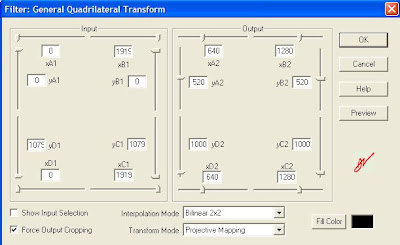
The last line being actually on a single line with all the ++ etc. The outro also had some gymnastics because of an extra line of audio I wanted added. This was before the Virtualdub quadrilateral transformation:
video=Trim(DirectShowSource("VTS_01_2.VOB"),750,4690)
blank=BlankClip(video,length=750, color=$000000)
blankaudio=DirectShowSource("30sec_48k.wav")
video_pre=AudioDub(blank, blankaudio)
video_pre ++ video
Finally, all the three - intro, outro and the show itself - were put in a KMPlayer playlist, a .KPL file.

1000 - 520 = 480 and so on.
Except for simple FadeOut and Trim commands, the intro video was relatively straightforward. The show video itself had some extras, including a subtitle call for adding the Indian voices to the credits. The file was as below:
video=DirectShowSource("TSPOG_2k_w.avi")
audio=WavSource("TSPOG_IN_stereo.wav")
mix=AudioDub(video,audio)
Trim(mix,0, 3085)
++ subtitle(Trim(mix,39024,40504), "Indian voices: K, A, V", -1, 1000, align=2, 651, 699)
++ FadeOut(Trim(mix,3116, 37816),60)
The last line being actually on a single line with all the ++ etc. The outro also had some gymnastics because of an extra line of audio I wanted added. This was before the Virtualdub quadrilateral transformation:
video=Trim(DirectShowSource("VTS_01_2.VOB"),750,4690)
blank=BlankClip(video,length=750, color=$000000)
blankaudio=DirectShowSource("30sec_48k.wav")
video_pre=AudioDub(blank, blankaudio)
video_pre ++ video
Finally, all the three - intro, outro and the show itself - were put in a KMPlayer playlist, a .KPL file.
Friday, March 18, 2011
MediaWarp3D evaluation
Tried out MediaWarp3D - had been in touch with one of the guys involved in developing it. Priced at $995. On my machine - Athlon X2 Dual core at 1.9 GHz, 2.75 GB RAM, nVidia GeForce 9100 M G - only one of the two windows could be running for a full fps Real-Time Warping. If both windows were open, drops to 15 fps or so. Has options for 3D, but since I neither have the hardware nor the content, couldn't test the 3D part. A screenshot is here.
rate of sending emails
This morning, there was a gateway mixup - the SMTP firewall rule was pointing to a disabled gateway, so the emails did not go through. After I changed it, checking the number of mails pending with sudo qshape incoming active deferred found that the mails were going at the rate of approximately 20,000 per hour. Of course, services like yahoo which had rate limiting would queer the pitch, but otherwise this was the rate for a 1 Mbps line, I believe.
Wednesday, March 16, 2011
bat file to start IMs
Going offline in three chat apps and coming back online later was a bit of a pain. So, exiting them instead, and made a bat file to start all three of them at once. But for running Windows apps in a BAT file, and to continue execution (similar to putting a task in the background on *nix) the syntax is:
START C:\Progra~1\PATH\TO\FILE\IN\DOS\STYLE\file.exe
START C:\Progra~1\PATH\TO\FILE\IN\DOS\STYLE\file.exe
migrating mail from GMail to Google Apps and so on
While discussing the sssihl migration, where they have an edu GApps account and hence can use GApps IMAP migration tool, S mentioned that some other institutions like MedTrust had similar requirements. But they're using the Standard (Free) Edition.
For just a single account to another account, the migration would be possible, though slow, by just adding both accounts as IMAP accounts on a desktop client like thunderbird, making sure that emails are retrieved completely and not only headers, and dragging and dropping from one account to the other, as given in this discussion.
In the link above, the popular answer is the way it's being done with the IMAP migration tool on the Edu version. But the lifehacker link just below that gives this other method.
For just a single account to another account, the migration would be possible, though slow, by just adding both accounts as IMAP accounts on a desktop client like thunderbird, making sure that emails are retrieved completely and not only headers, and dragging and dropping from one account to the other, as given in this discussion.
In the link above, the popular answer is the way it's being done with the IMAP migration tool on the Edu version. But the lifehacker link just below that gives this other method.
Tuesday, March 15, 2011
transferring files to a Nokia phone
N wanted me to transfer some mp3s to a Nokia music phone. First try with the data card directly inserted into the card reader did not work - probably because the card reader can't read high density SD cards or something like that. Then tried by connecting the phone via usb and using Nokia Phone browser. That opened up Windows Media Player, and asked it to transfer files. But when we attempted to transfer, it would say "An error occurred". Finally got the job done by transferring to my SD card, then transferring from my phone to the Nokia via bluetooth. One future possibility is attempting through Nokia PC suite.
Thursday, March 10, 2011
phplist attachment size limit
There were issues with the shared internet connection being swamped by the Sai Inspires emails, especially when they were sent late. P wanted me to set an attachment size limit in phplist, so that the email attachment would be 20 kB instead of 100 kB as was done recently. Went through the docs, did not find any such parameter in phplist except setting file upload limit for php itself, as given at this post.
Since the upload_max_filesize attribute is of php itself, not of phplist, I was afraid of breaking things if I set it in php.ini, so did not do so. Instead, the current solution is to not embed images at all inline, and to just link them instead as in Sai Spiritual Showers. A link to the online version makes it easier for the 'linked image challenged' email clients.
Since the upload_max_filesize attribute is of php itself, not of phplist, I was afraid of breaking things if I set it in php.ini, so did not do so. Instead, the current solution is to not embed images at all inline, and to just link them instead as in Sai Spiritual Showers. A link to the online version makes it easier for the 'linked image challenged' email clients.
changing virtual postfix hosts and testing SMTP with telnet
As given in my earlier post, the only change required was to change the line
virtual_alias_domains = whateverdomain.com
in /etc/postfix/main.cf and accordingly make changes in /etc/postfix/virtual running
sudo postfix reload
sudo postmap virtual
afterwards. Actually I ran the postfix reload after the postmap also, just to be sure. For testing, using telnet as given in this technet article, telnet on port 25 to our machine failed from dreamhost. Tried restarting the network, firewall box, etc, but probably dreamhost has blocked port 25 for spam-blocking. Restarting network was
sudo /etc/init.d/networking restart
by the way. Finally tried it from our colinux machine, there it was working fine.
telnet our.mail.server.radiosai.org 25
Trying 111.111.111.111...
Connected to our.mail.server.radiosai.org.
Escape character is '^]'.
220 our.mail.server.radiosai.org ESMTP Postfix
MAIL FROM:whatever@yahoo.co.in
250 2.1.0 Ok
RCPT TO:whoever@whatever.in
250 2.1.5 Ok
DATA
354 End data with.
Subject:2nd test
One more test email.
.
250 2.0.0 Ok: queued as 491ID14E8EC
^]
telnet> quit
virtual_alias_domains = whateverdomain.com
in /etc/postfix/main.cf and accordingly make changes in /etc/postfix/virtual running
sudo postfix reload
sudo postmap virtual
afterwards. Actually I ran the postfix reload after the postmap also, just to be sure. For testing, using telnet as given in this technet article, telnet on port 25 to our machine failed from dreamhost. Tried restarting the network, firewall box, etc, but probably dreamhost has blocked port 25 for spam-blocking. Restarting network was
sudo /etc/init.d/networking restart
by the way. Finally tried it from our colinux machine, there it was working fine.
telnet our.mail.server.radiosai.org 25
Trying 111.111.111.111...
Connected to our.mail.server.radiosai.org.
Escape character is '^]'.
220 our.mail.server.radiosai.org ESMTP Postfix
MAIL FROM:whatever@yahoo.co.in
250 2.1.0 Ok
RCPT TO:whoever@whatever.in
250 2.1.5 Ok
DATA
354 End data with
Subject:2nd test
One more test email.
.
250 2.0.0 Ok: queued as 491ID14E8EC
^]
telnet> quit
Wednesday, March 09, 2011
backing up phone contacts
I've not tried them myself, but A at the Studio said these were good:
1. Google Sync for your phone
2. www.mobical.net
(this one seems to have moved to
https://www.everdroid.com/
)
1. Google Sync for your phone
2. www.mobical.net
(this one seems to have moved to
https://www.everdroid.com/
)
deleting a gateway in Cyberoam
Our ISP changed, and suddenly I had to delete a gateway on the Cyberoam which was no longer active. With the gateway still existing, the device was unstable and not allowing incoming connections. First took a backup as P advised, System -> Manage Data -> Backup Data. Then, going directly to System -> Gateway -> Manage Gateways and trying to delete it gave the error message
So I went to Firewall -> Manage Firewall and removed all the firewall rules relating to virtual hosts which mentioned that gateway. Still no dice. Then removed those virtual hosts too. Still no. Then removed the relevant host names from Firewall -> Host -> Manage. Still no. Then, during a support chat with Tech support, thought about other firewall rules, outgoing rules for eg. Lan to Wan and so on. Went through those, in a couple of them the old gateway was the Primary. Modified the rules suitably, then the gateway could be deleted.
Gateway used for pool(s) or Acting as Effective Gatway or assigned to firewall(sic)
rule cannot be deleted
So I went to Firewall -> Manage Firewall and removed all the firewall rules relating to virtual hosts which mentioned that gateway. Still no dice. Then removed those virtual hosts too. Still no. Then removed the relevant host names from Firewall -> Host -> Manage. Still no. Then, during a support chat with Tech support, thought about other firewall rules, outgoing rules for eg. Lan to Wan and so on. Went through those, in a couple of them the old gateway was the Primary. Modified the rules suitably, then the gateway could be deleted.
Friday, March 04, 2011
ip address change and cyberoam changes needed
After getting a new IP address and a new ISP, did the following changes to cyberoam.
1. Delete firewall rules using the relevant virtual host(s) which reference the old ISP ip addresses etc. For this, you have to go through all the firewall rules - even things like DMZ-DMZ etc.
2. Delete the relevant virtual host.
3. Create the corrected virtual host - basically only the External ip address changes.
4. Make the firewall rules again! Here, things like DMZ-DMZ rules are made automatically, when the WAN-DMZ rules are made.
5. Modify host group (if any) to add the new ips. We had the group of machines which were allowed to ssh. For this, first create a relevant host name, and add it to the group while creating it.
All these changes took around half an hour.
Later I had to change the ip addresses pointing to the web server and so on.
Edit: After 24 hours, learnt from experience :( that I should have updated the spf txt dns records before-hand! All gmail emails went to spam. Anyway, I have done so now...
1. Delete firewall rules using the relevant virtual host(s) which reference the old ISP ip addresses etc. For this, you have to go through all the firewall rules - even things like DMZ-DMZ etc.
2. Delete the relevant virtual host.
3. Create the corrected virtual host - basically only the External ip address changes.
4. Make the firewall rules again! Here, things like DMZ-DMZ rules are made automatically, when the WAN-DMZ rules are made.
5. Modify host group (if any) to add the new ips. We had the group of machines which were allowed to ssh. For this, first create a relevant host name, and add it to the group while creating it.
All these changes took around half an hour.
Later I had to change the ip addresses pointing to the web server and so on.
Edit: After 24 hours, learnt from experience :( that I should have updated the spf txt dns records before-hand! All gmail emails went to spam. Anyway, I have done so now...
Tuesday, February 22, 2011
sql injection
Tried out HackBar for firefox to check for SQL injection on our sites. Basically followed this article's walkthrough. Lots of useful links at this stackoverflow post, in the comments. Especially the Oracle tutorial.
Sunday, February 20, 2011
Reviving a Transcend 256 MB pen drive
S wanted me to try and revive a 256 MB Transcend USB flash memory pen-drive. Plugging into an Ubuntu machine and checking fdisk -l showed it was formatted as FAT16. Probably there was also some corruption since he reported pulling it out while Puppy was formatting and/or partitioning it! Anyway, a quick mkfs -t vfat /dev/sdc1 did the trick, working fine now.
Friday, February 11, 2011
adding a mail relay
Re-created a virtual mail server relaying mail to alias addresses on our current server just like in my previous posts
http://hnsws.blogspot.com/2006/03/finishing-postfix-configuration.html
http://hnsws.blogspot.com/2006/03/using-krishna-to-forward-mails-to.html
Just had to do postmap /etc/postfix/virtual after the cf file etc update. This new machine did not start refusing emails for krishna.radiosai.org after adding the virtual domain. Added appropriate firewall rules to the gateway, of course. Just a note: in /etc/postfix/main.cf,
mynetworks = 127.0.0.0/8
does not need to be changed. Changing this is only required if you want the postfix to relay mail (without auth, for third-party domains - an open relay!) from some other ip address also.
http://hnsws.blogspot.com/2006/03/finishing-postfix-configuration.html
http://hnsws.blogspot.com/2006/03/using-krishna-to-forward-mails-to.html
Just had to do postmap /etc/postfix/virtual after the cf file etc update. This new machine did not start refusing emails for krishna.radiosai.org after adding the virtual domain. Added appropriate firewall rules to the gateway, of course. Just a note: in /etc/postfix/main.cf,
mynetworks = 127.0.0.0/8
does not need to be changed. Changing this is only required if you want the postfix to relay mail (without auth, for third-party domains - an open relay!) from some other ip address also.
Saturday, February 05, 2011
winamp not playing wav files - resolved
For many months, my WinAmp installation was not playing wav files, but was playing mp3 files. Today I finally worked out that the in_wave.dll was missing. And the reason was given in this post - I had installed Winamp Lite at one point of time, and that does not have wav support. Installed WinAmp full now - Lite is no longer available - and now it plays wav files without problems.
Friday, February 04, 2011
problems with Nokia Internet Radio on E63
B had a problem with his Nokia E63 phone not allowing him to open the Internet radio app, and giving
playinit error =-5
on trying to play with s60 internet radio app which was installed later. Googling found that this was most probably due to a failed update. Suggested solution seems to be to hard-reset the phone.
playinit error =-5
on trying to play with s60 internet radio app which was installed later. Googling found that this was most probably due to a failed update. Suggested solution seems to be to hard-reset the phone.
Thursday, February 03, 2011
playlist in The KMplayer
Making a playlist in The KMplayer might be the solution to my issue of playing PAL clip followed by NTSC (or 30 fps HD) clip. To make KMplayer play the next file in the playlist automatically, I had to go into
Options -> Preferences -> General -> Repeat / Playlist -> Choose Play Next Album
under "When Finished (Album has been fully played)..."

Wednesday, February 02, 2011
niggling bugs with Kubuntu
Had installed Kubuntu Ubuntu 10.04.2 LTS as the dual boot on my work machine after the earlier install stopped booting. (Most probably that was due to the mbr file being deleted from c:, or becoming corrupted.) This installation also runs from a loopback device, a file on the Windows filesystem, like my earlier install.
Anyway, came across some niggling bugs. One persistent one was the error message E:Unable to correct problems, you have held broken packages.

This would pop up every time I clicked OK for Amarok to install "extra multimedia functionality" as this dialog box says.

Doing a mouse-over reveals the correct package name. Installing everything else worked fine except for Flash. The package was flashplugin-installer
Googling found this thread, and as suggested, doing
sudo apt-get update
sudo apt-get install flashplugin-installer
seems to have done the trick.
Anyway, came across some niggling bugs. One persistent one was the error message E:Unable to correct problems, you have held broken packages.

This would pop up every time I clicked OK for Amarok to install "extra multimedia functionality" as this dialog box says.

Doing a mouse-over reveals the correct package name. Installing everything else worked fine except for Flash. The package was flashplugin-installer
Googling found this thread, and as suggested, doing

sudo apt-get update
sudo apt-get install flashplugin-installer
seems to have done the trick.
Monday, January 31, 2011
Testing our page loads and optimizing
K pointed out some excellent page-load speed resources for testing and optimizing:
http://googlepagespeed.com/
http://code.google.com/speed/page-speed/
http://modpagespeed.com/
And for testing, http://www.webpagetest.org/
As suggested by webpagetest.org , I have enabled compression on media.radiosai.org as given in this article: basically
cd c:\InetPub\AdminScripts
cscript adsutil.vbs set w3svc/filters/compression/parameters/HcDoStaticCompression true
cscript adsutil.vbs set W3Svc/Filters/Compression/GZip/HcFileExtensions "txt" "htm" "html" "js"
cscript adsutil.vbs set W3Svc/Filters/Compression/Deflate/HcFileExtensions "txt" "htm" "html" "js"
cscript adsutil.vbs set W3Svc/Filters/Compression/GZip/HcDynamicCompressionLevel 7
cscript adsutil.vbs set W3Svc/Filters/Compression/Deflate/HcDynamicCompressionLevel 7
cscript adsutil.vbs set W3Svc/Filters/Compression/GZip/HcOnDemandCompLevel 7
cscript adsutil.vbs set W3Svc/Filters/Compression/Deflate/HcOnDemandCompLevel 7
I have not enabled the compression for aspx and other dynamic files, I have not disabled for HTTP 1.0 or proxies as given in the last two lines: will do that if problems arise.
Also set in content expiration as 1 day from the IIS Manager. http://www.radiosai.org/ had some difficulty in setting compression, since it is a shared environment under Plesk. Did contact nettigritty team about it anyway.
http://googlepagespeed.com/
http://code.google.com/speed/page-speed/
http://modpagespeed.com/
And for testing, http://www.webpagetest.org/
As suggested by webpagetest.org , I have enabled compression on media.radiosai.org as given in this article: basically
cd c:\InetPub\AdminScripts
cscript adsutil.vbs set w3svc/filters/compression/parameters/HcDoStaticCompression true
cscript adsutil.vbs set W3Svc/Filters/Compression/GZip/HcFileExtensions "txt" "htm" "html" "js"
cscript adsutil.vbs set W3Svc/Filters/Compression/Deflate/HcFileExtensions "txt" "htm" "html" "js"
cscript adsutil.vbs set W3Svc/Filters/Compression/GZip/HcDynamicCompressionLevel 7
cscript adsutil.vbs set W3Svc/Filters/Compression/Deflate/HcDynamicCompressionLevel 7
cscript adsutil.vbs set W3Svc/Filters/Compression/GZip/HcOnDemandCompLevel 7
cscript adsutil.vbs set W3Svc/Filters/Compression/Deflate/HcOnDemandCompLevel 7
I have not enabled the compression for aspx and other dynamic files, I have not disabled for HTTP 1.0 or proxies as given in the last two lines: will do that if problems arise.
Also set in content expiration as 1 day from the IIS Manager. http://www.radiosai.org/ had some difficulty in setting compression, since it is a shared environment under Plesk. Did contact nettigritty team about it anyway.
Thursday, January 27, 2011
ssh-add required for Ubuntu 8.04 after ssh-keygen
On the Macbuntu running Ubuntu 8.04, when I attempted to use ssh with RSA key-based authentication like in my old post, ssh returned an error
Agent admitted failure to sign using the key.
Permission denied (publickey).
Googling found this as the first match.
Verified that running
SSH_AUTH_SOCK=0 ssh myuser@myhost
works fine with key-based auth.
Then ran ssh-add as suggested in that thread. From then on, ssh works fine.
Agent admitted failure to sign using the key.
Permission denied (publickey).
Googling found this as the first match.
Verified that running
SSH_AUTH_SOCK=0 ssh myuser@myhost
works fine with key-based auth.
Then ran ssh-add as suggested in that thread. From then on, ssh works fine.
Wednesday, January 26, 2011
keeping Windows and Linux dual-boot times correct
In this old post I had mentioned how to do it with Mandrake 10. In Kubuntu 10, the file to be edited, as per this forum post, is /etc/default/rcS
and by default it is already set to UTC=no
and by default it is already set to UTC=no
Saturday, January 15, 2011
downmixing to stereo
According to these posts on Hydrogenaudio forums, for downmixing 5.1 to stereo I should go with either
Lo = 1.0 * L + 0.7071 * C + 1.0 * Ls;
Ro = 1.0 * R + 0.7071 * C + 1.0 * Rs;
or
Lo = 1.0 * L + 0.5 * C + 1.0 * Ls;
Ro = 1.0 * R + 0.5 * C + 1.0 * Rs;
But I suppose in my case the C will have to be more since I want the commentary to be a bit louder.
Lo = 1.0 * L + 0.7071 * C + 1.0 * Ls;
Ro = 1.0 * R + 0.7071 * C + 1.0 * Rs;
or
Lo = 1.0 * L + 0.5 * C + 1.0 * Ls;
Ro = 1.0 * R + 0.5 * C + 1.0 * Rs;
But I suppose in my case the C will have to be more since I want the commentary to be a bit louder.
Tuesday, January 11, 2011
direct links to listen to specific radio programs
Explored ways to give direct links to radio programs like the hidden form + javascript like the technique mentioned at this stackoverflow form post. Basically of the type

but all in one line. Tried making a tinyurl link out of the javascript. It works with preview.tinyurl.com, but not with the direct tinyurl link. Other url shorteners like bit.ly did not work with javascript at all. So finally decided on html forms with javascript to auto-submit.

but all in one line. Tried making a tinyurl link out of the javascript. It works with preview.tinyurl.com, but not with the direct tinyurl link. Other url shorteners like bit.ly did not work with javascript at all. So finally decided on html forms with javascript to auto-submit.
Tuesday, January 04, 2011
updates on twitter
Started populating the twitter feed by 31 Dec using FutureTweets.com so that a twitter update box could be added to the schedule page by 2 Jan. Maybe it will be added to the home page later. Takes around 10 minutes a day or less to update. The thing to get the hang of is: which timezone to report in the tweet. For AsiaStream programs, IST is the easy choice. Other programs need some thinking.
Earlier, I'd envisaged making some sort of automated twitter posting with code similar to this blog post using php - but the coding is pending with P, and for me spending 5 minutes daily tweeting is easier.
Earlier, I'd envisaged making some sort of automated twitter posting with code similar to this blog post using php - but the coding is pending with P, and for me spending 5 minutes daily tweeting is easier.
Wednesday, December 29, 2010
printing to a receipt printer from OpenBravo POS
P had installed a new POS system on a Win7 Lenovo netbook and was having trouble printing to the USB receipt printer. It was printing, but leaving a lot of blank space at the top before printing and cutting the receipt. Finally fixed it by going to the printer properties, and in the paper settings, choosing 'Conserve paper' 'Top and Bottom'. The font is also different from the one seen in his other POS, which runs Linux. Probably because the Linux machine is printing to a driver similar to Generic Text. Trying Generic Text driver on the Win7 box gave the "correct" font, but the layout was awry. Probably an issue with paper settings for that driver, too. Anyway, since the smaller font is OK, he'll probably go with the Epson driver.
Edit: P adds:
Finally was able to get this work with correct font size.
Suggestion from this forum post.
Solution:
Epsons POS website had the latest virtual COM port software which works for Windows 7: TM Virtual Port Driver Ver.5.00aE . Assigned the printer to COM1 through the software and changed the openbravo pos settings to Printer: epson -> Serial -> COM1
Edit: P adds:
Finally was able to get this work with correct font size.
Suggestion from this forum post.
Solution:
Epsons POS website had the latest virtual COM port software which works for Windows 7: TM Virtual Port Driver Ver.5.00aE . Assigned the printer to COM1 through the software and changed the openbravo pos settings to Printer: epson -> Serial -> COM1
Tuesday, December 28, 2010
set mime types in Plesk
Noticed that after the server migration, the pls and asx files were no longer being served from www.radiosai.org - so went into the Plesk control panel,
radiosai.org -> Virtual Directories -> Mime types tab and added
asx - video/x-ms-asf
pls - audio/x-scpls
radiosai.org -> Virtual Directories -> Mime types tab and added
asx - video/x-ms-asf
pls - audio/x-scpls
upgrading ActiveSync and more
A brought a Toshiba Portege for me/A. When I attempted to sync it, it wanted me to upgrade to ActiveSync 4.5 from 4.2. After doing that, syncing from the old phone no longer does Contacts Sync - it says install Outlook for that functionality. So, for now, using ActiveSync merely as a connection mechanism to manually transfer files. Initially internet connectivity using ActiveSync did not work. Then changed the Connection settings on the desktop, "This computer is connected to:", changing the dropdown to The Internet

Also, as this post points out, changed the Remote NDIS host setting on the mobile so that the "Unable to obtain IP address" error stops popping up.

Also, as this post points out, changed the Remote NDIS host setting on the mobile so that the "Unable to obtain IP address" error stops popping up.
Wednesday, December 08, 2010
gmail pop3 captcha
Found an issue with pop3 not working on our automated bounce processing - fetchmail could not fetch mail from gmail and gapps accounts. At first I thought it was the problem with the issue reported here, and that I had to go to http://www.google.com/accounts/DisplayUnlockCaptcha
Did all that, but actual problem was a change in password from sssbpt.org. Fixed that, and everything started working again.
Did all that, but actual problem was a change in password from sssbpt.org. Fixed that, and everything started working again.
Tuesday, December 07, 2010
cyberoam failover tweak
By default, cyberoam failover rules checks pings to the default gateway and fails-over if the pings fail. But in our case, the default gateway itself is ususally fine, it is the link to Bangalore which fails. So, it needs to ping the Bangalore end of the link and if that fails, failover. Changed the rule accordingly in cyberoam, works well now.
Monday, December 06, 2010
upload through cyberoam - problem solved
In a previous post, I'd mentioned that the Studio people have problems uploading stuff - ftp / yousendit / vimeo et al. Found a workaround - disable virus / spam scanning in the firewall rules. You can, of course, do this for only the particular host you are uploading from.

That is, clear all the check-boxes in the last line in the image above.

That is, clear all the check-boxes in the last line in the image above.
Sunday, December 05, 2010
problems with kindle not connecting to wifi - solved with static ip address
K had some issues with his Kindle not connecting to his wireless router at home. He tried many things including changing the security settings to WPA and even to unencrypted. Still did not connect. Finally he put in a static ip address instead of getting the ip address from the router, and this worked like a charm. So, don't rely on the DHCP server running on routers for connecting mobile devices. I did not even try to connect my Windows mobile to Airport at home with DHCP, since even my Windows laptop had problems with the Airport's DHCP. Static IPs work with no problems.
K was initially turned off since a DNS server IP address is required. You can always give the google public dns ip address of 8.8.4.4 or 8.8.8.8 if your router itself does not do a good job of providing a stable dns server. OpenDNS is also available, 208.67.222.222 and 208.67.220.220
K was initially turned off since a DNS server IP address is required. You can always give the google public dns ip address of 8.8.4.4 or 8.8.8.8 if your router itself does not do a good job of providing a stable dns server. OpenDNS is also available, 208.67.222.222 and 208.67.220.220
Thursday, December 02, 2010
uploads problems with Cyberoam
The Studio people have problems uploading stuff - ftp / yousendit / vimeo - using the Cyberoam 50ia as the gateway. For all of last month, P was directly connecting a laptop to the gateway directly for uploads. So is there a solution with Cyberoam support, or do we have to make a workaround with another router etc?
Wednesday, December 01, 2010
thumbnail images for saicast
Ran a thumbnail factory this morning for saicast, generating 15 thumbnail images. On DG's guidance, this was my procedure.
Saved http://saicast.org/images/gangacanal.jpg on my system as saicast4x3.jpg
Opened it in Gimp and found the dimensions of the image alone excluding the frame to be 171 x 127
Then, opened the vimeo videos one by one, played them till a suitable frame, paused and hit printscreen, pasted into Gimp, cropped to a suitable 4x3 frame, resized to 171x127, pasted into the selection on saicast4x3.jpg and then exported as whatever.jpg.
Saved http://saicast.org/images/gangacanal.jpg on my system as saicast4x3.jpg

Opened it in Gimp and found the dimensions of the image alone excluding the frame to be 171 x 127
Then, opened the vimeo videos one by one, played them till a suitable frame, paused and hit printscreen, pasted into Gimp, cropped to a suitable 4x3 frame, resized to 171x127, pasted into the selection on saicast4x3.jpg and then exported as whatever.jpg.
Wednesday, November 24, 2010
live streaming with stock laptop
Used the daily-use machine for live streaming on 23 November, with just its built-in soundcard. Reaper was running as something for me to monitor the waveform and also as an archive copy of the stream. Srv ran the mix through his Yamaha mixer from Chennai and used the Alesis compressor from the Studio to give me a compressed mix. My nominal input level for 0 dB for -10 dBV signal was as shown.

I rode the rec-level fader since Srv was monitoring before the compressor. Maybe next time a better choice of compressor settings can avoid my having to ride the faders. Anyway, output level was respectable, near -12 dB RMS, after the first few minutes when I was not riding the faders close enough and the compressor was not set on the output.

I rode the rec-level fader since Srv was monitoring before the compressor. Maybe next time a better choice of compressor settings can avoid my having to ride the faders. Anyway, output level was respectable, near -12 dB RMS, after the first few minutes when I was not riding the faders close enough and the compressor was not set on the output.
Saturday, November 20, 2010
direct download to kindle
Playing around with the Kindle got for A - Latest Generation Wifi. Can download directly to the kindle by browsing gutenberg.org. But can't load to the kindle from email attachments. I think it's because the kindle's experimental browser does not support redirects and most webmail services have a redirect for attachments. Pointing the kindle to the direct link after deciphering the redirect's URL encoding, it loads the content with no issues. This works with the content emailed by yourkindlename@free.kindle.com too.
Sunday, November 14, 2010
smtp timeout errors
After introducing the Cyberoam 50ia as the gateway at the studio, there were some teething troubles. When one of the two redundant links went down, the device would refuse incoming connections on the other link also. The management services would then have to be restarted from the console. Also, occasionally krishna had some smtp timeout issues even after the links were up. These were solved by restarting krishna.
Friday, November 12, 2010
qshape for checking postfix queue
One of the tools for checking the sending of our emails - qshape.
Some results from 5 days back when the problem was first detected:
sudo qshape -s incoming active deferred
shows
Some results from 5 days back when the problem was first detected:
sudo qshape -s incoming active deferred
shows
T 5 10 20 40 80 160 320 640 1280 1280+Out of these mails, most of them were yahoo.
TOTAL 33626 0 0 0 0 0 0 0 4 9645 23977
radiosai.org 32886 0 0 0 0 0 0 0 4 9645 23237
sssbpt.org 740 0 0 0 0 0 0 0 0 0 740
sudo qshape incoming active deferred
T 5 10 20 40 80 160 320 640 1280 1280+
TOTAL 33623 0 0 0 0 0 0 0 4 9645 23974
yahoo.com 24602 0 0 0 0 0 0 0 3 6365 18234
yahoo.co.in 7809 0 0 0 0 0 0 0 1 2903 4905
airtelbroadband.in 154 0 0 0 0 0 0 0 0 30 124
yahoo.in 127 0 0 0 0 0 0 0 0 72 55
spml.co.in 82 0 0 0 0 0 0 0 0 20 62
lycos.com 67 0 0 0 0 0 0 0 0 13 54
....  snip  .....
Wednesday, November 10, 2010
bug - some files not imported into database
When there is a file with the same download file name (spaces replaced by underscores) being imported, the import script silently fails. The workaround would be to change the download filename of the old file in the database and then do the import.
importing files to downloads without playing them
1. Create playlists for the required files. Don't forget Signature tune. Choose a date in 1985 or something like that.
2. Enter suitable date in /home/sgh/scripts/playlist_import_hardcoded_date.sh
3. Then we can run playlist_import_hardcoded_date.sh to get the csv to the radiosai.org database
4. Then go to http://localhost/mkcsv/csv.php?date=01&month=01&year=1985 (or whatever date) to upload csv
6. Then go to radiosai.org and import the csv of the correct date.
2. Enter suitable date in /home/sgh/scripts/playlist_import_hardcoded_date.sh
3. Then we can run playlist_import_hardcoded_date.sh to get the csv to the radiosai.org database
4. Then go to http://localhost/mkcsv/csv.php?date=01&month=01&year=1985 (or whatever date) to upload csv
6. Then go to radiosai.org and import the csv of the correct date.
Subscribe to:
Posts (Atom)