Showing posts sorted by relevance for query azure. Sort by date Show all posts

Thursday, July 30, 2020

appropriate technology - right-sizing tech solutions

Yesterday, I heard about a clever implementation of distance learning by some school here. The teachers would daily send assignments via Whatsapp with links to some online knowledge resource, along with some questions. The children are encouraged to go through the resource, answer the questions and get back to the teacher in case of questions. This is quite useful in a bandwidth-starved nation like India, where asking pupils to participate in video calls would tax their parents' resources.

Today, I had to answer some queries regarding cost calculations for hosting of a medical data collection application. I'll copy-paste it below with some modifications.

As you may know, pricing of Azure services and AWS services are given at
https://azure.microsoft.com/en-in/pricing/
and
https://aws.amazon.com/pricing/

In general, such cloud services are very much more expensive than other hosting services, if the loads are small and predictable. By small load, I would classify even radiosai.org, with 1.5 lakh visitors a month, thousands of concurrent listeners, as "small".

But in the case of wildly fluctuating loads, when you have a load balancing system and multiple servers which need to be brought online and taken offline dynamically, cloud servers then become cost effective. They are also useful for outsourcing many of the management headaches of servers, to have the peace of mind of managed hosting without the possible security issues of shared hosting.

In the case of the medical data collection tool, they recommend Azure/AWS/your own server for security and licensing reasons. As mentioned at their website, only a very basic set of specs is needed for it, which can easily be supplied by even a shared hosting provider offering Rs. 40 per month hosting. The only caveat is that the organisation who has the license should take sole responsibility for the hosting and support of the application as given in the requirements page.

If the organisation hosting the site is a non-profit, it would be possible to get non-profit credits from Microsoft for Azure, and from Amazon for AWS.
https://www.microsoft.com/en-us/nonprofits/azure
https://aws.amazon.com/government-education/nonprofits/

Azure seems to be offering a larger number of credits - $5000 vs $2000. Also, on the Azure pricing page, they mention that they will price match AWS for cloud infrastructure. So, it might seem that hosting on Azure may be the better option, if you do get non-profit credits.

Since the loads expected on this server would be small - by my definition of small as given above - I would recommend using a VM with a couple of cores and low end specs
https://azure.microsoft.com/en-in/pricing/details/virtual-machines/linux/

If you don't get non-profit credits, the lowest cost option would be to hire two shared servers from two different reputed providers, ensuring that their services are located in different physical locations (since your services are in India, you could look for Bangalore and Mumbai, for example) and have one of them as hot-spare. If you use cloudflare.com to host your dns, operating a hot spare becomes very easy. Such a hot-spare setup allows you to have the peace of mind that Azure/AWS offers, at 10x lower cost. But your provider(s) need to be reputable in the sense that they should not steal your data, and they need to ensure good security practices.

Even if for security reasons you do not want to go for shared hosting, you could get reputed dedicated servers for half the price of Azure/AWS VMs of similar specs, or host it on your premises if you have redundant internet links to your facility. Only drawback, of course, would be that you would need to manually set up as against the automated Azure setup option offered by your software. And you need to know how to do some server management and maintenance.

In the case of VMs or shared servers or dedicated servers, you can directly calculate the costs by just multiplying the per hour or per month cost by the number of hours/months in a year.

In case you wish to estimate traffic, you will need to know what sort of data is going to be uploaded/ downloaded - whether it would be predominantly just numbers, or whether images/video/audio would be included, and what are the estimated numbers of users. Again, a simple multiplication.

When looking to host something for non-profits, where there is no charge for the services being offered, we can get the best RoI by minimising cost while ensuring that performance doesn't suffer. So, for small operations such as ours, I wouldn't recommend cloud solutions except when free credits are available.

Sunday, April 20, 2025

migrating Azure VM from one tenant to another

Azure documentation talks about migrating a VM from one region to another region - https://learn.microsoft.com/en-us/azure/resource-mover/tutorial-move-region-virtual-machines


but with some changes - instead of a file share, creating a disk from snapshot seems to need a blob container for the "Create Managed Disk" applet nowadays. Following the exact steps as above results in not finding any container in that storage account.

Shifted using the following steps:

1. Enabled CLI maintenance mode on the Moodle instances with 
sudo -u www-data /usr/bin/php admin/cli/maintenance.php --enable
- verified that this does stop the cron also, which would otherwise hit the database every minute.

2. Shut down the database VM, went to its OS disk, created snapshot, went to the snapshot's page, "Export snapshot", copied the export snapshot url. 

3. I had earlier created a test VM in the destination tenant, in the Central India region which is the cheapest at present. Had also created a storage account, and a blob container. Also, had installed azcopy on that VM with the following - https://www.thomasmaurer.ch/2019/05/how-to-install-azcopy-for-azure-storage/
#Download AzCopy
wget https://aka.ms/downloadazcopy-v10-linux
 
#Expand Archive
tar -xvf downloadazcopy-v10-linux
 
#(Optional) Remove existing AzCopy version
sudo rm /usr/bin/azcopy
 
#Move AzCopy to the destination you want to store it
sudo cp ./azcopy_linux_amd64_*/azcopy /usr/bin/


4. Created SAS token (Shared Access Signature) from Azure portal > thestorageaccount - the default 3600 seconds may be too short if we need to do multiple operations. Enabled container, blob and file, all three, and copied the blob url and sas token strings. The blob url would be of the form https://storageaccountname.blob.core.windows.net/?sv=SAS-token - we need to edit this, and add nameofourcontainer/desired-name-of-file.vhd before the ?sv=SAS-token

5. SSH'd into that VM, and ran azcopy. (I could have avoided creating the VM, installing azcopy etc by using an Azure shell instead.) The command will be of the form:
azcopy copy "https://md-abcefg12nmg.z12.blob.storage.azure.net/snapshot/abcd?sv=2018-03-28&sr=b&si=this-is-the-snapshot-url-1234566b61d3&sig=zj9jh0ABCDEDFGHHJtnkD9yK0rvJ44I%3D" "https://lmsmigratestorage.blob.core.windows.net/testcontainer/LMSDBsnapshot.vhd?sv=2024-11-04&ss=bfqt&srt=sco&sp=abcdefghytfx&se=2025-04-21T11:49:12Z&st=2025-04-20T03:49:12Z&spr=https&sig=qwertyuiopasdfghjkABCDEFGuLYlgBQlWZE%3D"

# Actually ran steps 2 and 5 three times, azcopy took the following times:
# Elapsed Time (Minutes): 2.034 <-- LMS db OS disk
# Elapsed Time (Minutes): 1.2004 <-- LMS php disk
# Elapsed Time (Minutes): 22.0734 <-- LMS data disk
 
6. From Azure portal, in the destination tenant, Home > Create > Managed Disks > (Choosing Source as Blob storage) > Browse > choosing our VHD snapshot file in blob storage. Creating disk from snapshot, creating snapshot etc are very fast operations, these operations complete in less than a minute.  

7. From the created disk, if it is an OS disk, Create VM. Note that in our case, the default "Operating System type" was v1, but our original VM was v2, so I created the new VM also as v2. 

8. The data disk can be attached later to the VM, even when it is running - "Attach existing disk". Caution - attaching an OS disk as data disk does not seem to work properly - that new OS disk becomes the primary OS disk! 

9. In our case, we were cloning the db VM and copying the php files (and postgresql db) from the php server into the db VM, since we wanted to consolidate the two VMs into a single one. So, I had to copy over from the old VM to the new VM using rclone copy. What I needed to copy, and the steps taken, will be a separate post.

(What does not work:
1. "Export disk" and trying to use that using azure cli - this will not work. We need to create a snapshot first, then export the snapshot, and use the snapshot to re-create the disk in the new tenant.
2. Mounting azure blob storage on a VM and using wget to copy the snapshot VHD to blob storage will not help us to create the disk in the new tenant - azcopy is mandatory.
3. wget -O mydisksnapshot.vhd "https://snapshot-export-URL" followed by
azcopy copy mydisksnapshot.vhd "https://blob-storage-url" will work, but takes double the time - azcopy works fine directly from snapshot url to blob storage url. Caveat is that we must make a container first, and then use azcopy copy.) 

Saturday, September 07, 2024

deleting a Microsoft account linked to an Azure free trial

After a month of the free trial, an email reminded me to upgrade to 'pay as you go' and add a payment method (credit card) to continue to use the free services for a year. I did so. But I did not have much use for the free trial - I had tested it out for downloading from 1and1's cloud platform IONOS which some collaborators had used, and which was timing out using BSNL fiber due to downloading at around 30 Mbps. Similarly, Google Drive shared files also would time out after an hour or so.

I had found that the workaround of using rclone was a better and easier alternative to (a) create a free trial (b) create a VM (c) download on the VM (d) download from the VM to my local machine. 

So, when I got an email from Microsoft saying that all Azure logins would need multi-factor authentication (MFA), I thought I would just delete the Azure free trial subscription and the associated microsoft account.

For this, 

and Microsoft account -
 
Just going to the 'close account' link in the above support page, first tried after 'Cancel'ling the Azure subscription. Apparently, that is not enough. 30 minutes after we 'cancel' the subscription, a 'Delete' subscription button become active - we have to 'Delete' the subscription.
 
It is only after we delete the azure subscription that we can exit the tenant - had to delete tenant and not exit the tenant because this account was the sole user and hence the 'Global Administrator' for this tenant - before it allowed to close microsoft account -
https://learn.microsoft.com/en-us/entra/identity/users/directory-delete-howto
 
After the 'delete microsoft account' page completed, it just dropped me into login.live.com which asks me to log in - no confirmation page that the account has been marked for deletion etc.

If I try to log in with the account marked for deletion, it says that this account is marked for deletion, and logging in will unmark it for deletion, so we need to choose 'Cancel'.  
 
So, in short, the steps were:
1. Cancel the subscription from Azure portal
2. Wait 30+ minutes, then delete the subscription from Azure portal
3. Wait for a few minutes for their servers to update, then delete the tenant from Entra Admin Centre
4. (Wait a few minutes for their servers to update?), then delete the microsoft account from the link on the support page.


Thursday, August 22, 2024

Microsoft Azure - enable MFA - multi-factor authentication

Microsoft has sent an email asking Azure admins to enable MFA - multi-factor authentication - for all users of the Azure portal (and Entra, and Intune admin panels).

https://learn.microsoft.com/en-us/entra/identity/authentication/concept-mandatory-multifactor-authentication

But in the document above, they don't give a direct link to enable MFA, nor a direct link to enforce MFA. Probably because there are multiple ways to do it.

After a lot of searches, found the following. First we have to add sign-in methods for the MFA, then we can enable MFA.

Going to portal.azure.com
Home > Users > (my username) > Manage > Authentication methods
came to

https://mysignins.microsoft.com/security-info
 

Here, we can choose "Add sign in method" to add SMS, phone call, Microsoft Authenticator app or "Other authenticator app" like Google Authenticator which uses TOTP (time-based one-time password).

Then to enable or enforce 2FA (two-factor authentication) for admin users, we can go to portal.azure.com
(Just a note: Azure Entra ID is the new name for Azure Active Directory for translating from old tutorials.)

Users > Per user MFA (button on top of the page) > (which redirects to the page https://account.activedirectory.windowsazure.com/usermanagement/multifactorverification.aspx?tenantId=theRelevantTenantID for "legacy experience")

choose the relevant username, and then choose the "Enable" link on the right-hand pane. Confirm that you want to enable MFA for that user, then you are done.

If not "legacy experience", then the per user MFA page has a different look - with buttons to enable, disable or enforce MFA for the selected users, and also User MFA settings:


Sunday, December 08, 2024

Azure AD graph retirement

 There was an email from Microsoft Azure, "Migrate Service Principals from the retiring Azure AD Graph APIs to Microsoft Graph" - clicking through, the recommendation only showed the id of the function or resource using the deprecated API, and did not provide any other information.

After an internet search, this faq showed how to identify it - 
https://learn.microsoft.com/en-us/graph/migrate-azure-ad-graph-faq#as-an-it-admin-how-do-i-identify-apps-in-my-tenant-that-use-azure-ad-graph

(It was not an application which I had created, it says the owner is "Power Virtual Agents Service" - so no action was taken. More info - https://techcommunity.microsoft.com/blog/azure-ai-services-blog/use-your-own-data-to-create-a-power-virtual-agent-with-azure-openai-service/3891860 )

Friday, September 05, 2025

Microsoft Azure - no meaningful way to contact regarding technical issues for non-profits

We're running some VMs on Microsoft Azure with free credits provided to non-profits. This means that in the Azure support section on the Azure portal, only billing support is visible, not technical support - that would probably need a paid plan. 

There was an intermittent network issue with one of our VMs - Ubuntu update not being able to reach the servers, ssh into the VM failing intermittently, and so on. 

I changed the type of support from Technical to Subscription, and then was able to submit the report.

Some more data points for troubleshooting -
1. Our other Azure VMs in other regions do not have this issue.
2. Some of our team members had issues connecting to this server on Aug 19 2025, between 3 & 7 pm IST. At around 8:45 pm IST, I could log on to the server without issues, I used BSNL as my ISP. On Aug 20, 11:30 am, the team at Hyderabad could not connect to the VM using Jiofiber ISP, but I could connect via Telexair located in Bangalore.
3. Rebooting the VM itself did not help - probably some other routing issue at your Central India location.

Edit 25 Sep - But there was no response from Microsoft other than that they would look into it - but the problem seemed to have been resolved in a few hours. Twenty days later, there was an email from the VM team, saying that the network team had passed on the issue to the VM team, so I just replied, "We have not had issues after my last updated to the ticket. You can call me if you wish between 9 and 11.30 am Indian Standard time or between 12.30 and 3.30 pm IST, but I have nothing further to add."

Google's lack of human support is well known. So, Azure is more of the same. I believe this is the norm for all these "cloud" companies.

Tuesday, September 20, 2022

deleting an Azure free trial and deleting a hotmail account

Earlier, I had posted about stopping the Azure free trial from an unmanaged domain account. This post is about stopping an Azure free trial subscription and deleting a free hotmail account. 

https://learn.microsoft.com/en-us/azure/cost-management-billing/manage/cancel-azure-subscription

portal.azure.com  --> Cost Management + Billing --> Overview --> your plan --> select Cancel --> verify that you want to cancel and select Yes, cancel.

After that, to delete the hotmail account which had that free trial,
https://www.makeuseof.com/tag/how-to-delete-outlook-hotmail-account/

account.microsoft.com --> login --> Your Info tab  --> Scroll down to the Help with Microsoft account  -->  How to close your account --> Choose whether you want Microsoft to retain your data for 30 days or 60 days --> Next etc (various security confirmations)  

This info is probably subject to change as these portals constantly undergo slight revisions in UI.

Saturday, November 07, 2020

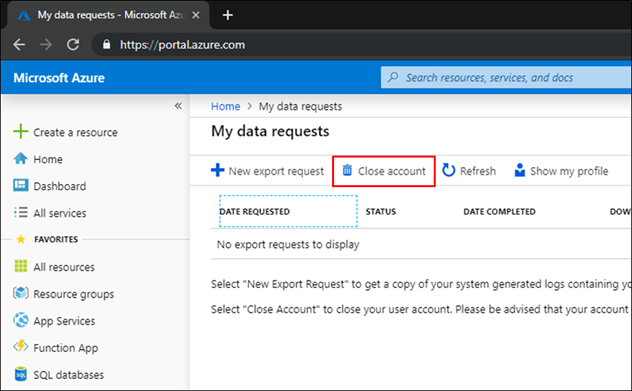
Azure AD guest account and how to close an azure account

There are conflicting posts all around, saying that one can only remove subscriptions and not close an Azure account once it is opened. Since I had used this from a test domain, it was an "unmanaged organization" 

https://docs.microsoft.com/en-us/azure/active-directory/enterprise-users/users-close-account

  1. Sign in to close your account, using the account that you want to close.

  2. On My data requests, select Close account.

    My data requests - Close account

I used this to remove the test account I had created to delegate permissions for an app being developed by a third-party. The delegation of permissions via Azure Active Directory implies that the guest user has to switch directory to the directory of the current resource in the Azure portal, and then the guest user would have view access to the current directory name (and probably more). 


Saturday, November 09, 2024

moving from Azure CDN

The Azure portal had emailed us that the Azure CDN from Edgio would be retiring, and that since Edgio had gone into bankruptcy, service continuity was iffy. Their "recommended replacement" Azure Front Door Standard or Premium, looked pricey:

Front Door seems to have a minimum monthly cost of $35,
https://azure.microsoft.com/en-us/pricing/details/frontdoor/

So, instead, shall I just migrate the content elsewhere?

Currently, only old issues of a newsletter seems to be on cdn.ourdomain.org - content being served from a particular storage container.

I could move all the stuff there to a github pages repository instead, and map cdn.ourdomain.org to that - Github pages is free, (limited to 2 GB per repository).

Another option is that I can configure a cheap VM to point to the relevant container, mounting the container with blobfuse - 
https://learn.microsoft.com/en-us/azure/storage/blobs/storage-how-to-mount-container-linux?tabs=RHEL

Looking at the size of the content, which was only 780 MB of archival content and not expected to grow, thought of going with github pages.

Created a github pages repository,
put all the files there,
and changed cdn.ourdomain.org CNAME record to point there instead of the CDN.

Tested with google site:cdn.ourdomain.org for old cached links, working with the new site - like
http://cdn.ourdomain.org/sssihms/wp-content/uploads/2018/01/nameoffile.pdf
 

OK.


Sunday, August 08, 2021

detailed steps for moodle upgrade using git

  1. Official documentation at https://docs.moodle.org/311/en/Upgrading is a bit sparse on details like where to locate the plugins - I’m attempting to do this manually using
    find . -name “customcert”
    and so on for each of the “additional plugins” found on the plugins overview page at
    https://oursite.tld/admin/plugins.php?updatesonly=0&contribonly=1

  2. This youtube video gives a good overview of how to manage a moodle installation and upgrades with git - https://www.youtube.com/watch?v=npks4TngSvo which gives a good presentation, tips for upgrading, a rapid summary and explanation for the documentation at https://docs.moodle.org/311/en/Git_for_Administrators

  3. Creating the git directory and doing a test run with devel2.oursite.tld, which has the home dir /var/www/site  - commands -
    cd /var/www
    sudo mkdir sitegit
    sudo chown azureuser:www-data sitegit
    git clone git://git.moodle.org/moodle.git sitegit
    cd sitegit
    git branch --track MOODLE_311_STABLE origin/MOODLE_311_STABLE
    git branch --track MOODLE_39_STABLE origin/MOODLE_39_STABLE
    git checkout MOODLE_39_STABLE
    # first make sure 3.9 works, then upgrade 3.11

  4. List of additional plugins and commands to copy them -
    cp -R ../site_learning/mod/customcert ./mod
    # have to copy the moove pix_plugins after copying moove theme first
    cp -R ../site_learning/mod/game ./mod
    cp -R ../site_learning/mod/hvp ./mod
    # have to copy the moove pix_plugins after copying moove theme first
    # not migrating admin/tool/objectfs
    cp -R ../site_learning/course/format/onetopic ./course/format
    cp -R ../site_learning/report/coursesize ./report
    cp -R ../site_learning/theme/moove ./theme
    cp -R ../site_learning/theme/moove/pix_plugins/mod/customcert ./theme/moove/pix_plugins/mod
    cp -R ../site_learning/theme/moove/pix_plugins/mod/hvp ./theme/moove/pix_plugins/mod
    # not migrating local/azure_storage
    # not migrating local/edwiserbridge
    cp ../site/config.php .

  5. Change owner group from azureuser:azureuser to azureuser:www-data
    sudo chown -R azureuser:www-data *

  6. Take a backup and create symlinks for easy switching between old and versions.
    cd ..
    sudo mv site site_old && sudo ln -s site_old site
    # sudo chown azureuser:www-data site < - - - this doesn’t work

  7. Check that the site is working, and that the version is seen as 3.9.2+ at https://devel2.oursite.tld/admin/index.php?cache=0
    Site Administration -> notifications.

  8. Change over to the new code
    sudo rm site && sudo ln -s sitegit site

  9. Check if Site Administration -> notifications reflects the new code - it prompts for update for minor upgrade. Have to go plugin by plugin and upgrade as needed. This took just a couple of minutes.

  10. Now removed those plugins which we did not copy over, by going to Site Administration -> Plugins -> Plugins overview -> Additional plugins and uninstall for everything except those in step 4.
    customcert
    game
    hvp
    onetopic
    coursesize

  11. Now trying upgrading directly to 3.11 using git checkout -
    git checkout MOODLE_311_STABLE

  12. Only warning seen was PHP setting max_input_vars is recommended to be at least 5000. Clicked through all the prompts, Notifications page shows 3.11

  13. Cron not run for 5 minutes error message went away after a couple of minutes. But some sort of css issue, page formatting jumbled. Purged caches with
    sudo -u www-data php admin/cli/purge_caches.php
    But still the issue persists. Looks like the accessibility toolbar.

  14. https://moodle.org/mod/forum/discuss.php?d=335856 gave the clue of ownership issues. Did Step 5. again. Stil not solved. https://moodle.org/mod/forum/discuss.php?d=325116 suggests deleting the theme. Deleted by
    cd /var/www/sitegit/theme
    ls
    rm -R adaptable
    rm -R moove
    That solved the issue. Adaptable theme is not available for 3.11, perhaps that was the issue. Again installed moove theme manually, and changed to moove theme, OK.

  15. Trying to upgrade customcert,
    Validating mod_customcert ... Error
      [Warning] Target location already exists and will be removed [/var/www/sitegit/mod/customcert]  
    [Error] Write access check [/var/www/sitegit/mod/customcert] Installation aborted due to validation failure

  16. https://moodle.org/mod/forum/discuss.php?d=366460 pointed to permission issues. Found that mod/customcert did not have w set for group, so set for all mod with
    cd /var/www/sitegit/mod
    chmod  -R g+w *
    Solved.

  17. Found php.ini file location /etc/php/7.4/apache2/php.ini from https://devel2.oursite.tld/admin/phpinfo.php and modified to remove the warning about max_input_vars in step 12.

  18. For migrating oursite.tld, additional steps of copying over data from azure blob storage to local disk. Rclone would help to copy in advance and later sync only those files which have been added later.

  19. Compared speeds of downloads with oursite.tld without Cloudflare caching and devel2 with Cloudflare caching - not significantly different especially if cloudflare caching is on.
    11 sec for file.pptx (4.8 MB) from devel2 (3.5 Mbps)
    60 sec for afile.ppt (35.7 MB) from oursite (4.76 Mbps)
    48 sec for afile.ppt (35.7 MB) from devel2 (5.95 Mbps)
    So, migrating oursite to local disk from Azure blob storage will not have too much of a speed penalty. Is likely to save costs also since Azure storage charges for transfers and so on.

  20. In order to migrate oursite.tld filedir from Azure Blob storage to local HDD, started copying using a SAS token and SAS URL generated from the Azure portal.
    portal.azure.com -> Resource groups -> site-rgname -> sitelearning (storage account) -> Containers -> sitelms -> Shared Access Tokens -> Generate SAS token and URL.

  21. On the server, installed rclone and set it up with
    sudo apt  install rclone
    rclone config
    setting up a new remote called azurecontainer by passing the SAS URL when prompted.

  22. Created directory structure by copying from /var/www/site_learning_files to /var/www/site_data_disk/site_learning_data

  23. Tested rclone sync from the Azure container to the 00 subdirectory of filedir with
    rclone sync azurecontainer:sitelms/00 filedir/00 -P
    Worked, finished in less than a second.

  24. Started screen, and then ran
    rclone sync azurecontainer:sitelms/ filedir/ -P
    Showed ETA of 18 minutes for 34 GB. Total is 54 GB, so would probably take longer. Actual time taken was around 45 minutes for 54 GB.
     

  25. Can sync again just before doing the migration in a few seconds. And then can remove the remote using
    rclone config delete azurecontainer

  26. Creating git directory for site_learning just like step 3:
    cd /var/www
    sudo mkdir site_learning_git
    sudo chown azureuser:www-data site_learning_git
    git clone git://git.moodle.org/moodle.git site_learning_git
    cd site_learning_git
    git branch --track MOODLE_311_STABLE origin/MOODLE_311_STABLE
    git branch --track MOODLE_39_STABLE origin/MOODLE_39_STABLE
    git checkout MOODLE_39_STABLE
    # first make sure 3.9 works, then upgrade 3.11

  27. List of additional plugins and commands to copy them, as in step 4, except the last line for config.php which should be from site_learning -
    cp -R ../site_learning/mod/customcert ./mod
    # have to copy the moove pix_plugins after copying moove theme first
    cp -R ../site_learning/mod/game ./mod
    cp -R ../site_learning/mod/hvp ./mod
    # have to copy the moove pix_plugins after copying moove theme first
    # not migrating admin/tool/objectfs
    cp -R ../site_learning/course/format/onetopic ./course/format
    cp -R ../site_learning/report/coursesize ./report
    cp -R ../site_learning/theme/moove ./theme
    cp -R ../site_learning/theme/moove/pix_plugins/mod/customcert ./theme/moove/pix_plugins/mod
    cp -R ../site_learning/theme/moove/pix_plugins/mod/hvp ./theme/moove/pix_plugins/mod
    # not migrating local/azure_storage
    # not migrating local/edwiserbridge
    cp ../site_learning/config.php . cp ../site_learning/*.html . The last line is to copy site policy agreements if any, if they are located in the root directory.

  28. Like step 5, change owner group from azureuser:azureuser to azureuser:www-data
    sudo chown -R azureuser:www-data *

  29. Take a backup and create symlinks for easy switching between old and versions just like step 6.
    cd ..
    sudo mv site_learning site_learning_old && sudo ln -s site_learning_old site_learning

  30. Site working, but showed an initial error message on first login, later none. This concludes the pre-maintenance mode section.


  31. Beginning the migration - Put the site in maintenance mode from Site Administration -> Server -> Maintenance mode.

  32. Took a backup of the database by logging in to the database VM,
    Commands from https://hnsws.blogspot.com/2020/12/mysql-and-postgresql-command-line-cheat.html
    ssh site_admin@40.90.169.113
    mysqldump -u site_db_admin -p site_learning_master_db -r LMSbk20210808.sql
    (took just a few seconds, sql file was 333 MB in size.)

  33. Logged out of the Database VM, back on the php VM, equivalent commands to step 8 -
    sudo rm site_learning && sudo ln -s site_learning_git site_learning

  34. Need to sync the local data directory with the latest changes on Azure blob storage -
    screen -x
    rclone sync azurecontainer:sitelms/ filedir/ -P
    Transferred:      149.056M / 149.056 MBytes, 100%, 22.964 MBytes/s, ETA 0s
    Errors:                 0
    Checks:             15701 / 15701, 100%
    Transferred:          148 / 148, 100%
    Elapsed time:        6.4s

  35. Made sure the permissions were proper -
    cd /var/www/site_data_disk
    sudo chown -R azureuser:www-data site_learning_data
    sudo chmod -R 775 site_learning_data

  36. Before starting the upgrade, we need to change config.php to point to the new data directory.
    cd /var/www/site_learning_git
    nano config.php
    Changed the line
    //$CFG->dataroot  = '/var/www/site_learning_files';
    To
    $CFG->dataroot  = '/var/www/site_data_disk/site_learning_data';
    And commented out
    //$CFG->alternative_file_system_class = '\tool_objectfs\azure_file_system';

  37. Copied the files from the existing data directory, other than the filedir directory, to the new data directory -
    cd /var/www/site_data_disk/site_learning_data
    cp -Rv /var/www/site_learning_files/lang .
    cp -Rv /var/www/site_learning_files/models .
    cp -Rv /var/www/site_learning_files/muc .

  38. Then started the upgrade process from the web console. Got
    Fatal error: $CFG->dataroot is not specified in config.php! Exiting. https://moodle.org/mod/forum/discuss.php?d=370441
    Indicates permission issues for the parent dir. Tried
    sudo chown -R www-data:www-data /var/www/site_data_disk
    sudo chown -R www-data:www-data /var/www/site_data_disk/site_learning_data
    Still no. Then tried
    sudo chown www-data:www-data config.php
    And tried cloudflare removing the proxying for learning - still no go.

  39. Changed back the config file with
    cd /var/www
    sudo rm site_learning && sudo ln -s site_learning_old site_learning
    Then the site works.

  40. Edited the file again to modify the existing line in /var/www/site_learning_git/config.php instead of creating a new line - that worked. Issue would probably be CRLF (line ending character) related, since the original config.php was probably created on Windows and I was editing it on Linux.

  41. Did step 33 again -
    sudo rm site_learning && sudo ln -s site_learning_git site_learning

  42. Working. Then uninstalled azure_storage, objectfs and edwiserbridge from plugins using the web interface, from Site Administration -> Plugins -> Plugins Overview -> Additional plugins

  43. Changed to Boost theme to prevent errors in moove theme during upgrade from Site Administration -> Appearance -> Theme selector

  44. Then the upgrade to 3.11 by running
    cd site_learning_git
    git checkout MOODLE_311_STABLE

  45. Then doing the upgrade from the web interface by clicking on Site Administration and following the prompts. When trying to upgrade the plugins, got the Error that the directory is not writable. So, made sure all the git subdirectories were writable by the www-data group with
    sudo chmod -R 775 /var/www/site_learning_git

  46. Removed maintenance mode.

  47. Changed theme back to Moove.

  48. Changed cloudflare back to proxied. Done.

  49. Cleaning up -
    Changed permissions of config.php to read-only
    sudo chmod -w /var/www/site_learning_git/config.php
    sudo chmod g-w /var/www/site_learning_git/config.php

  50. Try to not have 777 permissions on the moodledata directory,
    sudo chmod 755 /var/www/site_data_disk
    sudo chmod 755 /var/www/site_data_disk/site_learning_data
    (both are chown www-data:www-data)
    Site seems to be working fine.