https://www.demandsage.com/blog/google-multi-account-authentication-bug-what-it-is-possible-workarounds/
"Sorry, unable to open the file at present.
Mostly work related stuff which I would've entered into my "Log book". Instead of hosting it on an intranet site, outsourcing the hosting to blogger!
Freenom is the domain registrar for .tk and currently, their process for renewing free domains is -
Our audio streams were getting blocked by Chrome's insistence on https. Our initial workaround was to not use any javascript-based player, and instead just use a link to the stream URL with target = _blank to open it in a new window or tab. Now, working towards https support for our audio streams, we found two options.
1. Icecast 2.4.4 has support for SSL, but we need to recompile it on most platforms with the flag set as the icecast package which is available at this repo doesn't support SSL. ./configure --with-curl --with-openssl
2. The other option is to use an SSL reverse-proxy - Apache or Nginx.
Since we had Apache running on our server already, I tried the reverse-proxy method. I had to use acme.sh and not certbot since our server needs an OS upgrade. After the acme.sh installation, have to log out and log in (or open another shell) for the .bashrc changes to take effect. On the server, the main steps were:
a2enmod proxy
a2enmod proxy-http #(without this, got Internal Server Error)
service apache2 restart
a2ensite stream.ourdomain.tld
service apache2 reload
The file created for stream.ourdomain.tld in /etc/apache2/sites-available/stream.ourdomain.tld.conf was copied from another virtual host and then I added the lines like
ProxyPass /nameofstream http://11.22.33.44:8567/
ProxyPassReverse /nameofstream http://11.22.33.44:8567/
ProxyPass /nameofanotherstream http://11.22.33.44:8577/
ProxyPassReverse /nameofanotherstream http://11.22.33.44:8577/
</VirtualHost>
The file created for the ssl version had to be hand-written since acme.sh doesn't automatically create the config files unlike certbot. stream.ourdomain.tld-ssl.conf had the additional lines
<IfModule mod_ssl.c>
<VirtualHost *:443>
SSLEngine on
SSLCertificateFile /etc/ssl/certs/stream.ourdomain.tld.cer
SSLCertificateKeyFile /etc/ssl/private/stream.ourdomain.tld.key
So, with acme.sh, first issued the certificate in Apache mode as root -
acme.sh --issue --apache -d stream.ourdomain.tld
and then installed it using
acme.sh --install-cert -d stream.ourdomain.tld \
--cert-file /etc/ssl/certs/stream.ourdomain.tld.cer \
--key-file /etc/ssl/private/stream.ourdomain.tld.key
a2ensite stream.ourdomain.tld-ssl
service apache2 reload
Worked.
Everything seems to be fine - Apache was not having any issues I could detect with top and a tail -f of the Apache access log. Cloudflare proxying had been turned on, but I'm not sure if it had any impact since this was a stream and not a static file which could have been cached.
CPU utilization and RAM utilization didn't change more than 1-2% - 97% idle CPU, and all the Apache processes together were using only 14% RAM or less of our 8 GB server, which didn't increase substantially from what it was before the test. Some 300+ clients connected via our website with the new links to the various streams in the last 90 minutes or so of the test.
Edit: See the later post, implemented with icecast-kh
https://hnsws.blogspot.com/2021/06/adding-ssl-https-to-http-mp3-streams.html
While making some command-line commits to github, I'd received an email from github that password-based authentication is deprecated, and would be unavailable after Aug 2021. Github docs also mention that pw auth is deprecated. This stackoverflow post also discusses the change, and its advantages. So, basically we need to create the password token, give it suitable permissions and use that instead of the password on the commandline.
Working with xfce on a GCP cloud server, minimized windows were not visible. My workaround as suggested by this forum post was to centre-click on the desktop (right+left click on my trackpad) and choose the relevant window from the list.
Last week, I could not remote desktop into one of our servers which was a VM on Azure - Remote Desktop was working only immediately after a restart, and later not at all. Remmina failed with
connected to ip.address.tld:3389
recv: Connection reset by peer
Error: protocol security negotiation or connection failure
and rdesktop failed with
ERROR: CredSSP: Initialize failed, do you have correct kerberos tgt initialized ?
Failed to connect, CredSSP required by server.
I thought I got the explanation for CredSSP from this post and thought disabling NLA would solve the issue. But then, I could not connect at all. I'd done this by right-clicking on System, Properties, Remote, and disabling the check-box 'Allow connections only from computers with NLA...'
Tried resetting the connection configuration from Azure portal, still no. (Choose the VM in Azure Portal, Support + Troubleshooting, Reset Password screen, choose 'Reset configuration only').
I tried logging on using a Windows 10 VM on another server, but got an "internal error". Perhaps this was due to the Windows trial license expiring on that machine. Today when I re-installed a trial version of Windows 10 and tried to connect, the Remote Desktop connection worked fine. Turned on NLA, it still worked. Tried with Remmina on my local machine, that also worked.
So, why did it fail and why did it start working again? Was it due to a Windows update causing issues like in this forum thread? Perhaps a network glitch? Perhaps restarting the VM (which I did several times) or resetting the configuration solved the issue but I was unable to check due to turning off NLA? At that time, I did not see this post, but maybe in the future I might need these tips again.
One of our external IP addresses had port-forwarding set up to allow incoming ssh. That external network failed and the alternate network took over for web browsing, but our ssh connections would fail. Workaround was to set up identical port-forwarding rules for this alternate network external IP address also. Then, if the primary network fails, we can ssh in using the alternate network.
Troubleshooting an issue of iSpring's output html not appearing properly on a mobile app, found this page with some recommendations on font sizing for mobile devices. The issue itself might be due to javascript support issues or user-agent issues, I guess, since the page appears properly on mobile browsers.
Sending invites to a large number of email ids from google groups, found the following.
Google Cloud Platform's Billing -> Overview shows the number of free credits remaining as well as the number of days remaining.
Running 2 instances of e2-highmem-2 (2 vCPUs, 16 GB memory) cost approximately Rs. 600 or US$8 per day, or $250 per month, or $3000 per year.
URL Addressability API (superseded by WebScripts)
Interestingly, this is in version 5-0-b. But ticket-based addressing of image URLs is working locally (I believe?) in 5-0-d. Does Alfresco's versioning go from d to c to b? Or is my understanding of the URL Addressability flawed?
The URL addressability documentation says that it has been obsoleted - 5
https://hub.alfresco.com/t5/alfresco-content-services-hub/url-addressability/ba-p/291489
Rclone can mount a wide variety - over 40! - of cloud storage options as drives on Linux, Windows and Mac. If we're ssh-ing into a remote machine and want to authenticate, we can tunnel the temporary web server which Rclone opens on port 53682.
Another option for remote mounting is sshfs.
When I tried it with key-based authentication,
sudo sshfs -o allow_other,default_permissions,IdentityFile=~/.ssh/id_rsa bitnami@xxx.xxx.xxx.xxx:/ /mnt/mymount
I got errors - connection reset by peer.
Apparently, the full path to the key file is needed -
sudo sshfs -o allow_other,default_permissions,IdentityFile=/home/myhomedir/.ssh/id_rsa bitnami@xxx.xxx.xxx.xxx:/ /mnt/mymount
Then it worked.
As of this writing in Dec 2020, this discussion on configuring redirects is not directly applicable to Bitnami's Wildfly VM. The Proxy Pass commands etc are located in /opt/bitnami/apache2/conf/vhosts/wildfly-http-vhost.conf
and
wildfly-https-vhost.conf
Bitnami makes it easy for us to use https by providing an interactive script which will set up SSL certificates with LetsEncrypt as well as a cron job for renewal -
sudo /opt/bitnami/bncert-tool
One way to easily check for a service listening on a port for a Linux server running systemd is using ss - need not be run as root.
ss -tulpn
shows all listening ports
ss -tulpn | grep 5432
would indicate if PostgreSQL is running or not, and so on.
On Bitnami's Alfresco VM, installing phppgadmin using
sudo apt-get install phppgadmin
causes problems since apt-get on the platform (Debian 10) tries to install apache2 which is already installed as httpd on the Bitnami stack.
Bitnami's LAPP stack has phpPgAdmin, so one can install it as a user, disable or stop postgres from that stack, change phppgadmin/htdocs/ conf file for accessing any other db which we may have, change apache's port if another server is running at 8080, to 18080 for example, by modifying
apache2/conf/httpd.conf
and
apache2/conf/bitnami/bitnami.conf
The equivalent of adding virtual hosts in Apache is adding Sites in IIS. And similar to adding a host alias, what is done is to add a site binding. IIS Manager -> Servername -> Sitename -> Edit site
Bitnami's documentation mentions that the username to access the wildfly admin console is manager. But with the credentials supplied, I was unable to log on to the VM deployed using GCP marketplace (Version: 21.0.2-0-r02). Then, looking at how to change the credentials, looking at the file /opt/bitnami/wildfly/standalone/configuration/mgmt-users.properties found that the username is actually user and not manager. Then I was able to log on.
CPU usage is shown by default on the monitoring console, but in order to see how much RAM is used by a VM on Google Cloud Platform, one has to first install the agent, then in the Monitoring dashboard, open Metrics explorer, choose the GCE VM Instance Resource Type and choose the agent called Memory Usage (agent.googlapis.com/memory/bytes_used). This last part is a bit non-intuitive, because there are many entries labelled Memory Usage, and we have to scroll down till agent.googlapis.com/memory/bytes_used. The resulting chart can be saved to an existing dashboard or we can create a new dashboard.
MySQL
mysql -u root -p
(or bitnami user for bitnami VMs)
show databases;
use dbname1;
show tables;
create database dbname;
use dbname;
GRANT ALL PRIVILEGES ON *.* TO 'username'@'localhost' IDENTIFIED BY 'password';
Example SQL script import usage
mysql -u username -p < example.sql
And if required,
drop table tablename;
or
drop database dbname;
PostgreSQL
For Debian-based distributions,
sudo apt-get install postgresql-client
psql -h <REMOTE HOST> -p <REMOTE PORT> -U <DB_USER> <DB_NAME>
\l
to show databases, or
select datname from pg_database;
And to show tables,
\c databasename
\dt
Edit: For exporting the database, various options for pg_dump, most common would be
sudo su postgres
pg_dump dbname > dumpfile.sql
or if local authentication is not supported in the hba.conf, and username/pw auth is supported,
pg_dump --no-owner --dbname=postgresql://dbuser:dbuserpasswd@host:port/dbname > dump.sql
From bash shell, as postgres user, can import like
psql dbname < dbdump.sql
From https://medium.com/coding-blocks/creating-user-database-and-adding-access-on-postgresql-8bfcd2f4a91e
create database dbname;
create user username;
(To change, alter user username with encrypted password 'MyPassWord';)
grant all privileges on database dbname to username;
If the database was imported as postgres user, and another user is given all privileges as above, a possible issue is "permission denied when accessing schema postgres". My rough workaround was to create another super user (since I did not know the postgres user's password and didn't want to change it and potentially break things) by logging on as root, su postgres, and
CREATE USER newadmin WITH SUPERUSER PASSWORD 'newadminpassword';
After following the steps below, was unable to log on as alfresco admin user - the credentials were not being accepted. The solution is at the end of the post.
https://docs.alfresco.com/4.0/tasks/postgresql-config.html
https://computingforgeeks.com/install-postgresql-11-on-debian-10-buster/
To set the postgres alfresco user password MyPassWord
sudo su -
sudo postgres
psql
alter user alfresco with password 'MyPassWord';
Downloaded driver from
https://jdbc.postgresql.org/download.html
https://docs.bitnami.com/bch/infrastructure/tomcat/get-started/get-started/
says TOMCAT_HOME is /opt/bitnami/tomcat
but for the Bitnami Alfresco Community VM, found it was
/opt/bitnami/apache-tomcat
https://docs.alfresco.com/6.1/reuse/conv-syspaths.html
indicates location of <classpathRoot> as tomcat/shared/classes, so on this bitnami VM,
/opt/bitnami/apache-tomcat/shared/classes
Ask the database the location of pg_hba.conf as mentioned at
https://askubuntu.com/questions/256534/how-do-i-find-the-path-to-pg-hba-conf-from-the-shell
In our case doing
psql -t -P format=unaligned -c 'show hba_file';
as postgres user,
sudo nano /etc/postgresql/11/main/pg_hba.conf to add the line
host all all 127.0.0.1/32 password
and
systemctl restart postgresql
Then, restarting alfresco with
/opt/bitnami/ctlscript.sh restart
brings up alfresco by bootstrapping the required tables in the new database, but can't log in - the credentials are not accepted.
Tried various methods as given at https://docs.alfresco.com/5.1/concepts/admin-password.html and http://www.giuseppeurso.eu/en/alfresco-tips-and-tricks-1-reset-the-admin-password/ using hashes as given at https://blog.atucom.net/2012/10/generate-ntlm-hashes-via-command-line.html and so on. But did not work.
The solution was:
Delete or comment out the line with admin credentials at /opt/bitnami/apache-tomcat/shared/classes/alfresco-global.properties like
#alfresco_user_store.adminusername=admin
#alfresco_user_store.adminpassword=209c6174da490caeb422f3fa5a7ae634
so that when alfresco is restarted with
/opt/bitnami/ctlscript.sh restart
with a blank database, the admin username and password is reset to admin admin. After logging in, the password can be set as desired from the web console.
I generated a private+public key pair on a Windows 10 machine, copied the key over to a Linux Mint 18.03 (based on Ubuntu Xenial 16.04) machine and used it to ssh into that machine with no issues. Then I generated another key pair on another Windows 10 machine, which had been upgraded to 10 from a lower version of Windows, and tried to use that key pair to log on to that machine from the Linux machine, but it failed with "agent refused operation".
Looked at various possible reasons for this failure, finally found that the private key was of a different size, and also had the string OpenSSH PRIVATE KEY instead of RSA PRIVATE KEY at the beginning and end. This might have been due to a different OpenSSH server from MLS software I had tried installing on the 2nd Windows machine, or it could have been due to something else. Anyway, I just created one more key from the 1st Windows machine and used that key pair instead for authenticating into the 2nd machine. That worked fine.
Edit - This discussion seems to be related, and has an explanation.
While trying automated logins with a simplistic python script like this -
import requests
url = 'https://theserver.tld/login/index.php'
myobj = {'username': 'theUserName', 'password': 'ThisIsThePassWord!', "logintoken": "hCBVa2gzAWqSa2u7iNzdzlE9kwpVehFf"}
x = requests.post(url, data = myobj)
print(x.text)
Moodle would return authentication failure - it was checking the logintoken, which was hard-coded above. R used a modified script to get the logintoken correctly first, which then works -
import sys
import requests
from bs4 import BeautifulSoup
#driver = webdriver.Chrome()
# using this technique, the testing machines would run out of RAM
# after a dozen or so Chrome instances were loaded!
#def login(url,usernameId, username, passwordId, password, submit_buttonId):
# driver.get(url)
# driver.find_element_by_id(usernameId).send_keys(username)
# driver.find_element_by_id(passwordId).send_keys(password)
# driver.find_element_by_id(submit_buttonId).click()
#myMoodleEmail = sys.argv[1]
#login("https://server.tld/login/index.php", "username", myMoodleEmail, "password", "ThePW!", "loginbtn")
#driver.close()
login_data = {
#'logintoken': 'XPc8nw0a2gLXpgsn6njpehwEoW43mzYQ',
'username': sys.argv[1], 'password': 'ThePW!'
}
headers = {'user-agent': 'Mozilla/5.0 (Linux; Android 6.0; Nexus 5 Build/MRA58N) AppleWebKit/537.36 (KHTML, like Gecko) Chrome/87.0.4280.88 Mobile Safari/537.36'}
with requests.Session() as s:
url = "https://theserver.tld/login/index.php"
r = s.get(url)
soup = BeautifulSoup(r.content, 'html5lib')
login_data['logintoken'] = soup.find('input', attrs = {'name': 'logintoken'})['value']
r = s.post(url, data = login_data, headers = headers)
print(r.text)
So I didn't have to try JMeter as the moodle documentation suggests,
https://moodle.org/mod/forum/discuss.php?d=313489
which points to the moodle documentation on load testing.
https://docs.moodle.org/dev/JMeter#Make_JMeter_test_plan
Edit: Example usage of JMeter -
jmeter -n -t [jmx file] -l [results file] -e -o [Path to web report folder]
Edit: The final result was, on AWS, "R5A Quadruple Extra Large - 128 GB RAM, 16 Virtual CPUs, 10 GB Network" - for 2000 users to log in concurrently.
While setting up an ssh server on Windows, found that PermitTunnel is not supported by the Microsoft port of OpenSSH-Server. But then, PermitTunnel is not required to do local port forwarding at the client side, like
ssh -L 5990:192.168.12.34:5990 user@server.name
And interestingly, this sort of "poor man's VPN" using such an ssh tunnel seems to be much faster than OpenVPN etc as mentioned here, due to having less overhead.
Changing the SSL settings from Flexible to Strict fixed the too many redirects error for one of the domains - https://support.cloudflare.com/hc/en-us/articles/115000219871-Troubleshooting-redirect-loop-errors
Used this medium post which links to this codepen as a starting point for implementing share over email (a mailto link), copy to clipboard, and sharing via facebook, twitter and linkedin. Our code is on my (private) github repo.
The official firebase auth tutorial from Google needs you to set up billing. This tutorial made by the community doesn't need you to set up billing.
But since it's based on old versions of libs, with the current (newer) version of falcon, gives error at
from falcon.version import __version__ # NOQA
How times have changed since the days of the $1000 Matrox RT2000 which we purchased in 1999-2001. This HDMI frame-grabber costs only $35. But it's just a simple HDMI to USB conversion, raw frames with no encoding. So the PC needs to be capable enough to handle the high-bitrate stream and do encoding on the fly. Since these are generally used by gamers for streaming, beefy machines are not an issue. And OBS Studio is the software of choice. Then, OBS Studio has "BrowserSource" which can be used to capture - no hardware required, except OBS Studio's own hardware requirements.
All these could be possibilities if Google goes ahead with its plan to remove access to Google Meet recording ability for Education customers.
The preferred method is to just run certbot multiple times with each required domain, as mentioned at https://www.digitalocean.com/community/tutorials/how-to-set-up-let-s-encrypt-certificates-for-multiple-apache-virtual-hosts-on-ubuntu-14-04
So, sudo certbot --apache -d example.com -d www.example.com
and later
sudo certbot --apache -d example2.com -d www.example2.com
or whatever. And then add to root's cron,
15 3 * * * /usr/bin/certbot renew --quiet
which checks every morning at 3:15 AM and renews any certs with validity less than 30 days more.
To troubleshoot a web server running ruby on rails, checked the history of the ssh login I had been supplied (up arrow, up arrow, etc) and found that the admin had started rails using
rails s -p 5001 -b <ipaddress> -d
rails s -p 3001 -b <ipaddress> -d
for the two sites, and that they were running apache to proxy these ports to the two websites. The sites-available had virtual hosts configured like
DocumentRoot /full/path/to/rubyonrails/project/production
...
ProxyPass / http://xx.yy.zz.ww:5001/
ProxyPassReverse / http://xx.yy.zz.ww:5001/
and so on.
Found that the apache sites-enabled directory had some wrong entries + duplicate entries, which were causing apache to go back to the default configuration with no virtual servers, hence the various errors. There may be some issues with apache, serveralias and rails as mentioned here,
https://serverfault.com/questions/300226/serving-rails-through-apache-using-proxypass
that it was serving up the test page when the main domain was a server alias. So, I created a separate virtual server conf file in sites-available, with main-domain-name.conf which solved that issue. Then ran certbot for both domains for getting letsencrypt certificates.
Going step by step, found that dialogflow was returning the value "search" instead of the words the user was using. After going through the codelabs example at https://codelabs.developers.
After submitting this version as a release, the corrected version is live now.
Though GCP's "recommended way" of adding SSH keys is quite convoluted, found that I could use my usual method to add my key, and use PasswordAuthentication yes in /etc/sshd-config to allow password-based logins for users.
As can be seen in this techrepublic post, the way to prevent newly created users from seeing each others' directories is to edit the /etc/adduser.conf file, changing the default home directory permissions from 755 to 750. We can of course do this manually with sudo chmod 750 /home/user1 and so on.
Then, using a "Free Tier" f1 micro instance, someone can do text-based teaching like conducting a C lab after installing the required build tools like apt install gcc or apt-get install build-essential. Currently the specs of a free tier compute instance are -
1 F1-micro instance per month
Scalable, high-performance virtual machines.
1 non-preemptible f1-micro VM instance per month in one of the following US regions:
Oregon: us-west1
Iowa: us-central1
South Carolina: us-east1
30 GB-months HDD
5 GB-month snapshot storage in the following regions:
Oregon: us-west1
Iowa: us-central1
South Carolina: us-east1
Taiwan: asia-east1
Belgium: europe-west1
1 GB network egress from North America to all region destinations (excluding China and Australia) per month.
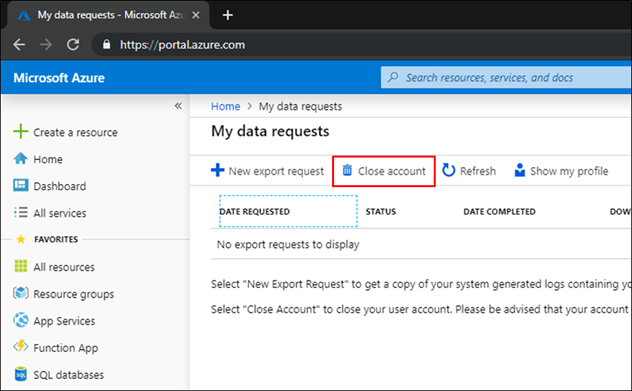
There are conflicting posts all around, saying that one can only remove subscriptions and not close an Azure account once it is opened. Since I had used this from a test domain, it was an "unmanaged organization"
https://docs.microsoft.com/en-us/azure/active-directory/enterprise-users/users-close-account
Sign in to close your account, using the account that you want to close.
On My data requests, select Close account.

I used this to remove the test account I had created to delegate permissions for an app being developed by a third-party. The delegation of permissions via Azure Active Directory implies that the guest user has to switch directory to the directory of the current resource in the Azure portal, and then the guest user would have view access to the current directory name (and probably more).
The graphical diff tool Diffuse was not opening - running it from the terminal gave the error message
diffuse
File "/usr/bin/diffuse", line 74
print codecs.encode(unicode(s, 'utf_8'), sys.getfilesystemencoding())
^
SyntaxError: invalid syntax
Apparently this is because diffuse is written for python2.
So, edited the hashbang for /usr/bin/diffuse to use /usr/bin/env python2 instead of /usr/bin/env/ python, works now.
#!/usr/bin/env python2
geogebra.org is the Math App used in HS's blog, which is now https://jee-math.in/
I have used Adobe Acrobat to sign pdfs on Windows, now I needed a solution for Linux or Android. Adobe Fill and Sign is available for mobiles, and its workflow lets you sign on the touchscreen with a finger or stylus. Since I had a scanned signature available, I preferred the Linux solution using Xournal. I had cleaned up the image, deleting the background in Gimp and leaving only transparency and the signature saved as a png.
There seems to be some bugginess in the Export to PDF dialog in my version of Xournal (0.4.8), so that if I try to edit the filename in the dialog box, it fails to save. But I can just export and then edit the filename later. Howtogeek lists solutions for Mac, Windows and Linux, using Preview, Adobe Reader and Xournal respectively, and also for iOS, Chromebook and Android.
An update to my previous post about clearing up disk space by clearing old kernel images - on this machine running Linux Mint 18.3, it appears purge-old-kernels was not removing the kernel headers. Following the post at https://www.pontikis.net/blog/remove-old-kernels-debian-ubuntu for the manual process,
dpkg --list | grep linux-image
- old kernel images were being purged by purge-old-kernels
dpkg --list | grep linux-headers
- were not being purged.
So, did with
sudo apt-get --purge remove linux-headers-4.15.0-7* linux-headers-4.15.0-6* linux-headers-4.15.0-5* linux-headers-4.15.0-4* linux-headers-4.15.0-3* linux-headers-4.15.0-2*
and so on, since current kernel and previous one were linux-headers-4.15.0-118 and 117. This cleared up 3 GB or so.
I followed the digitalocean instructions on setting up xfce properly over vnc for the virtual machine I was running on GCP. Initially, the ~/.vnc/xstartup file was either blank or absent, so only a bare-bones X was coming up. After adding this in the xstartup file,
#!/bin/bash
xrdb $HOME/.Xresources
startxfce4 &
xfce came up nicely. My earlier manual startup trials were missing the xrdb line, hence xfce was not starting cleanly.
Emergency resuscitation for a website which had been hacked, by setting up temporary hosting on github pages - the method I used was:
1. using webhttrack - follow only 2 levels down, -*.pdf, -*.zip, 0 external levels
2. find and replace in files using regexxer
(a) temporary-domain.com with actualdomain.name
(b) replacing js injected code when found using inspect
(c) replacing http with https (This was done later, after https was made to work.)
For html, css and js files.
*html In regexxer, Find files, open a file, Find, then choose the All Files button at the bottom.
3. Copy paste into local github repo, ignoring / overwriting existing files.
4. git add .
git commit -m "git message"
git push
Stackoverflow had an answer when I wondered by some files hosted on github pages were returning 404 errors - the solution was to place a file called .nojekyll in the root directory to enable hosting of files within directories starting with underscore, like _css etc.
While doing the timed qwiklabs google cloud platform assessments on coursera, I found that google cloud shell was taking a lot of time to come up on Firefox. In fact, perhaps it was not coming up at all. Initially I tried the workaround of using the google cloud sdk locally and running gcloud commands from a terminal. Later, found that the cloud shell opens fine when Chrome is used instead of Firefox. So, this adds to the list of google products which don't work properly on Firefox. Can anyone else see some parallels to the bad old days of browser wars with Microsoft?
In a previous post, I wrote that Google Meet worked for me on Chrome and not on Firefox. Now, I work on Linux (Mint 18.3) and most of the world works on Windows. Apparently Google Meet had issues with Chrome, video not appearing, even screen sharing not working, on a Windows machine. Nz let me know the solution, which was based on this thread, https://support.google.com/
That thread has so many descriptions of so many different things which can go wrong! Privacy settings, antivirus, etc etc. If you expand and view the entire thread with nearly 300 messages, it makes interesting reading for people who want to mock Windows.
So, enable-media-foundation-video-capture must be Disabled, otherwise all sorts of weird video issues with Google Meet. This seems to be a windows-only issue.
There are many methods proposed at
https://stackoverflow.com/questions/6449733/how-can-i-add-javascript-inside-blogger
The CDATA method above seemed to work for me, from HTML view.
And preventdefault for stopping the scroll to the top of the page - used
return false;
instead, working for me on Chrome also.
https://stackoverflow.com/questions/13003044/href-going-to-top-of-page-prevent
Google sites recently announced a shift to "New Sites" with a mandatory upgrade for "Old Sites". Since New Sites had some disadvantages like inability to choose our own font size for particular lines of text (as we would like to do for important announcements, making them large), I looked around for options - whether to move to Blogger or New Sites or do something else. New Sites also had the disadvantage of breaking our photo gallery page when using the migration tool. Blogger would break existing page urls. So, since there was only static content, thought about hosting it on github pages.
The move was relatively straightforward, though I took a long time since I did a drag-and-drop commit after each change instead of using the commandline. The changes I needed to make were:
After setting the CNAME records on the domains DNS servers, even 4 days later, the "Enforce HTTPS" was not available, with the message "Not yet available for your site because the certificate has not finished being issued." One of the suggested workarounds was to remove and re-add the custom domain. I did that, and immediately Enforce HTTPS was enabled.
This post on ClassCentral has a good run-down on some 1400+ completely free Coursera courses. I've been doing some Coursera courses lately, and found some of them very nicely done. Courses I'm taking or have taken are:
Fundamentals of Graphic design
Create your first web app with Python and Flask
Visual elements of User Interface design
Google IT automation with Python
In general, you can speed up some of the courses with the available video speed changer, while for some of the courses, you can learn better by pausing the video, doing some of the exercises and then resuming.
A link dump for resources on how to host small low-traffic websites for free on Google Cloud Platform (GCP) or Microsoft Azure - the link names are self explanatory.
I had an issue with converting to pdf with convert - error message, convert not authorized. Found that it was due to a Ghostscript vulnerability.
https://askubuntu.com/questions/1081895/trouble-with-batch-conversion-of-png-to-pdf-using-convert
So I temporarily used the renaming method,
sudo mv /etc/ImageMagick-6/policy.xml /etc/ImageMagick-6/policy.xmlout
And later I commented out the Ghostscript policy restrictions in the policy.xml.