Used this medium post which links to this codepen as a starting point for implementing share over email (a mailto link), copy to clipboard, and sharing via facebook, twitter and linkedin. Our code is on my (private) github repo.
Wednesday, November 25, 2020

Monday, November 23, 2020
firebase authentication tutorial without the need to set up billing - but ...
The official firebase auth tutorial from Google needs you to set up billing. This tutorial made by the community doesn't need you to set up billing.
But since it's based on old versions of libs, with the current (newer) version of falcon, gives error at
from falcon.version import __version__ # NOQA
Saturday, November 21, 2020
exporting users from a large google group
We wanted to export all the current subscribers to a large google group (>30k), and the export members functionality doesn't seem to work even for owners of the group*. So, brute-forcing to the rescue. Used SikuliX to automate the process of going to each page of subscribers, select all, copy, paste into a text file, save, and move to the next page of 100 users after sorting the users by join date earliest first. Since I didn't have opencv installed using apt on this machine and didn't want to break any opencv3.x configuration I might have done, used hard-coded locations on screen instead of Sikuli's feature detection. So, I had to manually click popups to ensure proper wait times after each operation. The script looked like this -
Then the following python script helped parse it into a csv -
i=18 #the page from which we're starting
while(True):
dragDrop(Location(721,265), Location(821,365)) #drag at the top end
type("a",KeyModifier.CTRL) #Ctrl a - select all
type("c",KeyModifier.CTRL) #Ctrl c - copy
click(Location(1301,565)) #click inside text editor
type("v",KeyModifier.CTRL) #Ctrl v - paste
popup("waiting for paste")
click(Location(1336,450)) #click save toolbar icon
popup("waiting for save dialog")
click(Location(726,102)) #click on save dialog
type(str(i)) #save filename = pagenumber
popup("waiting for save")
click(Location(1311,720))
popup("waiting for creating new file")
click(Location(1276,450))
i=i+1
click(Location(1207,232))
popup("waiting for pageload")
#!/usr/bin/env python3

import sys
count = 0
for line in sys.stdin:
#print(line)
if line.startswith("Profile image"):
Profileim = line
username = next(sys.stdin).strip()
ExtOrRadiosaiId = next(sys.stdin).strip()
if (ExtOrRadiosaiId == "External"):
emailid = next(sys.stdin).strip()
else:
emailid = ExtOrRadiosaiId
print('{},{}'.format(username, emailid))
count = count + 1
print(count)
by calling it as
cat * | parsedumpinfile.py > mycsvfilename.csv
Earlier, I had thought about importing the txt files into a spreadsheet and processing the fields there, creating a formula to copy every sixth (email id) to column next to username, taking care to select six + six + six before dragging down, using a modified method from
to select every sixth row. Or using autoformat in LibreOffice Calc, which looks like this.

But the python script above is much easier and cleaner, of course.
*Edit - For a group inside a GSuite account, this method using Directory API might work. But GSuite api and googlegroups.com api are different. Only brute-forcing works for googlegroups.com :)
Thursday, November 19, 2020
low cost video capture and streaming
How times have changed since the days of the $1000 Matrox RT2000 which we purchased in 1999-2001. This HDMI frame-grabber costs only $35. But it's just a simple HDMI to USB conversion, raw frames with no encoding. So the PC needs to be capable enough to handle the high-bitrate stream and do encoding on the fly. Since these are generally used by gamers for streaming, beefy machines are not an issue. And OBS Studio is the software of choice. Then, OBS Studio has "BrowserSource" which can be used to capture - no hardware required, except OBS Studio's own hardware requirements.
All these could be possibilities if Google goes ahead with its plan to remove access to Google Meet recording ability for Education customers.
Sunday, November 15, 2020
creating and distributing private keys as pem files
I wanted to create and distribute some keys as filename.pem for people to ssh into a server like
ssh -i filename.pem username@machine.name
as is done for qwiklabs. With a bit of digging, found that the pem file is actually the private key and not the public key, and the whole process would be as follows.
ssh-keygen -t rsa -m PEM
cd .ssh
cp id_rsa filename.pem
cp id_rsa.pub authorized_keys
chmod 600 authorized_keys
References:
How to log on using the pem file with PuTTY on windows is via PuTTYgen as explained at
for example.)
setting up letsencrypt certificates for multiple virtual hosts with apache
The preferred method is to just run certbot multiple times with each required domain, as mentioned at https://www.digitalocean.com/community/tutorials/how-to-set-up-let-s-encrypt-certificates-for-multiple-apache-virtual-hosts-on-ubuntu-14-04
So, sudo certbot --apache -d example.com -d www.example.com
and later
sudo certbot --apache -d example2.com -d www.example2.com
or whatever. And then add to root's cron,
15 3 * * * /usr/bin/certbot renew --quiet
which checks every morning at 3:15 AM and renews any certs with validity less than 30 days more.
Saturday, November 14, 2020
troubleshooting a ruby on rails web server
To troubleshoot a web server running ruby on rails, checked the history of the ssh login I had been supplied (up arrow, up arrow, etc) and found that the admin had started rails using
rails s -p 5001 -b <ipaddress> -d
rails s -p 3001 -b <ipaddress> -d
for the two sites, and that they were running apache to proxy these ports to the two websites. The sites-available had virtual hosts configured like
DocumentRoot /full/path/to/rubyonrails/project/production
...
ProxyPass / http://xx.yy.zz.ww:5001/
ProxyPassReverse / http://xx.yy.zz.ww:5001/
and so on.
Found that the apache sites-enabled directory had some wrong entries + duplicate entries, which were causing apache to go back to the default configuration with no virtual servers, hence the various errors. There may be some issues with apache, serveralias and rails as mentioned here,
https://serverfault.com/questions/300226/serving-rails-through-apache-using-proxypass
that it was serving up the test page when the main domain was a server alias. So, I created a separate virtual server conf file in sites-available, with main-domain-name.conf which solved that issue. Then ran certbot for both domains for getting letsencrypt certificates.
Tuesday, November 10, 2020
debugging the radiosai google assistant action's audio search issue
Going step by step, found that dialogflow was returning the value "search" instead of the words the user was using. After going through the codelabs example at https://codelabs.developers.
Now, instead of the word "search", dialogflow returns the correct user phrase, as in the screenshot below.
After submitting this version as a release, the corrected version is live now.
Monday, November 09, 2020
test of creating a free tier instance, using it for multiple users like students
Though GCP's "recommended way" of adding SSH keys is quite convoluted, found that I could use my usual method to add my key, and use PasswordAuthentication yes in /etc/sshd-config to allow password-based logins for users.
As can be seen in this techrepublic post, the way to prevent newly created users from seeing each others' directories is to edit the /etc/adduser.conf file, changing the default home directory permissions from 755 to 750. We can of course do this manually with sudo chmod 750 /home/user1 and so on.
Then, using a "Free Tier" f1 micro instance, someone can do text-based teaching like conducting a C lab after installing the required build tools like apt install gcc or apt-get install build-essential. Currently the specs of a free tier compute instance are -
1 F1-micro instance per month
Scalable, high-performance virtual machines.
1 non-preemptible f1-micro VM instance per month in one of the following US regions:
Oregon: us-west1
Iowa: us-central1
South Carolina: us-east1
30 GB-months HDD
5 GB-month snapshot storage in the following regions:
Oregon: us-west1
Iowa: us-central1
South Carolina: us-east1
Taiwan: asia-east1
Belgium: europe-west1
1 GB network egress from North America to all region destinations (excluding China and Australia) per month.
Saturday, November 07, 2020
Azure AD guest account and how to close an azure account
There are conflicting posts all around, saying that one can only remove subscriptions and not close an Azure account once it is opened. Since I had used this from a test domain, it was an "unmanaged organization"
https://docs.microsoft.com/en-us/azure/active-directory/enterprise-users/users-close-account
Sign in to close your account, using the account that you want to close.
On My data requests, select Close account.
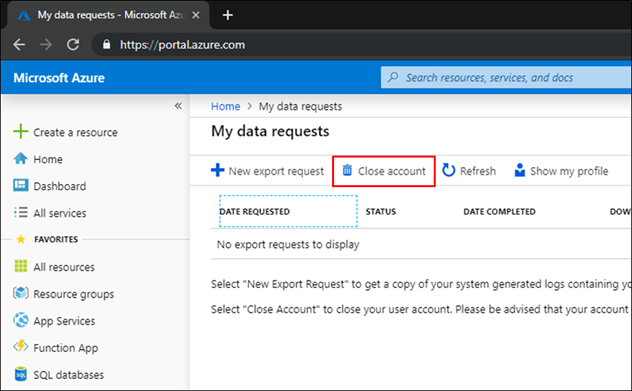
I used this to remove the test account I had created to delegate permissions for an app being developed by a third-party. The delegation of permissions via Azure Active Directory implies that the guest user has to switch directory to the directory of the current resource in the Azure portal, and then the guest user would have view access to the current directory name (and probably more).
Monday, November 02, 2020
diffuse not opening - needs python2
The graphical diff tool Diffuse was not opening - running it from the terminal gave the error message
diffuse
File "/usr/bin/diffuse", line 74
print codecs.encode(unicode(s, 'utf_8'), sys.getfilesystemencoding())
^
SyntaxError: invalid syntax
Apparently this is because diffuse is written for python2.
So, edited the hashbang for /usr/bin/diffuse to use /usr/bin/env python2 instead of /usr/bin/env/ python, works now.
#!/usr/bin/env python2
Sunday, October 25, 2020
embedding math tools in blog
geogebra.org is the Math App used in HS's blog, which is now https://jee-math.in/
Sunday, October 18, 2020
font issue with GMail on Chrome after installing google fonts on Linux Mint
So I was seeing the GMail inbox in Chrome with a bold narrow font after installing google fonts. Workaround to get back to the normal view was to remove Archivo* fonts - I moved them from /usr/share/fonts/truetype/google-fonts to a local directory, and on checking Chrome, found the issue was solved.


Thursday, September 24, 2020
signing pdfs on Linux with Xournal
I have used Adobe Acrobat to sign pdfs on Windows, now I needed a solution for Linux or Android. Adobe Fill and Sign is available for mobiles, and its workflow lets you sign on the touchscreen with a finger or stylus. Since I had a scanned signature available, I preferred the Linux solution using Xournal. I had cleaned up the image, deleting the background in Gimp and leaving only transparency and the signature saved as a png.
- File -> Annotate PDF,
- Choose the Image tool, click and drag inside the document to make it give the file open dialog
- After positioning the image, Export to PDF.
There seems to be some bugginess in the Export to PDF dialog in my version of Xournal (0.4.8), so that if I try to edit the filename in the dialog box, it fails to save. But I can just export and then edit the filename later. Howtogeek lists solutions for Mac, Windows and Linux, using Preview, Adobe Reader and Xournal respectively, and also for iOS, Chromebook and Android.
Wednesday, September 23, 2020
removing old kernel headers
An update to my previous post about clearing up disk space by clearing old kernel images - on this machine running Linux Mint 18.3, it appears purge-old-kernels was not removing the kernel headers. Following the post at https://www.pontikis.net/blog/remove-old-kernels-debian-ubuntu for the manual process,
dpkg --list | grep linux-image
- old kernel images were being purged by purge-old-kernels
dpkg --list | grep linux-headers
- were not being purged.
So, did with
sudo apt-get --purge remove linux-headers-4.15.0-7* linux-headers-4.15.0-6* linux-headers-4.15.0-5* linux-headers-4.15.0-4* linux-headers-4.15.0-3* linux-headers-4.15.0-2*
and so on, since current kernel and previous one were linux-headers-4.15.0-118 and 117. This cleared up 3 GB or so.
Thursday, September 10, 2020
xfce startup on vnc - Ubuntu 18.04
I followed the digitalocean instructions on setting up xfce properly over vnc for the virtual machine I was running on GCP. Initially, the ~/.vnc/xstartup file was either blank or absent, so only a bare-bones X was coming up. After adding this in the xstartup file,
#!/bin/bash
xrdb $HOME/.Xresources
startxfce4 &
xfce came up nicely. My earlier manual startup trials were missing the xrdb line, hence xfce was not starting cleanly.
Wednesday, September 09, 2020
updating a static version of a website
Emergency resuscitation for a website which had been hacked, by setting up temporary hosting on github pages - the method I used was:
1. using webhttrack - follow only 2 levels down, -*.pdf, -*.zip, 0 external levels
2. find and replace in files using regexxer
(a) temporary-domain.com with actualdomain.name
(b) replacing js injected code when found using inspect
(c) replacing http with https (This was done later, after https was made to work.)
For html, css and js files.
*html In regexxer, Find files, open a file, Find, then choose the All Files button at the bottom.
3. Copy paste into local github repo, ignoring / overwriting existing files.
4. git add .
git commit -m "git message"
git push
github pages in directories prefixed by _ - no jekyll
Stackoverflow had an answer when I wondered by some files hosted on github pages were returning 404 errors - the solution was to place a file called .nojekyll in the root directory to enable hosting of files within directories starting with underscore, like _css etc.
Tuesday, September 08, 2020
ad links in youtube embed code
Poking around our website and inspecting it (using Ctrl+Shift+I on Chrome, or right-click and inspect), found that ad_status.js and googleads.g.doubleclick.net are being called. This seems to be from the youtube embed code -


Probably there is no real workaround except drastic ones like not using youtube embed code and using a link instead etc.
Edit: 19 Nov 2020 - Today, I get an email from youtube with their updated terms of service, which includes the following line which may prick quite a few people:
YouTube's right to monetize: YouTube has the right to monetize all content on the platform and ads may appear on videos from channels not in the YouTube Partner Program.
Saturday, August 29, 2020
GCP console issues with Firefox
While doing the timed qwiklabs google cloud platform assessments on coursera, I found that google cloud shell was taking a lot of time to come up on Firefox. In fact, perhaps it was not coming up at all. Initially I tried the workaround of using the google cloud sdk locally and running gcloud commands from a terminal. Later, found that the cloud shell opens fine when Chrome is used instead of Firefox. So, this adds to the list of google products which don't work properly on Firefox. Can anyone else see some parallels to the bad old days of browser wars with Microsoft?
Subscribe to:
Posts (Atom)