Tuesday, November 10, 2020

debugging the radiosai google assistant action's audio search issue

Going step by step, found that dialogflow was returning the value "search" instead of the words the user was using. After going through the codelabs example at https://codelabs.developers.google.com/codelabs/actions-1/ ,  saw that after the dialogflow intent was edited with new training phrases without template mode, I needed to delete the old phrases, and then retrain before the changes would take effect, as per


Now, instead of the word "search", dialogflow returns the correct user phrase, as in the screenshot below.

image.png

After submitting this version as a release, the corrected version is live now. 

Monday, November 09, 2020

test of creating a free tier instance, using it for multiple users like students

Though GCP's "recommended way" of adding SSH keys is quite convoluted, found that I could use my usual method to add my key, and use PasswordAuthentication yes in /etc/sshd-config to allow password-based logins for users.

As can be seen in this techrepublic post, the way to prevent newly created users from seeing each others' directories is to edit the /etc/adduser.conf file, changing the default home directory permissions from 755 to 750. We can of course do this manually with sudo chmod 750 /home/user1 and so on.

Then, using a "Free Tier" f1 micro instance, someone can do text-based teaching like conducting a C lab after installing the required build tools like apt install gcc or apt-get install build-essential. Currently the specs of a free tier compute instance are -

1 F1-micro instance per month
Scalable, high-performance virtual machines.

1 non-preemptible f1-micro VM instance per month in one of the following US regions:
Oregon: us-west1
Iowa: us-central1
South Carolina: us-east1

30 GB-months HDD
5 GB-month snapshot storage in the following regions:
Oregon: us-west1
Iowa: us-central1
South Carolina: us-east1
Taiwan: asia-east1
Belgium: europe-west1

1 GB network egress from North America to all region destinations (excluding China and Australia) per month.

Saturday, November 07, 2020

Azure AD guest account and how to close an azure account

There are conflicting posts all around, saying that one can only remove subscriptions and not close an Azure account once it is opened. Since I had used this from a test domain, it was an "unmanaged organization" 

https://docs.microsoft.com/en-us/azure/active-directory/enterprise-users/users-close-account

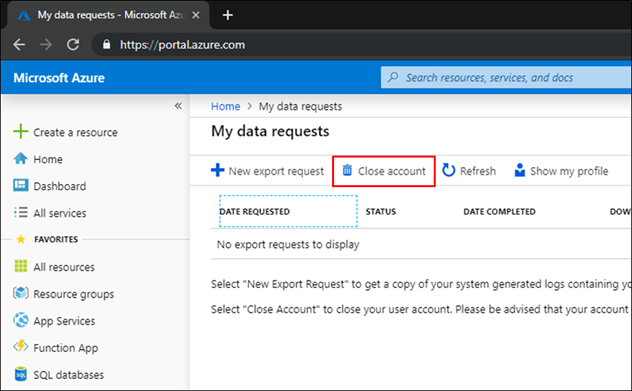
  1. Sign in to close your account, using the account that you want to close.

  2. On My data requests, select Close account.

    My data requests - Close account

I used this to remove the test account I had created to delegate permissions for an app being developed by a third-party. The delegation of permissions via Azure Active Directory implies that the guest user has to switch directory to the directory of the current resource in the Azure portal, and then the guest user would have view access to the current directory name (and probably more). 


Monday, November 02, 2020

diffuse not opening - needs python2

 The graphical diff tool Diffuse was not opening - running it from the terminal gave the error message 

diffuse
  File "/usr/bin/diffuse", line 74
    print codecs.encode(unicode(s, 'utf_8'), sys.getfilesystemencoding())
               ^
SyntaxError: invalid syntax

Apparently this is because diffuse is written for python2.

So, edited the hashbang for /usr/bin/diffuse to use /usr/bin/env python2 instead of /usr/bin/env/ python, works now.

#!/usr/bin/env python2

Sunday, October 18, 2020

font issue with GMail on Chrome after installing google fonts on Linux Mint

So I was seeing the GMail inbox in Chrome with a bold narrow font after installing google fonts. Workaround to get back to the normal view was to remove Archivo* fonts - I moved them from /usr/share/fonts/truetype/google-fonts to a local directory, and on checking Chrome, found the issue was solved. 


Thursday, September 24, 2020

signing pdfs on Linux with Xournal

 I have used Adobe Acrobat to sign pdfs on Windows, now I needed a solution for Linux or Android. Adobe Fill and Sign is available for mobiles, and its workflow lets you sign on the touchscreen with a finger or stylus. Since I had a scanned signature available, I preferred the Linux solution using Xournal. I had cleaned up the image, deleting the background in Gimp and leaving only transparency and the signature saved as a png. 

  1. File -> Annotate PDF,
  2. Choose the Image tool, click and drag inside the document to make it give the file open dialog
  3. After positioning the image, Export to PDF.

There seems to be some bugginess in the Export to PDF dialog in my version of Xournal (0.4.8), so that if I try to edit the filename in the dialog box, it fails to save. But I can just export and then edit the filename later. Howtogeek lists solutions for Mac, Windows and Linux, using Preview, Adobe Reader and Xournal respectively, and also for iOS, Chromebook and Android.

Wednesday, September 23, 2020

removing old kernel headers

An update to my previous post about clearing up disk space by clearing old kernel images - on this machine running Linux Mint 18.3, it appears purge-old-kernels was not removing the kernel headers. Following the post at https://www.pontikis.net/blog/remove-old-kernels-debian-ubuntu for the manual process, 

dpkg --list | grep linux-image

- old kernel images were being purged by purge-old-kernels

dpkg --list | grep linux-headers

- were not being purged.

So, did with

sudo apt-get --purge remove linux-headers-4.15.0-7* linux-headers-4.15.0-6* linux-headers-4.15.0-5* linux-headers-4.15.0-4* linux-headers-4.15.0-3* linux-headers-4.15.0-2*

and so on, since current kernel and previous one were linux-headers-4.15.0-118 and 117. This cleared up 3 GB or so.

Thursday, September 10, 2020

xfce startup on vnc - Ubuntu 18.04

I followed the digitalocean instructions on setting up xfce properly over vnc for the virtual machine I was running on GCP. Initially, the ~/.vnc/xstartup  file was either blank or absent, so only a bare-bones X was coming up. After adding this in the xstartup file,

#!/bin/bash
xrdb $HOME/.Xresources
startxfce4 &

xfce came up nicely. My earlier manual startup trials were missing the xrdb line, hence xfce was not starting cleanly.

Wednesday, September 09, 2020

updating a static version of a website

Emergency resuscitation for a website which had been hacked, by setting up temporary hosting on github pages - the method I used was:

1. using webhttrack - follow only 2 levels down, -*.pdf, -*.zip, 0 external levels 

2. find and replace in files using regexxer

(a) temporary-domain.com with actualdomain.name
(b) replacing js injected code when found using inspect
(c) replacing http with https (This was done later, after https was made to work.)

For html, css and js files.
*html In regexxer, Find files, open a file, Find, then choose the All Files button at the bottom.

3. Copy paste into local github repo, ignoring / overwriting existing files.

4. git add .
git commit -m "git message"
git push

github pages in directories prefixed by _ - no jekyll

Stackoverflow had an answer when I wondered by some files hosted on github pages were returning 404 errors - the solution was to place a file called .nojekyll in the root directory to enable hosting of files within directories starting with underscore, like _css etc. 

Tuesday, September 08, 2020

ad links in youtube embed code

Poking around our website and inspecting it (using Ctrl+Shift+I on Chrome, or right-click and inspect), found  that ad_status.js and googleads.g.doubleclick.net are being called. This seems to be from the youtube embed code -


Probably there is no real workaround except drastic ones like not using youtube embed code and using a link instead etc.

Edit: 19 Nov 2020 - Today, I get an email from youtube with their updated terms of service, which includes the following line which may prick quite a few people:
YouTube's right to monetize: YouTube has the right to monetize all content on the platform and ads may appear on videos from channels not in the YouTube Partner Program.


Saturday, August 29, 2020

GCP console issues with Firefox

While doing the timed qwiklabs google cloud platform assessments on coursera, I found that google cloud shell was taking a lot of time to come up on Firefox. In fact, perhaps it was not coming up at all. Initially I tried the workaround of using the google cloud sdk locally and running gcloud commands from a terminal. Later, found that the cloud shell opens fine when Chrome is used instead of Firefox. So, this adds to the list of google products which don't work properly on Firefox. Can anyone else see some parallels to the bad old days of browser wars with Microsoft?

Sunday, August 23, 2020

Chrome and Google Meet issues on Windows

In a previous post, I wrote that Google Meet worked for me on Chrome and not on Firefox. Now, I work on Linux (Mint 18.3) and most of the world works on Windows. Apparently Google Meet had issues with Chrome, video not appearing, even screen sharing not working, on a Windows machine. Nz let me know the solution, which was based on this thread,  https://support.google.com/meet/thread/41815190?hl=en

That thread has so many descriptions of so many different things which can go wrong! Privacy settings, antivirus, etc etc. If you expand and view the entire thread with nearly 300 messages, it makes interesting reading for people who want to mock Windows.


So, enable-media-foundation-video-capture must be Disabled, otherwise all sorts of weird video issues with Google Meet. This seems to be a windows-only issue.

Friday, August 14, 2020

add javascript to Blogger

There are many methods proposed at 
https://stackoverflow.com/questions/6449733/how-can-i-add-javascript-inside-blogger


The CDATA method above seemed to work for me, from HTML view. 

And preventdefault for stopping the scroll to the top of the page - used 

return false; 

instead, working for me on Chrome also.

https://stackoverflow.com/questions/13003044/href-going-to-top-of-page-prevent

Tuesday, August 11, 2020

shifting a website out of google sites and into github pages

Google sites recently announced a shift to "New Sites" with a mandatory upgrade for "Old Sites". Since New Sites had some disadvantages like inability to choose our own font size for particular lines of text (as we would like to do for important announcements, making them large), I looked around for options - whether to move to Blogger or New Sites or do something else. New Sites also had the disadvantage of breaking our photo gallery page when using the migration tool. Blogger would break existing page urls. So, since there was only static content, thought about hosting it on github pages

The move was relatively straightforward, though I took a long time since I did a drag-and-drop commit after each change instead of using the commandline. The changes I needed to make were:

  1. removed all scripts
  2. jpg and css links made relative, uploaded to suitable directories
  3. created a template with the above, to which the changes needed for each page were:
    1. the title and other header info (at 4 places near each other)
    2. the div with id sites-chrome-sidebar-left
    3. the div with id  sites-canvas-main-content
    4. the h3 tags with page heading 

After setting the CNAME records on the domains DNS servers, even 4 days later, the "Enforce HTTPS" was not available, with the message "Not yet available for your site because the certificate has not finished being issued." One of the suggested workarounds was to remove and re-add the custom domain. I did that, and immediately Enforce HTTPS was enabled.

Sunday, August 09, 2020

Coursera - a good resource

This post on ClassCentral has a good run-down on some 1400+ completely free Coursera courses. I've been doing some Coursera courses lately, and found some of them very nicely done. Courses I'm taking or have taken are:

Fundamentals of Graphic design

Create your first web app with Python and Flask

Visual elements of User Interface design

Google IT automation with Python


In general, you can speed up some of the courses with the available video speed changer, while for some of the courses, you can learn better by pausing the video, doing some of the exercises and then resuming. 

Tuesday, August 04, 2020

free cloud hosting how-tos

A link dump for resources on how to host small low-traffic websites for free on Google Cloud Platform (GCP) or Microsoft Azure - the link names are self explanatory.

Google's cloud shell and other (free) resources for teaching and learning

Excerpts from an email I sent to a colleague - 
Currently, I have not applied for any Google Cloud grant for the institution, because

1. Google's Cloud credit grants for education are granted on a per professor and per student basis, not on an Institution basis. More info on how to apply is given at


2. Google's Cloud shell (free) may not allow for allows for c programming etc, but there are many  other  c, c++ , python and other language free online compilers/interpreters for teaching and learning -


Monday, August 03, 2020

issue with imagemagick convert

I had an issue with converting to pdf with convert - error message, convert not authorized. Found that it was due to a Ghostscript vulnerability. 

https://askubuntu.com/questions/1081895/trouble-with-batch-conversion-of-png-to-pdf-using-convert

So I temporarily used the renaming method,
sudo mv /etc/ImageMagick-6/policy.xml /etc/ImageMagick-6/policy.xmlout

And later I commented out the Ghostscript policy restrictions in the policy.xml.


Sunday, August 02, 2020

moving a user from one tenant to another on Microsoft 365

Googling, found that there are different scenarios for tenant* to tenant migration on Microsoft 365 -

*Tenant means (loosely speaking) subscription account. "A tenant is a representation of an organization."

Saturday, August 01, 2020

moving a domain from one Microsoft 365 tenant to another

As the title says - to move a domain from one Microsoft 365 tenant to another, since I did not have any data to be backed up, I just deleted all the users, then deleted the domain, and recreated the domain in the other tenant. In order to delete the domain in the admin centre at admin.microsoft.com I had to first create an admin user myusername@mydomain.onmicrosoft.com , log in as that user, and then delete the other existing admin user adminuser@mydomain.tld. Only then is the domain deletion permitted.  

Thursday, July 30, 2020

appropriate technology - right-sizing tech solutions

Yesterday, I heard about a clever implementation of distance learning by some school here. The teachers would daily send assignments via Whatsapp with links to some online knowledge resource, along with some questions. The children are encouraged to go through the resource, answer the questions and get back to the teacher in case of questions. This is quite useful in a bandwidth-starved nation like India, where asking pupils to participate in video calls would tax their parents' resources.

Today, I had to answer some queries regarding cost calculations for hosting of a medical data collection application. I'll copy-paste it below with some modifications.

As you may know, pricing of Azure services and AWS services are given at
https://azure.microsoft.com/en-in/pricing/
and
https://aws.amazon.com/pricing/

In general, such cloud services are very much more expensive than other hosting services, if the loads are small and predictable. By small load, I would classify even radiosai.org, with 1.5 lakh visitors a month, thousands of concurrent listeners, as "small".

But in the case of wildly fluctuating loads, when you have a load balancing system and multiple servers which need to be brought online and taken offline dynamically, cloud servers then become cost effective. They are also useful for outsourcing many of the management headaches of servers, to have the peace of mind of managed hosting without the possible security issues of shared hosting.

In the case of the medical data collection tool, they recommend Azure/AWS/your own server for security and licensing reasons. As mentioned at their website, only a very basic set of specs is needed for it, which can easily be supplied by even a shared hosting provider offering Rs. 40 per month hosting. The only caveat is that the organisation who has the license should take sole responsibility for the hosting and support of the application as given in the requirements page.

If the organisation hosting the site is a non-profit, it would be possible to get non-profit credits from Microsoft for Azure, and from Amazon for AWS.
https://www.microsoft.com/en-us/nonprofits/azure
https://aws.amazon.com/government-education/nonprofits/

Azure seems to be offering a larger number of credits - $5000 vs $2000. Also, on the Azure pricing page, they mention that they will price match AWS for cloud infrastructure. So, it might seem that hosting on Azure may be the better option, if you do get non-profit credits.

Since the loads expected on this server would be small - by my definition of small as given above - I would recommend using a VM with a couple of cores and low end specs
https://azure.microsoft.com/en-in/pricing/details/virtual-machines/linux/

If you don't get non-profit credits, the lowest cost option would be to hire two shared servers from two different reputed providers, ensuring that their services are located in different physical locations (since your services are in India, you could look for Bangalore and Mumbai, for example) and have one of them as hot-spare. If you use cloudflare.com to host your dns, operating a hot spare becomes very easy. Such a hot-spare setup allows you to have the peace of mind that Azure/AWS offers, at 10x lower cost. But your provider(s) need to be reputable in the sense that they should not steal your data, and they need to ensure good security practices.

Even if for security reasons you do not want to go for shared hosting, you could get reputed dedicated servers for half the price of Azure/AWS VMs of similar specs, or host it on your premises if you have redundant internet links to your facility. Only drawback, of course, would be that you would need to manually set up as against the automated Azure setup option offered by your software. And you need to know how to do some server management and maintenance.

In the case of VMs or shared servers or dedicated servers, you can directly calculate the costs by just multiplying the per hour or per month cost by the number of hours/months in a year.

In case you wish to estimate traffic, you will need to know what sort of data is going to be uploaded/ downloaded - whether it would be predominantly just numbers, or whether images/video/audio would be included, and what are the estimated numbers of users. Again, a simple multiplication.

When looking to host something for non-profits, where there is no charge for the services being offered, we can get the best RoI by minimising cost while ensuring that performance doesn't suffer. So, for small operations such as ours, I wouldn't recommend cloud solutions except when free credits are available.

Wednesday, July 29, 2020

Getting USB tethering to work with Linux Mint

Our home BSNL broadband has been on the fritz since yesterday. The land-line phone is dead. Airtel 4G on my LG Q6 can do wifi hotspot also, but I preferred to get USB tethering working, since the wifi card on this Lenovo laptop sometimes has issues.

Just connecting the USB cable to the phone and computer, enabling USB tethering on the phone, I get a "Connected" notification on the computer. But "could not find server" errors. Checked and saw that the default setting assigning my phone's IP address as the DNS server. Changed that to Google DNS 8.8.8.8, and the connection works fine. Network connections - Edit the relevant connection - IPv4 tab.

Friday, July 24, 2020

adding Next and Previous post links in new blogger

Tried http://copypastesave.blogspot.com/2017/06/add-pervious-page-home-and-next-page-in.html

using revert to legacy blogger.

Step 3 occurs in 9 places!

Unfortunately, this made the entire post not display! So, reverted to adding the Previous and Next links manually. 

Wednesday, July 22, 2020

Google Meet issues with Firefox

When I try to join a Google Meet meeting on Firefox 78, running on Linux Mint, I get a video network error and get disconnected. On the same machine, when I connect with Chrome 84, it works fine.

So, we have to use Chrome for Google Meet.

Friday, July 03, 2020

find and replace http with https with sed

htm pages under the SI folder used to give a POST request to http://www.radiosai.org/program/PlayNow.php
which we needed to change to https, since otherwise the POST requests do not get redirected

PB did this with
SI# ls
2011  2012  2013  2014  2015  2016  (etc)

SI# find ./ -type f -exec sed -i 's/action=\"http/action=\"https/g' {} \;

More examples of sed with find are given at https://linuxize.com/post/how-to-use-sed-to-find-and-replace-string-in-files/

Saturday, June 20, 2020

icecast ideas

Some ideas for showing "Now playing" on our icecast server, https://stackoverflow.com/questions/48327310/how-to-display-now-playing-in-my-website-with-icecast2-and-liquidsoap
but since we don't use metadata on our server, this method won't work directly for us. But perhaps I could try tinkering with ices0 to make it send the filenames alone, and then try out the worker.js as mentioned in the stackoverflow post above.


Saturday, June 06, 2020

adding a domain to Microsoft 365

The procedure to add a domain is given at this support page - basically, at admin.microsoft.com, Setup -> Get your custom domain set up -> Manage

There was another domain which they wanted me to add, but that seemed to be already connected to another tenant anotherdomain.onmicrosoft.com - migration would need all these steps, while a simple delete and add with no data being retained is relatively simple as I have posted elsewhere. There are also third-party tools to do this, as I have posted.

Friday, May 29, 2020

whl of wxPython

I had to download pre-compiled binary, else gave error,

https://github.com/wxWidgets/Phoenix/issues/760

https://www.wxpython.org/pages/downloads/


preventing shutting down due to overheating on linux

The laptop I'm currently working on has some overheating issues. Probably the heatsink has come off from the video chip or CPU or something, because playing 720p youtube streams for longer than half an hour or so on Firefox is a sure-fire way to make the CPU temperature go higher than 85 or 90 degrees C or whatever is the threshold in the BIOS, making the machine shut down. Found this hassle-free solution - 
sudo temp_throttle.sh 85
and it will reduce CPU frequency if the temp crosses 85 degrees C. So, if I'm starting a render or something like that which needs to run un-interrrupted by shut-downs, I can do this and do other tasks like running Firefox without having to worry if the CPU will overheat.

Sunday, May 24, 2020

automatic BCC and other email routing using GSuite admin console

I wanted to simplify my email work by automatic BCC to one email address. Found that GSuite's admin console had that option under Gmail - advanced - content compliance, where rules to forward can be added. Lots of other rule-based email routing options too.

Sunday, May 10, 2020

some appveyor and travis-ci gotchas

Here are some points which tripped me up while using appveyor.com or travis-ci.org to build repositories on github.

  • If doing a wget from github releases, sometimes it returns 429 too many requests. Have to cool off for an hour or so.

  • Every project must have the token saved as $mytokenname or whatever environment variable you choose, when using env vars on travis for deploying to github releases. The env vars are not shared between projects.

  • The yml configuration files are sensitive to white space. For example, on appveyor, a space before the build: causes it to not recognize the yml file, complaining "cannot parse".

  • Also on appveyor, the yml file and configurations made via the web UI are mutually exclusive. Either this or that. yml overrides web. So, artifact selection for example, has to be done on the yml if you're using yml.

  • Builds don't occur in the home directory. On travis, the path where the yml is parsed initially is like /home/travis/build/username/projectname/ and on appveyor, like C:\projects\projectname

Sunday, April 26, 2020

GCP costs

Following up on my GCP trials post - the Google Cloud Platform gives per second billing in dollars, so we have to do a bit of arithmetic to know how much it's going to cost. For the free trial of $300 (approx Rs. 22,500 in Indian rupees), the question was, will it last one year with my type of usage - which is, using the GCP VM for compiling and other such tasks, shutting it down use.

I downloaded the transactions listed on GCP as a csv. Found that the 150 GB standard persistent disk (divided as Storage Image and PD Capacity) was costing me around Rs. 25 per day. Other resource usage (like cores, network ingress/egress) would depend on how much I'm working on the VM. My maximum usage in a day was around Rs. 500, with 4 cores, 15 GB RAM, left on overnight.

Rs. 2.36 per hour per core x (4 cores) is nearly Rs. 10 per hour.
Rs. 0.3 per hour per GiB x (15 GB RAM) is nearly Rs. 5 per hour.
So, running my VM would be around Rs. 15 per hour.

Network egress around Rs. 5 per GB. But this is the more expensive APAC egress - peering Americas network is lower. Downloading Microsoft's 20 GB VM image did not even show up in the transactions. Maybe it is in the same data centre? My total network related expenses so far this month have been only around Rs. 12 in spite of downloading at least 25 GB of VMs and ISOs.

With minimal usage, Rs. 40 per day - the free credit will last more than a year. So, I can use the VM quite liberally.

Overall, expensive compared to a dedicated server, but attractive when it is a free trial. Thanks, Google.


Saturday, April 25, 2020

some git commands and github

For the error
Cannot pull with rebase: You have unstaged changes.
from https://stackoverflow.com/questions/23517464/error-cannot-pull-with-rebase-you-have-unstaged-changes
(when trying to do
git pull
before
git push
)

If the pull complains that you have changes,
git stash
git pull
git stash pop

git add relative/path/to/filename/which/has/changed
OR
git add directory/name/which/has/changed
git commit
git push

OR
git add -u # for adding changes to all previously staged files
git commit
git push


Atlassian's git cheat sheet is also useful, especially the first page.
git init
OR
git clone
to initialize local repo.

To copy a folder from one repo to another on github, a somewhat elaborate process, if you want to preserve histories.

And if you just want to download a single directory from a repo on github, this post has a nice solution using github's svn features - navigate to the folder you want on github, copy the url, change tree/master to trunk in the url, and pass it to svn.
For example, to download the directory https://github.com/hn-88/OCVWarp/tree/master/octave
the command would be
svn checkout https://github.com/hn-88/OCVWarp/trunk/octave

Edit: updated with pushing git tags.
For deleting a remote tag, if the name of the tag you wish to delete was v1
git push --delete origin v1

More basics of git and tags from here,
git clone
cd to the repo
To view existing tags,
git tag
To create a new tag called v2.11
git tag v2.11
To push the tag to remote,
git push origin --tags

But AppImages created with Travis-CI even with this git push --tags, still show up with the commit hash instead of the tag in the filename. Will need to look into it.

Monday, April 20, 2020

various tries to compile old version of VLC

Tried various methods to compile vlc-warp-2.1, which is based on VLC 2.1, on newer distros, or create an AppImage for VLC. Didn't succeed. Documenting various things I tried.

1. Doing a diff between VLC and vlc-warp - doing a diff between two directories. A very large number of files need to be modified, so I didn't take it  further. This would probably be the way to go - make similar changes to a newer VLC release.

2. Trying to make a vlc-warp AppImage - the AppImage complains that the plugins folder is not found. Tried this link for plugins path.

3. Tried installing VLC to a folder - https://wiki.videolan.org/VLC_configure_help/

4. Making a copy of the plugins folder in ~/.local/share didn't work.

5. Tried a Windows cross-compile on a recent Linux Mint. Used the wayback machine and also recent w32 compile instructions. With this forum post, for live555
apt-get install liblivemedia-dev
apt-get install libdc1394-22-dev
apt-get install libdvdread-dev

--disable-lua because lua5 was already installed.

apt-get install libshout-dev

libmad0-dev

But - configure: error: libavcodec versions 56 and later are not supported yet.

So, have to go back to Ubuntu 12.04 to compile VLC 2.1 (and vlc-warp 2.1). And I couldn't get a VLC AppImage to work either.

Friday, April 17, 2020

finding linked libraries

I had missed out opencv_ffmpeg349.dll when I initially released OCVWarp for Windows. At that time, I had copied over all those dlls which the exe complained about not finding, till it started running. But apparently a missing ffmpeg dll causes it to fail silently.

On Windows, listdlls PID got me the list of dlls I needed to add. But that needed me to run the executable, and run listdlls while it was running.

On Linux, there is ldd nameofexecutable.bin which can be used without running the executable.

On Windows, this post seems to say that with a hex editor, we should be able to find all the dlls. But I did not find the ffmpeg dll with a hex editor in OCVWarp. Maybe listdlls exists because of this? But then, ldd can run on Windows - so that may be the best option next time.

Airtable versus Google Sheets

I wondered how Airtable differs from Google Sheets, and googling threw up this informative post. Perhaps a bit subjective, but still.


Thursday, April 16, 2020

building OCVWarp with MinGW

In my earlier post, I mentioned how I'd compiled OpenCV 3.4.9 using MingGW (32-bit) on Windows 10. In this post, I give the details of the changes I needed to make in order to build a working OCVWarp using this opencv.

Strangely enough, the reason for OCVWarp to silently exit for earlier builds, which were deemed successful on appveyor, was the presence of this line,
const bool askOutputType = argv[3][0] =='Y';

Removing the argv from this line and making it just
const bool askOutputType =0
made the build go to the next problem point, which is that OpenCV on Windows needs paths which have \ escaped. So, C:\\path\\to\\video.mp4 and so on. Fixed that with this hack of creating a function with switch / case, then the build works on Windows 10, but doesn't find the video file on Windows 7. 

Also, to build with my compiled opencv, needed to specify the path to the link libraries, because otherwise it would link to the Visual Studio C libraries which were also present, and would cause linking errors. The easiest way I found to do this was to run the cmake gui, and choosing the Add Entry button to add target_link_libraries path to mingw's bin directory.


Then configure with MingGW Makefiles generator, followed by
cd build
make OCVWarp.bin
on the command-line, does the build properly. Interestingly, here the target name is case-sensitive :)

The pre-build dlls for OpenCV 3.4.3 which I had used for Appveyor builds have extremely limited support for output codecs. Probably they are built without ffmpeg support. So, if someone wants to build OCVWarp for x64 on Windows, it would be better to build OpenCV and then build OCVWarp rather than use the pre-built OpenCV.

Wednesday, April 15, 2020

building opencv 3.4.9 Windows 32 bit version with MinGW

I read a lot of confusing and contradictory posts on installing MinGW, MYS2, CMake etc on Windows and using them. Did not want to create any elaborate manually installed toolchain like
https://here-be-braces.com/a-windows-cpp-ecosystem-without-visual-studio/

Thought I could just run the powershell script from Mudlet, which gives a way of building it on Windows 7 - https://wiki.mudlet.org/w/Compiling_Mudlet#Compiling_on_Windows_7.2B

That worked quite well (on a VM running on GCP) upto installing QT. Before that, I had to enable running powershell scripts with
Set-ExecutionPolicy Unrestricted
or else the machine would not run unsigned powershell scripts. Also, I disabled Windows Defender Virus protection from Windows settings, since the virus scanner was running for every make, configure etc and slowing down things.

After installing QT, the installation script seemed to stop. Hitting Ctrl-C made it start again, and it installed a few more tools till luarocks. There, it gave some error and exited. But that was sufficient for me to try and build opencv.

Downloaded OpenCV 3.4.9 zip file, extracted it to C:\opencv3.4.9,
cd c:\opencv3.4.9
md build
cd build
cmake ..

But of course, that did not work so easily.

I had to set the CC environment variable, which I did temporarily with
$env:CC = "C:\Qt\Tools\mingw730_32\bin\gcc.exe"
since otherwise I would need to open another shell and all the env variables created by the mudlet install script would be lost. Then there were more errors about not specifying the MAKE and bitness, so finally the working cmake command was

cmake -D"CMAKE_MAKE_PROGRAM:PATH=C:\Qt\Tools\mingw730_32\bin\make.exe" -G "MinGW Makefiles" ..

That itself took a good five to ten minutes. Then make took another two or three hours! Looks like ffmpeg gets downloaded and installed during the build process.

At around 48%, the build exited with the sprintf error mentioned here. So I added the line
#define NO_DSHOW_STRSAFE
just above
#include "DShow.h"
in the file sources\modules\videoio\src\cap_dshow.cpp
went back and ran make again, and it started from where it left off (noticing that the earlier files had already been compiled.) I did not do multi-threaded compiling, since that also might give errors, as mentioned here.

Now the example files and the opencv test files created in the bin folder run, but OCVWarp still does not work. Silently exits on Windows 10, "Could not open video file input.mp4" error message on Windows 7 for OCVWarpcmd. Is it due to some codec missing issue? (Edit - it was a strange issue - my separate post on that is here.)

For building OCVWarp, I had to add some environment variables, since this was a new session after a restart. Paths to mingw's bin folder and cmake's bin folder added to the PATH variable,


the CC and CXX environment variables set to gcc.exe's path,


and the OpenCV_DIR variable set to the install folder, which in my case was C:\opencv3.4.9\build\install


For running on other machines, along with the opencv dlls, the runtime dlls from mingw's bin folder also need to be copied. libstdc++-6.dll, libwinpthread-1.dll, and libgcc_s_dw2-1.dll in this case.

Edit - 16th April - updated with link to building OCVWarp, and corrected the generator name - not NMake Makefiles, but MinGW Makefiles.

Tuesday, April 14, 2020

Windows mingw compile notes

Link dump of issues faced and their resolutions for compiling with mingw. Edit: The final product is posted at https://hnsws.blogspot.com/2020/04/building-opencv-349-windows-32-bit.html and the related github repo is https://github.com/hn-88/opencvpatch

1. mingw compile and log on to appveyor build machine - some tips are at https://github.com/symengine/symengine/blob/master/appveyor.yml

2. avoiding windows paths backslash problems in python - using raw strings - https://lerner.co.il/2018/07/24/avoiding-windows-backslash-problems-with-pythons-raw-strings/ 

3. For specifying make https://stackoverflow.com/questions/6141608/cmake-make-program-not-found

Setting env var with powershell https://docs.microsoft.com/en-us/previous-versions/windows/it-pro/windows-powershell-1.0/ff730964(v=technet.10)?redirectedfrom=MSDN

need to open a new shell if setting on machine as a whole and not for session.

manually may need to set as per https://stackoverflow.com/questions/41918477/how-to-build-opencv-3-2-0-with-mingw-on-windows

failed to set bitness, solved with -G as below.

4. https://answers.opencv.org/question/122696/is-it-possible-to-build-opencv-320-libraries-using-mingw-for-a-32bit-windows/

working cmake command was

cmake -D"CMAKE_MAKE_PROGRAM:PATH=C:\Qt\Tools\mingw730_32\bin\make.exe" -G "Nmake Makefiles" ..

from

https://stackoverflow.com/questions/48624415/how-to-fix-cmake-error-in-cmakelists-txt-generator-nmake-makefiles-does-not-sup 

 (by creating a build directory inside opencv directory, cd build.)

Done in powershell. 

Failed with CMake Error: Could not create named generator Nmake Makefiles

Went forward with MinGW Makefiles.

4. For error with sprintf, http://www.programmersought.com/article/3109513497/ says: modify E:\OpenCV_3.3.1\opencv\sources\modules\videoio\src\cap_dshow.cpp, at

#include "DShow.h"
Add a line above that line
#define NO_DSHOW_STRSAFE like:

#define NO_DSHOW_STRSAFE
#include "DShow.h"

Then, 

make

and it started from where it left off.

Edit: The final product is posted at https://hnsws.blogspot.com/2020/04/building-opencv-349-windows-32-bit.html and the related github repo is https://github.com/hn-88/opencvpatch

Monday, April 13, 2020

running Visual Studio 19 VM on Google Cloud Platform

Microsoft offers free Windows 10 90 day trial virtual machines for Edge and a larger Enterprise virtual machine set with Visual Studio, 60 day trial. To run these virtual machines, a computer with 100 GB or more free space, 2 or 4 CPU cores, 8 or 16 GB RAM etc would be good. In fact, the Visual Studio VMs are 20 GB downloads which take up more than 40 GB in use. So, those of us with low-end machines would be frustrated if we tried to use them - on external drives and so on - with slooow performance due to lack of RAM and slow disks. This is where cloud server free trials help. Earlier I had written about Microsoft's Azure free trial, this post is about Google Cloud Platform (GCP).

The one year free trial needs a fresh google account and a credit/debit card (in India), and gives you one year / $300 credits. 4-5 hours of work yesterday on a dual-core 8 GB VM cost me around $1.

Windows Server images are not available under the free trial credits. If you want to run Windows, you have to run it as a nested VM - a VM under a VM. Nested VM support on Google Cloud Platform has some restrictions - otherwise virtualbox complains that VT-X is not available. But the image I created worked - the Microsoft Virtualbox VM download, running on Ubuntu 18.04 obtained from GCP. The procedure I followed to get nested VMs working was basically this. Instead of downloading and installing the gcloud sdk, we can directly run the cloud shell from a browser, especially Chrome. With the following caveats for Windows nested VMs.

  1. sudo worked only for the ssh in browser window (without asking for any password) which could be opened from GCP. On the ssh opened in a terminal window on my local machine, it asked for user's password (which I did not know. Is it the same as the google account  password?). This ssh session was opened with manually copied ssh keys. So, just use the SSH from browser window.
     
  2. install the latest virtualbox - the downloaded image needs Virtualbox 6 and will not work with the default Virtualbox 5 installation from Ubuntu 18.04. If you are uninstalling Virtualbox 5 and installing Virtualbox 6, you need to sudo apt-get remove virtualbox-dkms also
  3. increase size of disk to 150 GB and change the machine type to have more RAM. This can be done with the Edit button in the VM instances page of GCP. If disk is too small, virtualbox complains of "invalid argument" and crashes. Plan for free disk space 3x the size of the downloaded image at the very minimum.
  4. I followed these instructions for setting up VNC, with the default local client Remmina. My preferred desktop was Cinnamon, but it kept crashing. Maybe because I did not edit the startup script. Then tried xfce. But the panel doesn't work, in spite of these instructions. But I can right-click to get a menu and run applications on the desktop.
Edit - I've now added a post on GCP running costs.

Sunday, April 12, 2020

announcing offline tools for warping

My post in the small_planetarium Yahoo group
(Edit - Yahoo groups closed down in Dec 2020)

Paul Bourke had recently announced a an offline pre-warping tool for Mac which can do warping for videos similar to his old tgawarp tool.

For non-Mac users, here is a tool which does a similar job using OpenGL, an update from my old GL_warp2Avi, now updated to use frame buffers and to run on Linux (and Windows, though I have not built on Windows yet.)
Here is the link to the readme, which has some usage info,
and the Linux binary is available at

I believe similar performance can be obtained with only CPU, without OpenGL, because for writing to disk, the frame-buffer again has to be copied to CPU memory and the video encoding is the slowest step. So I have incorporated this warping into OCVWarp also. Linux binary available at
with usage info in the readme at

In case anyone finds any image quality issues with the OCVWarp version, please let me know, since I have not tested extensively for anti-aliasing quality.

COVID-19 Global summary graphs

Some nice data visualizations at

Friday, April 10, 2020

deploying build artifacts from travis to github

Till now I had used the fairly easy to understand deployment strategy of uploading to transfer.sh, downloading from there, and then manually uploading to create github releases.
after_success:
  - curl --upload-file GL_warp2mp4*.AppImage https://transfer.sh/GL_warp2mp41.10-x86_64.AppImage


Appveyor has its artifacts page, so a similar strategy works there.

But a couple of days back, transfer.sh was (temporarily) down, so deploying directly to github from travis seemed attractive.

But did not get it to work, until now. Some notes -
  1. Directly entering github personal tokens in a commit on github results in github immediately revoking the token.
  2. Travis has rolled out v2 of their deployment code, but maybe still needs the edge: true directive to reliably use v2 instead of v1.
  3. Currently working code is here. The environment variable mytokenname has to be set in the project's settings on travis.
  4. The draft setting ensures that the deployment is visible only to me - I can edit the draft and create a release. Also, because of this, when I create a release, that commit does not create a new deployment in an infinite loop.
  5. The file_glob setting allows the use of wildcards in the file option.

deploy:
provider: releases
token: $mytokenname
file_glob: true
file: h*.bin
skip_cleanup: true
draft: true
edge: true
after_success:

Thursday, April 09, 2020

abandoning Windows 7 builds

Yesterday, I thought I would try Windows builds for OCVWarp, GL_warp2mp4, etc using MinGW and the procedure outlined in https://wiki.mudlet.org/w/Compiling_Mudlet#Compiling_on_Windows_7.2B

But it turns out, quite a few GB are required on C: drive, especially QT, and everything installs there by default. The machine I'm currently working on has only 4 GB free in C: drive. Tried doing a manual install to H:, too painful. So, it would be easier for those running old Windows versions to boot to a live cd or live USB of Ubuntu or Mint or something, and use the AppImage instead!

I might do appveyor builds and test on some Windows 10 VM, if that works without too much trouble. Possibly a good example for appveyor yml file is here. And more about the MinGW build ecosystem here.

Edit: The OCVWarp build on Windows with MinGW is detailed at
https://hnsws.blogspot.com/2020/04/building-ocvwarp-with-mingw.html

More notes on OpenGL programming

Following up on my earlier post about OpenGL programming. GL_warp2mp4 is now functional.

Checking the speeds achieved by pboUnpack on my machine, 2.8 fps for a 2048x2048 texture if GL_BGR is used, but increases to 29 fps if GL_RGBA8 is used. So, the 3 fps I get with GL_warp2mp4 with hi-res files seems to be limited by the writing to fbo.  If I write directly to screen and not to a texture on an fbo, I get faster frame rates. But that, of course, has the limitation that the destination has to be of lower resolution than the screen size.

The pixel format GL_BGRA is unfortunately not supported internally for FBO (at least on my system). So, GL_RGBA8 has to be used, which is apparently the fastest we can get.

pboPack shows between 6 and 9 Mpixels/s on my machine, both with PBO on and off.
../bin/pboPack
Video card supports GL_ARB_pixel_buffer_object.
Transfer Rate: 0.0 Mpixels/s. (0.0 FPS)
Transfer Rate: 7.7 Mpixels/s. (30.7 FPS)
Transfer Rate: 8.6 Mpixels/s. (34.4 FPS)
Transfer Rate: 9.0 Mpixels/s. (35.8 FPS)
Transfer Rate: 8.4 Mpixels/s. (33.5 FPS)
Transfer Rate: 8.6 Mpixels/s. (34.3 FPS)
Transfer Rate: 8.3 Mpixels/s. (33.2 FPS)
Transfer Rate: 8.8 Mpixels/s. (35.3 FPS)
PBO mode: off
Transfer Rate: 8.5 Mpixels/s. (34.0 FPS)
Transfer Rate: 6.5 Mpixels/s. (25.9 FPS)
Transfer Rate: 6.6 Mpixels/s. (26.5 FPS)
Transfer Rate: 6.7 Mpixels/s. (27.0 FPS)
Transfer Rate: 6.8 Mpixels/s. (27.4 FPS)
Transfer Rate: 6.7 Mpixels/s. (26.6 FPS)
PBO mode: on
Transfer Rate: 7.6 Mpixels/s. (30.4 FPS)
Transfer Rate: 8.4 Mpixels/s. (33.6 FPS)
Transfer Rate: 8.7 Mpixels/s. (34.9 FPS)
Transfer Rate: 8.9 Mpixels/s. (35.5 FPS)
Transfer Rate: 8.8 Mpixels/s. (35.4 FPS)

What I get with GL_warp2mp4 is around 3.5 fps with 1080p output - that comes to around 6.9 Mpixels/s. So, probably that's all I can expect.

Probably I will get better performance by avoiding OpenGL and the graphics card and going the remap way as in OCVWarp. The reason being, the data transfer to and from the video card seems to be the bottleneck, and CPU based remap computation is faster.

resources for free Earth satellite photos

Via Mapton, via AppImageHub, free to use images at https://s2maps.eu/
10 metre resolution cloudless whole Earth imagery!

Maptiler indicates that USGS Earth Explorer catalog gives us free date-wise data. For a small area which fits in a single tile, 500+ images show up, dating from 2015, for Sentinel2 data. Can be used for lots of interesting things :)

Apparently Google Earth has a historical animation feature. This is of course, free for personal use, but not free in terms of licensing. Here's a video about exporting video from Google Earth. But that's only on the downloaded version. The web version does not have the video export etc. What is required is the "Google Earth Pro" desktop version. Which is still free for personal use.

(On Linux, the latest version seems to have some issues, as mentioned here. I too had the blank screen issue. Installing the 7.1 version deb made it work.)

My location has around 17 historical images, from 2004. Most from 2015 onwards.


Animated gif from 3 images, created with ezgif.com,